

VibePrompt
1 rating
)
Overview
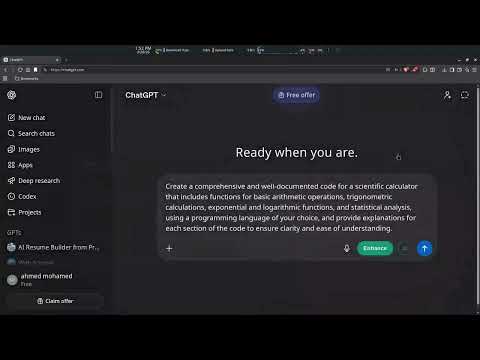
Refine prompts with AI — Enhance button with before/after diff, auto-enhance, and context memory.
VibePrompt — AI Prompt Enhancer for Claude, ChatGPT, Gemini & DeepSeek Stop writing weak prompts. VibePrompt adds a one-click Enhance button directly inside your favorite AI chat interfaces — no copy-pasting, no switching tabs. ✦ WORKS ON - ChatGPT - Claude - Gemini - DeepSeek ✦ FEATURES - One-click Enhance — rewrites your prompt using proven AI techniques - Before / After — compare your original vs the enhanced version side by side - 10 Prompting Techniques — Auto, Chain of Thought, Few-Shot, Role Assignment, ReAct, Task Decomposition, and more - Assumption Level — control how much detail the enhancer adds (keep your scope or let it fill the gaps) - Context Memory — reads your conversation history so enhancements stay relevant - Auto-Enhance — optionally enhances after a typing pause, hands-free - Per-platform theming — accent color matches each AI site automatically - Fully customizable — pick your own button color, technique, and delay ✦ HOW IT WORKS 1. Open Chatgpt, Claude, Gemini or Deepseek 2. Type your prompt 3. Click Enhance 4. Watch your vague idea become a precise, structured prompt No account required. 100% free. Perfect for developers, writers, researchers, marketers, and anyone who wants better results from AI.
5 out of 51 rating
Details
- Version4.0.0
- UpdatedApril 13, 2026
- Offered byAhmed Mohamed Hamimi Abdullah
- Size43.06KiB
- LanguagesEnglish
- Developer
Email
a.mhamimi@outlook.com - Non-traderThis developer has not identified itself as a trader. For consumers in the European Union, please note that consumer rights do not apply to contracts between you and this developer.
Privacy

This developer declares that your data is
- Not being sold to third parties, outside of the approved use cases
- Not being used or transferred for purposes that are unrelated to the item's core functionality
- Not being used or transferred to determine creditworthiness or for lending purposes
Support
For help with questions, suggestions, or problems, please open this page on your desktop browser