


Overview
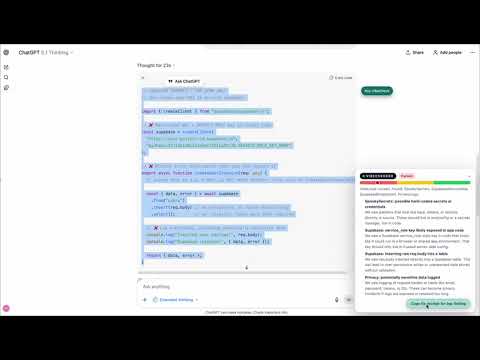
Highlight AI-generated code, run a local security vibe check, and copy a fix prompt for your AI helper. No code leaves your browser.
VibeChecker gives you a fast, local security “vibe check” for code that AI writes. Highlight a snippet, run a check, and instantly see whether the code is chill, sus, or cursed—all without leaving your browser. A. How it works 1. Highlight any code in your browser. 2. Click the Run VibeCheck pill that appears. 3. Read the VibeLevel card and the list of findings. 4. Copy a suggested fix prompt for the top issue and paste it into your AI assistant. 5. Refactor, re-run the check, and ship when the vibes are good. B. What VibeChecker looks for 1. SpookySecrets — hard-coded secrets or credentials 2. Service-Role Key Misuse — privileged keys appearing in client code 3. Broad Inserts — inserting unsanitized request bodies 4. PrivacyLogs — logging emails, tokens, IDs, or other sensitive data C. Privacy All analysis happens locally in your browser. Nothing is uploaded or stored remotely. Clipboard access is only used when you click “Copy fix prompt.” D. Who it’s for Vibe coders, indie hackers, and solo builders who want a lightweight safety net when AI is generating most of the code they ship.
0 out of 5No ratings
Details
- Version0.1.0
- UpdatedNovember 25, 2025
- Size73.1KiB
- LanguagesEnglish (United States)
- DeveloperWebsite
Email
hello@askappsec.com - Non-traderThis developer has not identified itself as a trader. For consumers in the European Union, please note that consumer rights do not apply to contracts between you and this developer.
Privacy

This developer declares that your data is
- Not being sold to third parties, outside of the approved use cases
- Not being used or transferred for purposes that are unrelated to the item's core functionality
- Not being used or transferred to determine creditworthiness or for lending purposes