

VibeBridge Lite: Deodap Importer

Overview
Import Deodap products to WooCommerce for free (20/month). Scrape high-res images, prices & descriptions. Bulk is Pro.
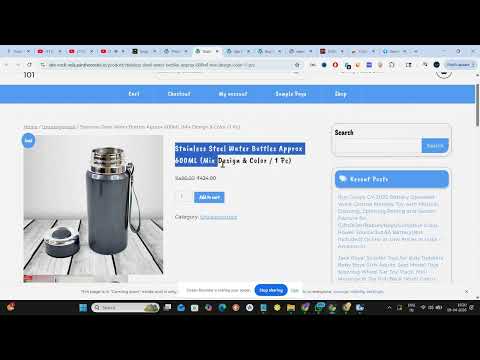
VibeBridge Lite is a powerful product sourcing and dropshipping extension that allows you to seamlessly import products from Deodap directly into your WooCommerce store with a single click. This Free Edition allows you to import up to 20 single products per month (automatically resetting every 30 days). It is the perfect tool for dropshippers and store owners looking to test products before scaling. KEY FEATURES INCLUDED IN LITE: One-Click Deodap Imports Instantly scrape the product title, selling price, MRP, description, and high-resolution images from Deodap product pages. Custom Price Margins Automatically add a custom profit margin (e.g., +99, +199, or custom) to both the source price and the MRP before sending it to your store. The preview updates instantly. Smart Image Deduplication & Filtering VibeBridge intelligently removes duplicate images and skips low-quality placeholders (like 1x1 pixels or lazy-loaders) to keep your WordPress Media Library perfectly clean. Rich HTML Descriptions Extracts the full product description and formats it beautifully for your WooCommerce product page. HOW TO USE: 1. Install the extension and click the VibeBridge icon to open the Side Panel. 2. Go to the Settings tab and connect your WooCommerce Store URL, API Username, and Application Password. 3. Open any Deodap product page. 4. Select your Price Margin and click "Scan Product" to preview the details. 5. Click "Import to Store" and the product is instantly created in your WooCommerce dashboard. READY TO SCALE? UPGRADE TO PRO! Want to import entire Deodap collections at once? The VibeBridge Pro version unlocks the powerful Bulk Import feature. Scan entire category pages, select dozens of products, and import them all concurrently with zero monthly limits! Privacy & Permissions Note: To send product data directly to your specific store, this extension requires access to your personal WooCommerce domain. Your API credentials are saved locally in your own browser and are never shared, tracked, or sent to any external servers.
0 out of 5No ratings
Details
- Version1.3.5
- UpdatedApril 23, 2026
- Offered byJAI SUNGWANI
- Size46.92KiB
- LanguagesEnglish
- DeveloperJAI KUMAR SUNGWANI
B-4/97, 3rd Floor, Near B3 Market, Yamuna Vihar Delhi, Delhi 110053 INEmail
jsinghwani@gmail.comPhone
+91 96256 31782 - TraderThis developer has identified itself as a trader per the definition from the European Union and committed to only offer products or services that comply with EU laws.
Privacy

VibeBridge Lite: Deodap Importer has disclosed the following information regarding the collection and usage of your data. More detailed information can be found in the developer's privacy policy.
VibeBridge Lite: Deodap Importer handles the following:
This developer declares that your data is
- Not being sold to third parties, outside of the approved use cases
- Not being used or transferred for purposes that are unrelated to the item's core functionality
- Not being used or transferred to determine creditworthiness or for lending purposes
Support
For help with questions, suggestions, or problems, visit the developer's support site