

Vibe Annotations - Visual Feedback for AI Coding Agents
5 ratings
)
Overview
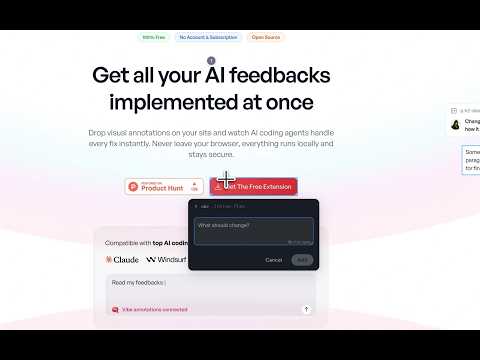
Visual annotations for localhost dev projects. Send feedback to AI coding agents like Claude & Cursor via MCP.
Transform your localhost development workflow with visual annotations for AI coding agents. Vibe Annotations lets you drop visual feedback directly on your development pages and send it to any AI coding agent. Annotate elements, describe what should change, and let your agent implement the fixes across multiple pages, respecting your responsive breakpoints. 🎯 Key Features 📌 Drop annotations: Click any element to leave a comment or an empty pointer for your AI agent to pick up and act on 🎨 Direct design edits: Tweak CSS properties (font size, colors, layout, spacing) with live preview changes are captured as annotations for your agent to implement in source 👁️ Watch mode: Tell your agent "Start watching Vibe Annotations" — it picks up annotations as you drop them, implements changes, and loops. Hands-free 🤖 Works with Claude Code, Cursor, Windsurf, Codex, OpenClaw, and any MCP-compatible agent 🤝 Agent collaboration: let browser-based agents (Claude Chrome, OpenClaw) annotate autonomously as a styling or copywriting partner 🔍 Captures full element context: CSS selectors, styles, positioning, and viewport dimensions 🗂️ Multi-page support: annotate across different routes in your SPA or multi-page app 📍 Persistent inspection mode: stay in annotation mode to drop multiple pins efficiently ⚡ Batch workflow: annotate → copy or let your agent read → implement → delete 📋 Copy to clipboard with rich context formatting, or connect via MCP for automated reads 🔄 Auto-deletion after copy (opt-in) for streamlined iteration cycles 🌐 Per-site enabling (beta): optionally annotate on public URLs for design reference 🧠 Intelligent project detection prevents cross-project annotation mixing 🔧 How It Works 1. Annotate: Click the extension icon, enter inspection mode, and click elements to add feedback 2. Send to your agent: Copy all annotations to clipboard and paste, or connect the MCP server for automatic reads 3. Implement: Your AI agent reads the annotations with full element context and applies the changes 4. Iterate: Delete resolved annotations and start the next cycle 🔌 MCP Server Setup (Optional) Install the companion server for direct agent integration. Your agent fetches annotations automatically without copy/paste. Claude Code: claude mcp add --transport http vibe-annotations http://127.0.0.1:3846/mcp Cursor / Windsurf / Codex / OpenClaw: Add the MCP server URL to your agent's config. See the extension's Get Started guide for full setup instructions. ✅ Works With React, Vue, Angular, Next.js, Svelte, and all web frameworks Any localhost dev server (ports 3000, 5173, 8080, etc.) Local development domains (*.local, *.test, *.localhost) Local HTML files (file://) Public URLs via per-site opt-in (beta) 📦 Requirements Chrome browser with Developer mode or Chrome Web Store install Optional: vibe-annotations-server npm package for MCP integration Note: The extension auto-enables on localhost, local development domains, and file:// URLs. Public site annotation requires explicit per-site permission. All data stays local — no external network requests.
5 out of 55 ratings
Details
- Version1.6.3
- UpdatedApril 20, 2026
- Offered bySpellbind Creative Studio
- Size458KiB
- LanguagesEnglish
- DeveloperRaphaël Régnier
50 rue de Navarre Bordeaux 33000 FREmail
contact@spellbind.me - Non-traderThis developer has not identified itself as a trader. For consumers in the European Union, please note that consumer rights do not apply to contracts between you and this developer.
Privacy

This developer declares that your data is
- Not being sold to third parties, outside of the approved use cases
- Not being used or transferred for purposes that are unrelated to the item's core functionality
- Not being used or transferred to determine creditworthiness or for lending purposes