


खास जानकारी
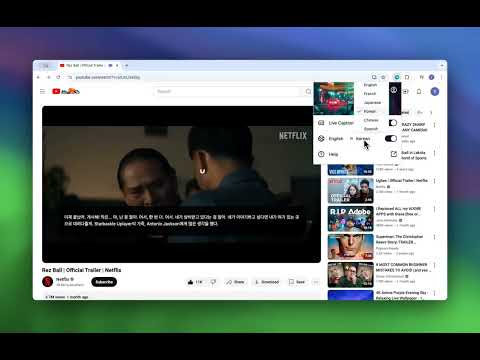
Vi Subtitle - AI से अपने देखे जा रहे वीडियो या भाषण में लाइव कैप्शन जोड़ें
AI-powered Live Captions & Subtitle Generator — SRT/VTT Export, Bilingual Subtitles (Chrome 138+) Generate real-time subtitles with on-device AI. No cloud, no privacy risk. Works on any video, meeting, or live stream in your browser. ━━━━━━━━━━━━━━━━━━━━━━ FREE FEATURES ━━━━━━━━━━━━━━━━━━━━━━ ✓ Live captions powered by on-device Whisper AI (no internet required) ✓ Transcribe 17+ languages: English, Chinese, Japanese, Spanish, French, German, Korean, and more ✓ Overlay subtitles on any webpage — YouTube, Netflix, Zoom, Google Meet, Twitch, and more ✓ Customizable font size, color, and position ━━━━━━━━━━━━━━━━━━━━━━ PREMIUM FEATURES ━━━━━━━━━━━━━━━━━━━━━━ ★ Translate subtitles into 10+ languages in real time ★ Bilingual subtitles — show original and translation simultaneously (perfect for language learners) ★ Export subtitles as .TXT, .SRT, or .VTT — ready for video editing (Premiere, DaVinci, CapCut, etc.) ★ 7-day free trial ━━━━━━━━━━━━━━━━━━━━━━ PERFECT FOR ━━━━━━━━━━━━━━━━━━━━━━ • Language learners who want to read both original and translated text at once • Content creators and video editors who need SRT/VTT subtitle files • Professionals attending multilingual meetings or webinars • Deaf and hard-of-hearing users who need live captions • Students watching foreign-language lectures or online courses ━━━━━━━━━━━━━━━━━━━━━━ HOW TO USE ━━━━━━━━━━━━━━━━━━━━━━ 1. Install the extension (model downloads automatically on first launch) 2. Visit any video page or start a meeting 3. Click the extension icon and turn on Live Caption 4. Select your source language (and target language for translation) 5. Subtitles appear instantly as an overlay ━━━━━━━━━━━━━━━━━━━━━━ SUPPORTED LANGUAGES ━━━━━━━━━━━━━━━━━━━━━━ English, Chinese (Simplified & Traditional), Hindi, Spanish, French, Arabic, Bengali, Russian, Portuguese, Indonesian, Italian, German, Greek, Japanese, Korean, Thai, Vietnamese ━━━━━━━━━━━━━━━━━━━━━━ NOTES ━━━━━━━━━━━━━━━━━━━━━━ • Requires Chrome 138 or above • Recommended: Windows 16GB RAM + NVIDIA GPU, or Mac with Apple Silicon Questions or feature requests? Contact us via the support link.
वर्णन
- वर्शन1.1.9
- पिछली बार अपडेट होने की तारीख:4 नवंबर 2026
- सुविधाएंइन-ऐप्लिकेशन खरीदारी ऑफ़र करता है
- ऑफ़र करने वालाNatlan LLC
- आकार1.2MiB
- भाषाएं40 भाषाएं
- डेवलपरNatlan LLC
30 N Gould St ste r Sheridan, WY 82801-6317 USईमेल
natlan.tech@gmail.com - गैर-व्यापारीइस डेवलपर ने अपनी पहचान व्यापारी के तौर पर ज़ाहिर नहीं की है. अगर आप यूरोपियन संघ के किसी देश में रहने वाले उपभोक्ता हैं, तो आपके और डेवलपर के बीच हुए समझौते पर उपभोक्ता के अधिकार लागू नहीं होंगे.
निजता

Vi Subtitle: किसी भी वेबपेज पर लाइव कैप्शन जोड़ें में यह जानकारी दी गई है कि आपके डेटा को कैसे इकट्ठा और इस्तेमाल किया जाता है. ज़्यादा जानकारी के लिए, डेवलपर की privacy policy देखें.
Vi Subtitle: किसी भी वेबपेज पर लाइव कैप्शन जोड़ें, निजता से जुड़े इस डेटा को मैनेज करता है:
डेवलपर ने एलान किया है कि आपका डेटा
- जिन मामलों में इस्तेमाल की मंज़ूरी दी गई है उनके अलावा, किसी भी तीसरे पक्ष को नहीं बेचा जाता
- किसी ऐसे मकसद से इस्तेमाल या ट्रांसफ़र नहीं किया जाता जो आइटम के मुख्य फंक्शन के हिसाब से ज़रूरी नहीं है
- क़र्ज़ लेने या क़र्ज़ देने की स्थिति तय करने के लिए इस्तेमाल या ट्रांसफ़र नहीं किया जाता
सहायता
सवालों, सुझावों या समस्याओं के बारे में मदद पाने के लिए, डेवलपर की सहायता साइट पर जाएं.


