

Vi Subtitle: Add Live Captions to Any Webpage
22 ratings
)
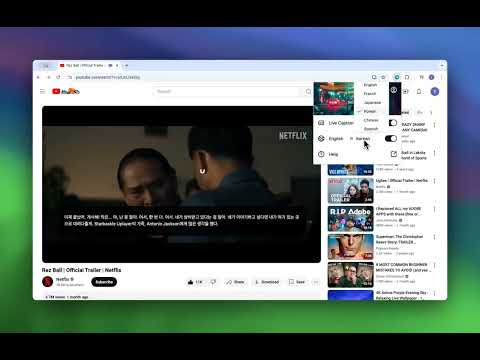
Overview
Vi Subtitle - Add Live Captions for your watching video or speech with AI
AI-powered Live Captions & Subtitle Generator — SRT/VTT Export, Bilingual Subtitles (Chrome 138+) Generate real-time subtitles with on-device AI. No cloud, no privacy risk. Works on any video, meeting, or live stream in your browser. ━━━━━━━━━━━━━━━━━━━━━━ FREE FEATURES ━━━━━━━━━━━━━━━━━━━━━━ ✓ Live captions powered by on-device Whisper AI (no internet required) ✓ Transcribe 17+ languages: English, Chinese, Japanese, Spanish, French, German, Korean, and more ✓ Overlay subtitles on any webpage — YouTube, Netflix, Zoom, Google Meet, Twitch, and more ✓ Customizable font size, color, and position ━━━━━━━━━━━━━━━━━━━━━━ PREMIUM FEATURES ━━━━━━━━━━━━━━━━━━━━━━ ★ Translate subtitles into 10+ languages in real time ★ Bilingual subtitles — show original and translation simultaneously (perfect for language learners) ★ Export subtitles as .TXT, .SRT, or .VTT — ready for video editing (Premiere, DaVinci, CapCut, etc.) ★ 7-day free trial ━━━━━━━━━━━━━━━━━━━━━━ PERFECT FOR ━━━━━━━━━━━━━━━━━━━━━━ • Language learners who want to read both original and translated text at once • Content creators and video editors who need SRT/VTT subtitle files • Professionals attending multilingual meetings or webinars • Deaf and hard-of-hearing users who need live captions • Students watching foreign-language lectures or online courses ━━━━━━━━━━━━━━━━━━━━━━ HOW TO USE ━━━━━━━━━━━━━━━━━━━━━━ 1. Install the extension (model downloads automatically on first launch) 2. Visit any video page or start a meeting 3. Click the extension icon and turn on Live Caption 4. Select your source language (and target language for translation) 5. Subtitles appear instantly as an overlay ━━━━━━━━━━━━━━━━━━━━━━ SUPPORTED LANGUAGES ━━━━━━━━━━━━━━━━━━━━━━ English, Chinese (Simplified & Traditional), Hindi, Spanish, French, Arabic, Bengali, Russian, Portuguese, Indonesian, Italian, German, Greek, Japanese, Korean, Thai, Vietnamese ━━━━━━━━━━━━━━━━━━━━━━ NOTES ━━━━━━━━━━━━━━━━━━━━━━ • Requires Chrome 138 or above • Recommended: Windows 16GB RAM + NVIDIA GPU, or Mac with Apple Silicon Questions or feature requests? Contact us via the support link.
2.6 out of 522 ratings
Details
- Version1.1.8
- UpdatedSeptember 30, 2026
- FeaturesOffers in-app purchases
- Offered byNatlan LLC
- Size1.12MiB
- Languages14 languages
- DeveloperNatlan LLC
30 N Gould St ste r Sheridan, WY 82801-6317 USEmail
natlan.tech@gmail.com - Non-traderThis developer has not identified itself as a trader. For consumers in the European Union, please note that consumer rights do not apply to contracts between you and this developer.
Privacy

Vi Subtitle: Add Live Captions to Any Webpage has disclosed the following information regarding the collection and usage of your data. More detailed information can be found in the developer's privacy policy.
Vi Subtitle: Add Live Captions to Any Webpage handles the following:
This developer declares that your data is
- Not being sold to third parties, outside of the approved use cases
- Not being used or transferred for purposes that are unrelated to the item's core functionality
- Not being used or transferred to determine creditworthiness or for lending purposes
Support
For help with questions, suggestions, or problems, visit the developer's support site