


Overview
Translate YouTube, Udemy & Coursera videos with dual subtitles in 109 languages, even without captions. AI dubbing and SRT export.
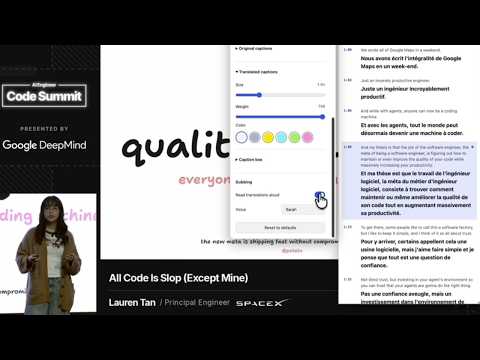
VGLOT puts two subtitle lines on the video you are watching: the original words and a translation in your language. It works on YouTube videos, Udemy course lectures and Coursera lectures, supports 109 translation languages, and still works when a video has no captions. On Standard and Premium, an AI voice can read the translation aloud. WHY PEOPLE USE VGLOT • Learn a language from real videos by reading each line in the original and in your language at the same time. • Follow an online course taught in another language without pausing to look things up. • Watch videos that have no subtitles: VGLOT makes captions from the audio, then translates them. BILINGUAL CAPTIONS FOR VIDEOS AND ONLINE COURSES On course lectures, VGLOT reads the lecture's own captions and shows your translation under each line. If a lecture has no captions, press "Listen to tab audio" and VGLOT makes them from the tab's sound. On YouTube, VGLOT prepares captions from the video's audio one minute at a time and keeps them in sync as you watch, pause or skip. AI DUBBING Turn on "Read translations aloud" and an AI voice reads each translated sentence in time with the video while the original audio is muted. Choose from 5 voices in 86 languages. Included with Standard and Premium. On course lectures, dubbing is available when VGLOT uses the lecture's captions, not while it listens to tab audio. LEARN WORDS AS YOU WATCH Click a word or drag across a phrase to see what it means in that sentence. Tap ✦ for a plain explanation of a whole line. Save words with their sentence and review them with spaced repetition on the Saved words page. TRANSCRIPT, STYLE AND EXPORT Read along in a movable transcript panel and click any line to jump the video there. Show captions on the video or in the panel, place them in one of 6 positions, and change size, colors and background. Copy or export loaded captions as TXT, Markdown or SRT: original, translation or both. The interface is available in 52 languages. GET STARTED 1. Open a YouTube video or an online course lecture in Chrome. 2. Click VGLOT and connect your account. 3. Pick the spoken language and the language you want to read. 4. Press Start captions. The first time on a course site, Chrome asks for access to that site. FREE TO START Free includes a monthly caption allowance. Creating new captions uses it; captions you already made for the same video and languages open again without using more. Standard and Premium add more caption time and AI dubbing. FAQ How do I get dual subtitles on Udemy? Open a Udemy lecture, choose your language in VGLOT and press Start captions. The lecture's captions appear with your translation under each line. How do I translate a Coursera lecture into my language? Open the lecture and press Start captions. VGLOT uses the lecture's original captions and shows a bilingual transcript next to the video. Can I translate a YouTube video that has no subtitles? Yes. VGLOT makes captions from the video's audio, then translates them. Can VGLOT dub a video into another language? Yes, on Standard and Premium. An AI voice reads the translation in 86 languages. Is VGLOT free? Yes. Free includes a monthly caption allowance. AI dubbing needs Standard or Premium. Which videos are supported? Recorded public YouTube videos and course lectures on Udemy and Coursera. Shorts, livestreams, private videos and some protected lectures are not supported. PRIVACY On course sites, VGLOT uses the page's captions when they exist. When you press "Listen to tab audio", Chrome asks once, then VGLOT sends short clips of the tab's audio to the VGLOT server to make captions. Clips are deleted after transcription, and the lecture address is stored only as a hash. Words and lines you look up are sent to VGLOT, and dubbing text is sent to VGLOT's speech provider. AI explanations can make mistakes. Product: https://vglot.app Privacy: https://vglot.app/privacy Support: https://vglot.app/support
0 out of 5No ratings
Details
- Version1.4.1
- UpdatedNovember 25, 2026
- FeaturesOffers in-app purchases
- Size770KiB
- Languages55 languages
- DeveloperWebsite
Email
tuantran@knoveya.com - Non-traderThis developer has not identified itself as a trader. For consumers in the European Union, please note that consumer rights do not apply to contracts between you and this developer.
Privacy

VGLOT – Dual Subtitles & AI Dubbing for YouTube, Udemy & Coursera has disclosed the following information regarding the collection and usage of your data. More detailed information can be found in the developer's privacy policy.
VGLOT – Dual Subtitles & AI Dubbing for YouTube, Udemy & Coursera handles the following:
This developer declares that your data is
- Not being sold to third parties, outside of the approved use cases
- Not being used or transferred for purposes that are unrelated to the item's core functionality
- Not being used or transferred to determine creditworthiness or for lending purposes
Support
For help with questions, suggestions, or problems, please open this page on your desktop browser