

Vertical Tabs
158 valoraciones
)
Descripción general
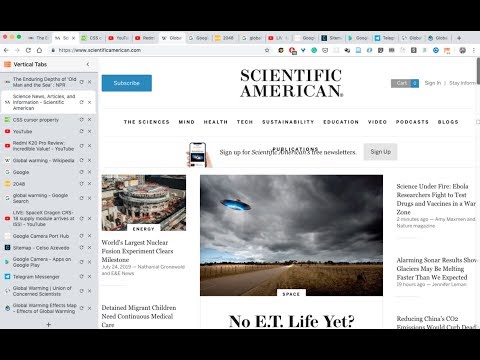
A chrome extension that presents your tabs vertically. News: - Tab preview support is here! - Dark theme support is here!…
A chrome extension that presents your tabs vertically. News: - Tab preview support is here! - Dark theme support is here! Features include: - Dark theme. - Display tabs vertically in a sidebar on web pages. - Tabs are displayed with the same style as Google Chrome. - Drag and drop to reorder tabs. - Mute tabs. - Search and filter tabs in the sidebar. - Toggle the sidebar by clicking on the extension icon. - Toggle the sidebar using the keyboard shortcut: Cmd + E (Ctrl + E on PC)(Using keyboard shortcuts are recommended once you formed the corresponding muscle memory) - The sidebar is resizable. - Auto show/hide sidebar. - The sidebar can be placed on either the left or the right side of the window. New! More features to come! Such as tree styled tabs! Stay tuned! Some known problems: - Vertical Tabs only works on regular html pages (which is 99% of the time). However, it doesn't work on your Newtab page, chrome web store pages, or PDF pages. Unfortunately that's the way it works in chrome, and there's no known way to get around it currently. - It works by injecting an iframe into a webpage. Therefore, zooming in/out on the page will cause the vertical tabs to become large/small. There's no way to get around this. - Please refresh the page after a version update. For example, when you find that the toggling functionality gave up working, it's most probably I updated the version, and refreshing the web pages (using Cmd + R / Ctrl + R) should fix it. Thank you! Built with React, Webpack, and love by @lxieyang.
3,0 de 5158 valoraciones
Detalles
- Versión2.0.4
- Actualizado13 de enero de 2024
- Ofrecido porMichael
- Tamaño376KiB
- IdiomasEnglish (United States)
- Desarrollador
Correo electrónico
xieyangl@andrew.cmu.edu - No operadorEste desarrollador no se ha identificado como operador. Los consumidores residentes en la Unión Europea deben tener en cuenta que los derechos de los consumidores no son aplicables a los contratos que suscriban con este desarrollador.
Privacidad
Este desarrollador declara que tus datos:
- No se venden a terceros, excepto en los casos de uso aprobados
- No se usan ni se transfieren para fines no relacionados con la función principal del elemento.
- No se usan ni se transfieren para determinar la situación crediticia ni para ofrecer préstamos.
Ayuda
Si tienes alguna pregunta, sugerencia o problema, visita el sitio de asistencia del desarrollador.