

Vertical Tabs
158 Bewertungen
)
Übersicht
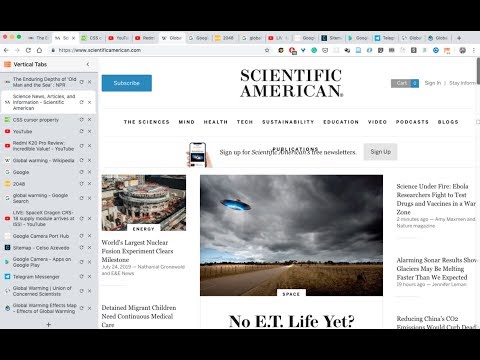
A chrome extension that presents your tabs vertically. News: - Tab preview support is here! - Dark theme support is here!…
A chrome extension that presents your tabs vertically. News: - Tab preview support is here! - Dark theme support is here! Features include: - Dark theme. - Display tabs vertically in a sidebar on web pages. - Tabs are displayed with the same style as Google Chrome. - Drag and drop to reorder tabs. - Mute tabs. - Search and filter tabs in the sidebar. - Toggle the sidebar by clicking on the extension icon. - Toggle the sidebar using the keyboard shortcut: Cmd + E (Ctrl + E on PC)(Using keyboard shortcuts are recommended once you formed the corresponding muscle memory) - The sidebar is resizable. - Auto show/hide sidebar. - The sidebar can be placed on either the left or the right side of the window. New! More features to come! Such as tree styled tabs! Stay tuned! Some known problems: - Vertical Tabs only works on regular html pages (which is 99% of the time). However, it doesn't work on your Newtab page, chrome web store pages, or PDF pages. Unfortunately that's the way it works in chrome, and there's no known way to get around it currently. - It works by injecting an iframe into a webpage. Therefore, zooming in/out on the page will cause the vertical tabs to become large/small. There's no way to get around this. - Please refresh the page after a version update. For example, when you find that the toggling functionality gave up working, it's most probably I updated the version, and refreshing the web pages (using Cmd + R / Ctrl + R) should fix it. Thank you! Built with React, Webpack, and love by @lxieyang.
3,0 von 5158 Bewertungen
Details
- Version2.0.4
- Aktualisiert13. Januar 2024
- Angeboten vonMichael
- Größe376KiB
- SprachenEnglish (United States)
- Entwickler
E-Mail
xieyangl@andrew.cmu.edu - Kein HändlerDieser Entwickler hat sich nicht als Händler deklariert. Für Verbraucher in der Europäischen Union gelten die Verbraucherrechte nicht für Verträge, die zwischen dir und diesem Entwickler geschlossen werden.
Datenschutz

Dieser Entwickler erklärt, dass deine Daten
- nicht an Dritte verkauft werden, außer in den genehmigten Anwendungsfällen
- nicht für Zwecke genutzt oder übertragen werden, die nichts mit der Hauptfunktionalität des Artikels zu tun haben
- nicht zur Ermittlung der Kreditwürdigkeit oder für Darlehenszwecke verwendet oder übertragen werden
Support
Wenn du Probleme, Fragen oder Vorschläge hast, rufe die Supportwebsite des Entwicklers auf