

Vertical Tabs
158 件の評価
)
概要
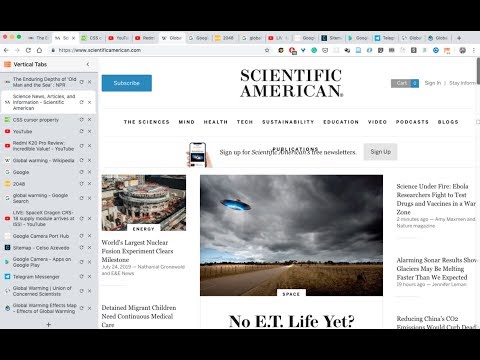
A chrome extension that presents your tabs vertically. News: - Tab preview support is here! - Dark theme support is here!…
A chrome extension that presents your tabs vertically. News: - Tab preview support is here! - Dark theme support is here! Features include: - Dark theme. - Display tabs vertically in a sidebar on web pages. - Tabs are displayed with the same style as Google Chrome. - Drag and drop to reorder tabs. - Mute tabs. - Search and filter tabs in the sidebar. - Toggle the sidebar by clicking on the extension icon. - Toggle the sidebar using the keyboard shortcut: Cmd + E (Ctrl + E on PC)(Using keyboard shortcuts are recommended once you formed the corresponding muscle memory) - The sidebar is resizable. - Auto show/hide sidebar. - The sidebar can be placed on either the left or the right side of the window. New! More features to come! Such as tree styled tabs! Stay tuned! Some known problems: - Vertical Tabs only works on regular html pages (which is 99% of the time). However, it doesn't work on your Newtab page, chrome web store pages, or PDF pages. Unfortunately that's the way it works in chrome, and there's no known way to get around it currently. - It works by injecting an iframe into a webpage. Therefore, zooming in/out on the page will cause the vertical tabs to become large/small. There's no way to get around this. - Please refresh the page after a version update. For example, when you find that the toggling functionality gave up working, it's most probably I updated the version, and refreshing the web pages (using Cmd + R / Ctrl + R) should fix it. Thank you! Built with React, Webpack, and love by @lxieyang.
5 点満点で 3.0158 件の評価
詳細
- バージョン2.0.4
- 更新:2024年1月13日
- 提供元Michael
- サイズ376KiB
- 言語English (United States)
- デベロッパー
メール
xieyangl@andrew.cmu.edu - 非取引業者このデベロッパーは取引業者として申告していません。EU 加盟国の消費者とこのデベロッパーとの間に締結された契約には、消費者の権利が適用されません。
プライバシー
このデベロッパーは、お客様のデータについて以下を宣言しています
- 承認されている以外の用途で第三者に販売しないこと
- アイテムの中心機能と関係のない目的で使用または転送しないこと
- 信用力を判断する目的または融資目的で使用または転送しないこと
サポート
質問や提案、問題がある場合は、デベロッパーのサポートサイトにアクセスしてください。