

VerboNest – Meeting to Notes & MoM

Overview
Turn any meeting or video into notes & minutes (MoM) in English or Hindi. Free, private, 100% on-device. By Samarth Dalela.
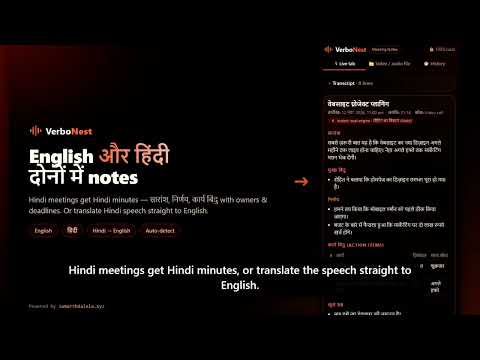
Turn any meeting, lecture or video into a clean transcript, smart notes and Minutes of Meeting (MoM) — in English or Hindi — right inside Chrome. Free, no sign-up, and 100% on-device: your audio never leaves your computer. HOW IT WORKSTurn any meeting, lecture or video into a clean transcript, smart notes and Minutes of Meeting (MoM) — in English or Hindi — right inside Chrome. VerboNest helps you capture discussions, generate summaries, identify important decisions and organize action items without manually writing everything down. **HOW IT WORKS** 1. Open your meeting or video tab and click the VerboNest icon (or press Alt+Shift+N). 2. Click "Start taking notes" while continuing to listen to your meeting. 3. Press Stop, then select "Generate notes & MoM". Your meeting notes are ready! **WHAT YOU GET** - Live transcript with timestamps while the meeting is running. - Summary of the entire discussion. - Important discussion points. - Decisions made during the meeting. - Action items with owners and deadlines. - Open questions and main topics. - Notes in English or Hindi, depending on the spoken language. **WORKS WITH** - Google Meet, Zoom (web), Microsoft Teams and Webex. - YouTube videos, online courses, webinars and other browser tabs playing audio. - Import supported audio and video recordings to generate transcripts and meeting notes. - Optionally include your microphone audio so your own contributions are captured too. **LANGUAGE SUPPORT** - English and Hindi transcription. - Automatic language detection. - Translate Hindi speech into English. - Enhanced speech recognition for Hindi and Indian accents. **PRIVACY BY DESIGN** - Speech recognition using OpenAI Whisper runs locally in your browser. - Uses your GPU when available. - Meeting notes are generated using Chrome's built-in AI when supported, or a local processing engine. - No account or sign-up required. - Your session history is stored locally in your browser and can be deleted anytime. **EXPORT AND SHARE** - Copy meeting notes with one click. - Export notes as Markdown or plain text. - Download transcripts and subtitles. - Access your recent 50 meeting sessions. - Easily share notes with email, Slack, WhatsApp, Notion and Google Docs. **FIRST-TIME SETUP** The first use downloads the required speech recognition model. Subsequent sessions can use the downloaded model without downloading it again. Make every meeting more productive with VerboNest. Made by Samarth Dalela https://samarthdalela.xyz/ 1. Open your meeting or video tab and click the VerboNest icon (or press Alt+Shift+N). 2. Press "Start taking notes" — you keep hearing the tab normally. 3. Press Stop, then "Generate notes & MoM". Done. WHAT YOU GET - Live transcript with timestamps while the meeting is running - Summary of the whole discussion - Key points - Decisions that were agreed - Action items with owner and deadline (e.g. "Rahul – share the draft – by Monday") - Open questions and main topics - Notes in English or Hindi (हिंदी), whatever language was spoken WORKS WITH - Google Meet, Zoom (web), Microsoft Teams, Webex - YouTube, online courses, webinars and any tab that plays audio - Optionally record your own microphone too, so your voice is in the notes LANGUAGES - English, Hindi, or auto-detect - Translate Hindi speech straight to English - A more accurate speech model for Hindi and Indian accents PRIVATE BY DESIGN - Speech recognition (OpenAI Whisper) runs locally in your browser, using your GPU when available - Notes are written on your device by Chrome's built-in AI (Gemini Nano) when your Chrome supports it, or by a fast local engine that always works - No account, no servers, no tracking, no analytics - Your history is stored only in this browser, and you can delete it anytime EXPORT & SHARE - Copy notes in one click and paste them into email, Slack, WhatsApp, Notion or Google Docs - Download notes as Markdown or text, the transcript as TXT, or subtitles as SRT - History of your last 50 sessions The first use downloads the speech model once (about 75 MB, or 240 MB for the accurate Hindi model). After that it starts in seconds. Free forever. Made by Samarth Dalela — https://samarthdalela.xyz/
5 out of 51 rating
Details
- Version1.0.0
- UpdatedNovember 13, 2026
- Size6.6MiB
- LanguagesEnglish
- DeveloperWebsite
Email
SAMARTHDALELA@GMAIL.COM - Non-traderThis developer has not identified itself as a trader. For consumers in the European Union, please note that consumer rights do not apply to contracts between you and this developer.
Privacy

VerboNest – Meeting to Notes & MoM has disclosed the following information regarding the collection and usage of your data. More detailed information can be found in the developer's privacy policy.
VerboNest – Meeting to Notes & MoM handles the following:
This developer declares that your data is
- Not being sold to third parties, outside of the approved use cases
- Not being used or transferred for purposes that are unrelated to the item's core functionality
- Not being used or transferred to determine creditworthiness or for lending purposes
Support
For help with questions, suggestions, or problems, please open this page on your desktop browser