

VeoRec: Screen Recorder with Webcam & Share Link
4 ratings
)
Overview
Screen recorder for Chrome: record your screen, camera and mic, get an instant share link, plus screenshots and AI transcripts.
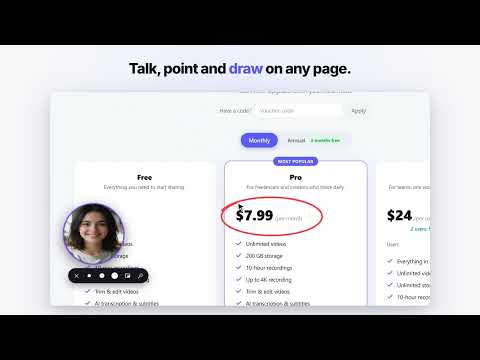
VeoRec is a screen recorder for Chrome that turns what you show into a video you can share. Record your screen, a window or a tab with your webcam and microphone. When you stop, the video uploads and its link is already copied, ready to paste into email, chat or a ticket. Every new account starts with 7 days of VeoRec Pro free. No credit card needed. KEY FEATURES • Screen and webcam recording: capture your entire screen, one window or a tab, with your mic and the system or tab sound. Add a webcam bubble, or record the camera only. • Webcam backgrounds: blur or remove your background, or replace it with a solid color, a picture or your own image. • Recording toolbar: pause, restart or cancel, draw on the screen, highlight clicks, mute the mic, add chapter markers and pin notes. • Instant sharing: rename, email or share from the finish screen, or save a copy to your device. In Gmail, a Video button adds your recording to an email as a clickable thumbnail. • AI on every video: every video gets a transcript and an automatic title. On the Free plan, your first 3 videos also get an AI summary and chapters. On Pro, and during your 7-day free trial, every video gets summaries and chapters, transcripts can be translated, and you can ask a video questions and get answers with timestamps. • Edit and collect feedback: trim, split and cut, blur sensitive areas, add music and overlays. Viewers watch in the browser without an account, comment and react at the exact moment, and a review board keeps feedback in one place. • Know who watched: see views and how far people watched, and get an email when someone watches or comments. • Import your videos: bring your existing Loom library over in bulk, plus videos from Google Drive, Dropbox or a plain video link. Your plan's limits apply. • Screenshots and web videos: capture the visible page, a full web page, a selected area or your screen. Hover a video player on any site and click Record to capture just that video and its sound, or Download to save it when the site serves a plain video file. USE CASES • Product demos and client walkthroughs • Bug reports that show what happened • Customer support replies • Tutorials, onboarding and training • Async team updates • Feedback on designs, documents and websites HOW IT WORKS 1. Add VeoRec to Chrome, then sign in or create a free account at veorec.com. Your first 7 days include everything in Pro. 2. Click the VeoRec icon, choose your camera and mic, and press Start. Chrome asks which screen, window or tab to share. 3. Click Stop. Your link is copied: paste it wherever you need it. PLANS 7-day Pro trial: every new account gets all of Pro free for 7 days, with no credit card. If you do not upgrade, your account moves to the Free plan and keeps your videos. Free: up to 10 videos at a time (videos in the trash do not count), 20 GB storage, recordings of up to 10 minutes in up to 1080p, AI transcripts and titles, and AI summaries and chapters on your first 3 videos. Free videos show a small "Made with VeoRec" badge. Pro ($7.99 a month or $79 a year): unlimited videos, 200 GB storage, recordings of up to 10 hours in up to 4K, AI summaries, chapters and translation on every video, view analytics, password-protected links, custom thumbnails, and the option to remove VeoRec branding. Business ($24 per user a month, 2 users minimum): everything in Pro plus a shared team workspace with roles and invites, and 500 GB of storage per user. Prices are in US dollars. Local VAT, GST or sales tax is added at checkout. Paid plans come with a 14-day money-back guarantee. PRIVACY AND PERMISSIONS VeoRec records only after you press Start and choose what to share in Chrome's own dialog. Your camera and microphone are used only when you turn them on. VeoRec does not read your browsing history. A small script on web pages places the Record button on video players. While a recording runs, VeoRec saves the layout of the recorded page (element positions and short visible labels) so comments can be pinned to the right spot; it never saves what you type into forms. The Download permission is optional and requested only when you first click Download. When you import videos, VeoRec asks for access to that site only at that moment, and you stay signed in there yourself; VeoRec never sees your passwords. Privacy policy: https://veorec.com/privacy Questions: support@veorec.com Add VeoRec to Chrome and start your 7-day Pro trial today.
5 out of 54 ratings
Details
- Version1.103.1
- UpdatedNovember 21, 2026
- Offered byCoding Clicks
- Size2.32MiB
- LanguagesEnglish (United States)
- DeveloperChaudhary Muhammad Ali Raza
House No. 169, Street No. 4, Facing Masjid Quba, Bostan Khan Road, Rawalpindi 46000 PKEmail
codingclicks@gmail.comPhone
+92 325 6677758 - TraderThis developer has identified itself as a trader per the definition from the European Union and committed to only offer products or services that comply with EU laws.
Privacy

VeoRec: Screen Recorder with Webcam & Share Link has disclosed the following information regarding the collection and usage of your data. More detailed information can be found in the developer's privacy policy.
VeoRec: Screen Recorder with Webcam & Share Link handles the following:
This developer declares that your data is
- Not being sold to third parties, outside of the approved use cases
- Not being used or transferred for purposes that are unrelated to the item's core functionality
- Not being used or transferred to determine creditworthiness or for lending purposes