

Veo 3 AI Video Generator | Create Video from Text & Image

Descripción general
Generate cinematic AI videos from text or images with Veo 3.1. Features synchronized, realistic physics, and multi-shot control.
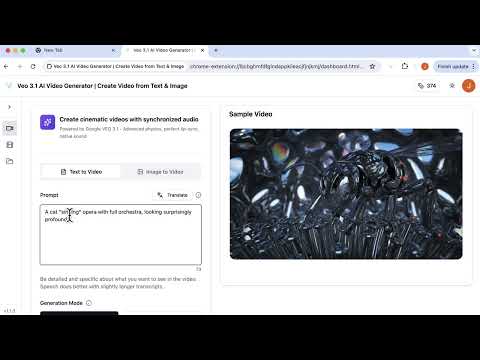
Transform your ideas into captivating, high-quality videos in minutes. Powered by Google VEO 3.1's advanced AI, create cinematic videos with synchronized audio, realistic physics, and native sound generation. Start with text prompts, images, or multiple reference ingredients - then extend scenes, control transitions, and bring your vision to life. No filming, no editing skills, no production crew required. 🎯 KEY FEATURES 🔊 Synchronized Audio Generation Powered by Google VEO 3, automatically generates music and sound effects that sync perfectly with your visuals. Native sound generation means no silent clips—every video comes with professional audio. 📝 Text to Video & 🖼️ Image to Video Simply describe your vision with detailed prompts or upload an image to create stunning video content. Advanced physics and realistic motion bring your ideas to life cinematically. 🎬 First and Last Frame Control Provide starting and ending images with "Frames to Video," and Flow generates a seamless video that bridges the two. Perfect for artful transitions and epic visual storytelling. 🎨 Ingredients to Video Guide generation with multiple reference images to control characters, objects, and style. Upload your visual ingredients and Flow creates a final scene that matches your exact vision with consistent style and elements. Now supports 9:16 vertical format - perfect for TikTok, Instagram Reels, and YouTube Shorts. ⏱️ Scene Extension with Fast & Quality Modes Create longer videos lasting a minute or more by extending your original clip. Each video connects to and continues the action from your previous clip's final second - ideal for extended establishing shots and longer narratives. Now supports both Fast mode for quick iterations and Quality mode for cinematic, professional-grade extended sequences with enhanced detail and coherence. ⚡ Fast & Quality Modes Choose your priority: Fast mode for quick iterations and social media, or Quality mode for cinematic, professional-grade output suitable for commercial use. Quality mode is now available across all core workflows including scene extension. 🎥 4K Ultra HD Output Export your videos in stunning 4K resolution for maximum clarity and detail. Perfect for large displays, professional presentations, and high-end production work. 🎬 Advanced Physics & Lip-Sync Google VEO 3 technology ensures realistic motion, natural physics, and perfect lip-sync for character speech - creating truly cinematic results. ⏱️ Flexible Duration Control Generate videos up to 8 seconds with precise control, or extend them to create longer sequences. Perfect length for social media clips, product showcases, and attention-grabbing content. 📐 Landscape & Vertical Formats Generate in 16:9 landscape or 9:16 vertical. Ingredients to Video now fully supports 9:16 - create consistent character videos optimized for vertical platforms. 😊 Intuitive Interface Clean, simple design: enter your prompt, select generation mode and aspect ratio, and generate. Built-in translation support and example prompts help you get started instantly. 👥 Who It's For • Content Creators & Social Media Teams - Generate platform-optimized videos at scale with synchronized audio for TikTok, Instagram Reels, YouTube Shorts Generate native 9:16 vertical videos across all Veo 3 workflows, optimized for TikTok, Reels, and YouTube Shorts. • Marketing & E-Commerce Brands - Create compelling product demos, launches, and ads with cinematic quality in minutes • Small Businesses & Freelancers - Produce professional-quality videos on any budget and compete visually with larger brands 🚀 Get Started in 3 Simple Steps 1. Choose Your Mode - Select Text to Video or Image to Video, then pick Fast or Quality generation 2. Create Your Prompt - Describe your video in detail, select your preferred aspect ratio 3. Generate & Download - Click Generate Video, preview your creation with synchronized audio, upscale to 4K when needed 💡 Pro Tips for Better Results Be Detailed and Specific The interface recommends: "Be detailed and specific about what you want to see in the video. Speech does better with slightly longer transcripts." Specify Audio & Mood Guide the sound generation: "upbeat electronic music with drums," "dramatic orchestral crescendo," "calm acoustic guitar ambience," "energetic pop background" Describe Physics & Actions For realistic results: "water splashing naturally," "fabric flowing in wind," "realistic hair movement," "smooth object interactions" Use Quality Extension for Longer Narratives When building longer sequences, use Quality mode for scene extension to maintain cinematic detail and visual coherence across extended clips. Use Ingredients for Consistency Upload multiple reference images to maintain consistent characters, objects, and visual style across your video generation. Plan Transitions with Frames Provide compelling first and last frames to create seamless, artistic transitions that tell a complete visual story. 🔐 Privacy & Data Protection We respect your privacy. The extension processes images and prompts only with your permission. Generated outputs and uploaded images are stored according to your account settings - see our privacy policy on the website for details. 📚 Support & Resources If you have questions or need help, contact support with details and screenshots for faster assistance.
5 de 52 valoraciones
Detalles
- Versión1.3.1
- Actualizado12 de febrero de 2026
- Tamaño226KiB
- IdiomasEnglish
- DesarrolladorSitio web
Correo electrónico
hello@ainanobanana.co - No operadorEste desarrollador no se ha identificado como operador. Los consumidores residentes en la Unión Europea deben tener en cuenta que los derechos de los consumidores no son aplicables a los contratos que suscriban con este desarrollador.
Privacidad

Veo 3 AI Video Generator | Create Video from Text & Image ha revelado la siguiente información sobre la recogida y el uso de tus datos. Puedes consultar información más detallada en la privacy policy del desarrollador.
Veo 3 AI Video Generator | Create Video from Text & Image gestiona lo siguiente:
Este desarrollador declara que tus datos:
- No se venden a terceros, excepto en los casos de uso aprobados
- No se usan ni se transfieren para fines no relacionados con la función principal del elemento.
- No se usan ni se transfieren para determinar la situación crediticia ni para ofrecer préstamos.
Ayuda
Si tienes alguna pregunta, sugerencia o problema, abre esta página en tu navegador para ordenadores