

Velo Screen Recorder: MP4, 2K & Audio Capture

Overview
Free Chrome screen recorder for HD/2K MP4 with mic & system audio. Capture tutorials, demos & meetings—WhatsApp and Slack ready.
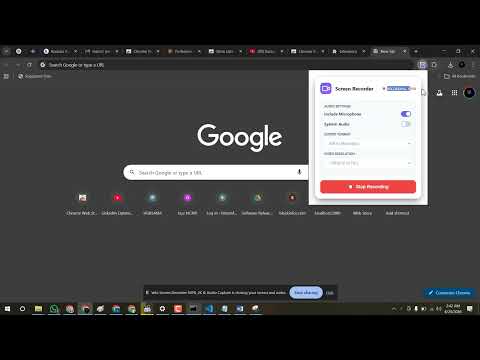
Velo Screen Recorder — Free HD & 2K Screen Recorder for Chrome (MP4, Mic & System Audio) Record your screen in Chrome without heavy desktop software. Velo is a free screen recorder extension for HD and 2K video capture, native MP4 export, microphone and system audio, pause/resume, and automatic saves to your Downloads folder. ——— WHY VELO? Velo is built for creators, teachers, developers, and professionals who need a fast Chrome screen recorder that just works. Capture tutorials, product demos, meetings, bug reports, and browser gameplay in crisp quality—processed locally on your device for privacy. ——— KEY FEATURES • Native MP4 recording (H.264) Export universal MP4 files ready for YouTube, WhatsApp, Slack, Google Drive, and social media. Also supports WebM and MKV when you need them. • HD & 2K resolution Record in 480p, 720p, 1080p, or 2K. Choose the quality that matches your tutorial, presentation, or demo. • Dual audio capture Record microphone and system (desktop) audio together with clear sync—ideal for walkthroughs, online classes, and meeting recaps. • Custom save location By default, videos save automatically to Downloads/VeloScreenRecorder. Set your preferred folder in Settings, or turn on “Ask where to save each time” when you want a Save As prompt. • Smart file naming Use a custom filename prefix, include date/time stamps, and keep recordings organized without overwriting files. • Pause & resume Pause mid-recording and continue when ready. Stop & Save finalizes your video instantly. • Countdown timer Start with a 3- or 5-second countdown so you can prepare before capture begins. • Frame rate control Choose 24, 30, or 60 FPS for smooth playback. • Keyboard shortcuts Alt+Shift+R — start or stop recording Alt+Shift+P — pause or resume • Lightweight & private Encoding runs locally with offscreen processing. Your recordings stay on your device until you save them. No cloud upload required. ——— IDEAL FOR • Teachers & students — lesson videos, assignments, and explainers • Professionals — demos, presentations, and client walkthroughs • Developers — bug reports and UI walkthroughs • Creators — short tutorials and browser-based content • Remote teams — meeting recaps and async updates ——— HOW TO USE VELO 1. Click the Velo icon in your Chrome toolbar 2. Choose format (MP4 / WebM / MKV), resolution, and FPS 3. Enable Mic and/or System audio 4. Set countdown if you want a head start 5. Click Start Recording and select the screen, window, or tab 6. Use Pause when needed, then Stop & Save 7. Find your video in Downloads/VeloScreenRecorder (or your custom folder) Open Settings anytime to change the save path, filename style, and post-save options (show in folder / open after save). ——— PERMISSIONS (PRIVACY-FIRST) Velo only requests what recording needs. We do not sell your data or track your browsing history. • displayCapture — record the screen, window, or tab you select • offscreen — encode HD/2K video smoothly in the background • storage — remember your quality, audio, and save preferences • downloads — save recordings to your chosen Downloads folder • downloads.open — optional “open after save” / show-in-folder features ——— SEO KEYWORDS Chrome screen recorder, free screen recorder, MP4 screen recorder, HD screen recorder, 2K screen recorder, record screen with audio, microphone and system audio recorder, tutorial recorder, online class recorder, demo recorder, browser screen capture, Screencastify alternative, Loom alternative for Chrome ——— Install Velo Screen Recorder free and start capturing high-quality MP4 videos in Chrome in seconds—fast, private, and ready to share.
0 out of 5No ratings
Details
- Version1.1.0
- UpdatedJuly 29, 2026
- Offered byMustafa Riaz
- Size5.29MiB
- LanguagesEnglish
- DeveloperGhulam Mustafa
NEAR SAGAR KARIYANA STORE MOHALLAH JAHANGEER PURA PINDI BHATTIAN DISTT, Hafizabad Punjab Pindi Bhattian 52180 PKEmail
mustafariazdev@gmail.comPhone
+92 309 6435752 - TraderThis developer has identified itself as a trader per the definition from the European Union and committed to only offer products or services that comply with EU laws.
Privacy

This developer declares that your data is
- Not being sold to third parties, outside of the approved use cases
- Not being used or transferred for purposes that are unrelated to the item's core functionality
- Not being used or transferred to determine creditworthiness or for lending purposes