

VectorShot – Vector PDF & Full Page Screenshot
1 rating
)
Overview
Save Amazon pages with the SellerAmp panel and Keepa chart, or any web page, as a sharp vector PDF, HD image PDF or PNG.
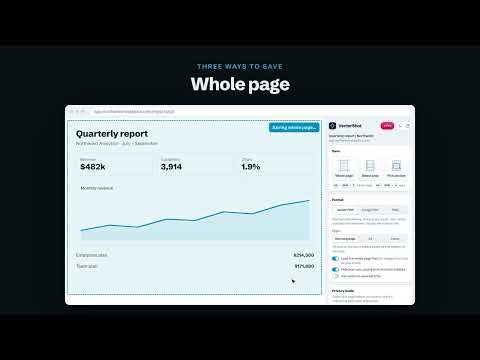
VectorShot saves web pages as real vector PDFs: text stays text, and everything stays sharp at any zoom. BUILT FOR AMAZON SELLERS • Save the Amazon product page together with the SellerAmp SAS panel and the Keepa price chart in one PDF • Keepa's price history is saved as real vector lines: sharp at any zoom • ASINs, prices and ranks stay real text you can search and copy Screenshots go blurry when you zoom in. VectorShot saves web pages the way they deserve: crisp at any size. WHAT YOU CAN SAVE • The whole page, top to bottom, including images that only load as you scroll • An area you drag: keep dragging past the edge and the page scrolls with you • One section: hover, click, and VectorShot saves exactly that block FORMATS • Vector PDF: real text and shapes. Sharp at any zoom, searchable, usually the smallest file • HD image PDF: looks exactly like your screen, at 1x to 4x resolution • PNG: one high-resolution image • One long page, A4 or Letter, with or without margins PRIVACY MODE: CLEAN UP BEFORE YOU SHARE • Replace text everywhere on the page: swap your name, email or city for anything you like • Hide or blur parts of the page with one click; blurred text cannot be copied out of the PDF • Cookie banners, chat bubbles and pop-ups are hidden automatically • Everything goes back to normal after saving PRIVATE BY DESIGN Pages are captured inside your own browser. Nothing is uploaded. No account needed. FREE AND PRO Free: 10 saves a month, image PDF and PNG up to 2x. Pro: unlimited saves, vector PDF, 3x and 4x, replace, hide and blur, no "Made with" line. Works as a side panel or a popup; switch any time. Light and dark themes. Shortcuts: Alt+Shift+F saves the whole page, Alt+Shift+A selects an area. Support: support@vectorshot.app VectorShot is not affiliated with Amazon, SellerAmp or Keepa. Product names belong to their owners.
5 out of 51 rating
Details
- Version1.2.9
- UpdatedOctober 28, 2026
- FeaturesOffers in-app purchases
- Offered byVectorShot
- Size355KiB
- LanguagesEnglish
- Developer
Email
support@vectorshot.app - Non-traderThis developer has not identified itself as a trader. For consumers in the European Union, please note that consumer rights do not apply to contracts between you and this developer.
Privacy

VectorShot – Vector PDF & Full Page Screenshot has disclosed the following information regarding the collection and usage of your data. More detailed information can be found in the developer's privacy policy.
VectorShot – Vector PDF & Full Page Screenshot handles the following:
This developer declares that your data is
- Not being sold to third parties, outside of the approved use cases
- Not being used or transferred for purposes that are unrelated to the item's core functionality
- Not being used or transferred to determine creditworthiness or for lending purposes
Support
For help with questions, suggestions, or problems, please open this page on your desktop browser