


Overview
Detect ghost jobs, check company safety scores, and save jobs to your VantageCV tracker — right from LinkedIn and job boards.
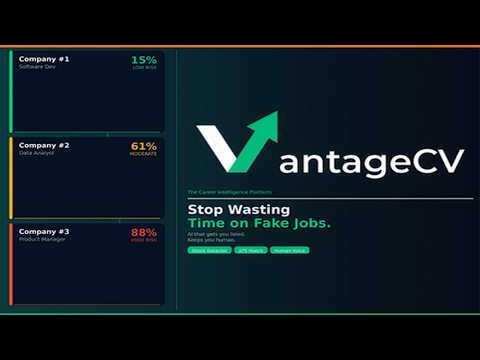
Stop wasting time on fake job postings. ⚠️ VantageCV's free browser extension detects ghost jobs directly on LinkedIn, Indeed, Glassdoor, ZipRecruiter, and other recruitment/company websites - before you spend hours tailoring your resume for a position that was never real. An estimated 21-33% of online job postings are ghost jobs - positions that have already been filled, were never real, or exist only to collect data (Ng, arXiv:2410.21771, 2024; MyPerfectResume analysis of BLS JOLTS, Nov 2025). That means up to 1-in-3 jobs you're applying to might be fake. VantageCV puts a stop to that. 🏆 GETTING STARTED 📶 1. Install the extension from the Chrome Web Store. 2. Click the VantageCV icon in your toolbar to open the popup. 3. (Optional) - Click "Connect Account" and follow the sign-in flow. - Ghost-risk badges & Ghost Job Checks work without an account; Save to Job Tracker & Quick Links require a free account; Apply Assist requires a Pro or Partner subscription. 4. Visit a supported job board - color-coded ghost-risk badges appear automatically next to listings. FEATURES ✨ • Ghost Job Detection: - Automatic, no account required - Color-coded badges appear next to each job listing: - Green = Low Risk, - Yellow = Moderate Risk, - Red = High Risk. - Visit LinkedIn, Indeed, Glassdoor, ZipRecruiter, and other recruitment/company websites. - Browse listings as you normally would - badges inject as the page loads (and as new listings appear when you scroll). - Hover a badge to see the risk level & confidence score. • Ghost Job Check (popup): - Manual, no account required for the basic check - For any job, including ones you found off-platform. - Click the VantageCV icon in your toolbar. - The popup pre-fills the company & title from the current job page when possible; otherwise type them in. - (Optional, for a deeper read) - Click "Paste job description" to expand the box & paste the description text. - Click "Check Ghost Job Risk" - the risk level and confidence score appear in the popup, with a "See full analysis on VantageCV" link to open the detailed breakdown on the dashboard (requires an account). • Save to Job Tracker: - Manual, free account required - Open the popup on a job posting page. - Review the auto-filled company, title, URL, and location in the "Save to Job Tracker" section, and edit if needed. - Click "Save Job" - the job lands in your VantageCV Job Tracker for pipeline management and follow-ups. • Apply Assist: - Pro/Partner only - Draft an honest, tailored answer to a screening question, drawn from your saved resume. - Never fabricated. - Open a job application on a supported board. - Click the "✨ Apply Assist" button that appears next to a screening-question field. - Review the suggested answer (and confidence rating) in the popover. - Click "Use this answer" to insert it into the field — or close the popover to skip. The form is never submitted by the extension; you stay in control. - Apply Assist - Add a Resume - Pro/Partner, only when needed - If you click Apply Assist before saving a resume, the popover offers an inline upload so you don't have to leave the page. - Click "✨ Apply Assist" on a screening question. - The popover shows an upload form because no resume is on file. - Either pick a PDF / DOCX / TXT file (up to 7MB) OR paste your resume text into the box. - Click "Save & continue" - your resume is saved to your VantageCV account and Apply Assist drafts your answer automatically. • Quick Links: - Free account required - Click the extension icon. - Once you're connected, use the Quick Links menu to jump directly to your VantageCV Dashboard, Job Tracker, or the Ghost Job Intelligence Database. (Before connecting, the popup shows a "Get Started Free" button instead.) • 13-Language Support: - Open the popup. - Pick your language from the language menu. - The popup, ghost-risk badges, and Apply Assist outputs all switch to your selected language. - Supported: English, Spanish, French, German, Portuguese (Portugal), Portuguese (Brazil), Chinese, Japanese, Arabic (with full right-to-left layout), Italian, Russian, Hindi, and Filipino. SUPPORTED JOB BOARDS 📌 • LinkedIn (linkedin.com/jobs) • Indeed (indeed.com) • Glassdoor (glassdoor.com) • ZipRecruiter (ziprecruiter.com) • Many more WHY VANTAGECV? ✅ VantageCV is The Career Intelligence Platform - a comprehensive AI-powered career toolkit that goes beyond resume optimization. The platform includes: • ATS Resume Analysis - See exactly how your resume scores against job descriptions • Resume Humanization - Make AI-assisted resumes sound authentically human • Recruiter View Simulation - See what recruiters see in the first 7.4 seconds • Cover Letter Generator - Tailored to each job description • LinkedIn Profile Optimization - Generate optimized headlines and summaries • Salary Negotiation Coach - Data-driven negotiation strategy • Skills Gap Analysis - Identify skill gaps for your target role • AI Career Agent-— Proactive career intelligence and alerts • Ghost Job Intelligence Database - Browse and contribute to crowdsourced ghost job reports The browser extension itself is free to install. Core ghost-job features (badges, manual checks) are free with no account required. Save to Job Tracker & Quick Links require a free VantageCV account. Apply Assist is included with a Pro or Partner subscription. For the full career intelligence experience, visit https://vantage-cv.com. SECURITY 🛡️ • Manifest V3, version 1.0.7: - The extension declares a strict content_security_policy.extension_pages directive that disallows remote script and eval-style execution inside extension contexts - a defense-in-depth hardening shipped 2026-05-03. - Apply Assist routes user-supplied questions, resumes, and job descriptions through a server-side prompt-injection wrapper before any LLM call. PRIVACY 👤 • No browsing history is tracked, no ads are shown, no third-party trackers are used, and no data is sold. • What the extension stores locally on your device (chrome.storage.local - never uploaded as bulk data): - Your extension session token (issued by VantageCV when you connect; used to authenticate API calls) - Your language and theme (light/dark) preferences - The configured API server URL and the extension version - A short-lived "form draft" of fields you typed in the popup (company, title, URL, location, pasted job description) so you don't lose work if you accidentally close the popup. - The draft expires after 30 minutes and is cleared when you change tabs to a different URL. • What the extension sends to the VantageCV API. - Some calls happen automatically while you browse a supported job board (so the badges can appear without you clicking anything); others happen only when you click a button in the popup or in the page. • Automatic, while browsing supported boards: - for each visible job listing the content script reads the job title and company name from the page and sends them to POST /api/extension/quick-ghost-check so the color-coded ghost-risk badge can be drawn next to that listing. - Triggered by page load & DOM updates (e.g. infinite scroll); no other page content is sent. • "Quick Ghost Check" - manual, from the popup (no account required): - the company name & job title you entered. - POST /api/extension/quick-ghost-check. • "Full Ghost Analysis" - manual, from the popup (account required): - company name, job title, the pasted or auto-extracted job description (truncated), and your selected language. - POST /api/extension/full-ghost-analysis. • "Save Job to Tracker" - manual, from the popup (account required): - the company, title, URL, and location you confirmed in the form. - POST /api/extension/save-job. • "Apply Assist" - manual, from the in-page trigger (Pro/Partner): - the screening question text you clicked Apply Assist on, the page's job title and company (best-effort from JobPosting structured data or the page title), and a truncated job description. - POST /api/extension/apply-assist. - Your resume itself is NOT uploaded by the extension on this call - the server reads your most recent resume already saved to your VantageCV account. • "Apply Assist - Add a resume" - manual, from the popover (Pro/Partner): - only used if you have no resume on file when you first click Apply Assist. - The popover offers a file picker (PDF/DOCX/TXT, up to 7MB) and a paste-text box. - The file you choose (or text you paste) is sent to POST /api/extension/apply-assist-resume, where it's parsed, validated, and saved as a resume project on your VantageCV account so Apply Assist can tailor an answer. - Nothing is sent until you click "Save & continue". • Sign-in handshake - one-shot, when you connect: - a read of your https://vantage-cv.com session cookie is exchanged at POST /api/extension/generate-token for an extension-scoped token (see "cookies" below). • Auth cookies on vantage-cv.com are READ only (never written), only on the https://vantage-cv.com domain, only when you open the popup or initiate sign-in, and only to check whether you're already signed in so the extension can reuse that session. - The cookie value is sent only to the VantageCV API to mint an extension token, and is never logged or shared with third parties. PERMISSIONS EXPLAINED 🔏 The extension requests the minimum permissions required to deliver its features. Each is justified below. API permissions: • "storage" - Stores the items listed in PRIVACY above (extension token, language, theme, API server URL, extension version, short-lived form draft) locally via chrome.storage.local. - Nothing is uploaded. • "activeTab" - Grants the popup one-shot access to the URL and visible DOM of the currently active tab, only when you open the extension popup. - Used together with "scripting" (below) to read the job URL plus a small set of best-effort fields (company, title, location, job description) so the popup forms can pre-fill them. - The "activeTab" grant is not restricted to job-board domains; that is by design (Chrome's standard model is "the page the user is actively looking at when they click the extension icon"), but the extension only reads the specific fields listed and does not transmit page content other than what's described in the PRIVACY section. • "scripting" - Used to run a one-shot script on the currently active tab when you open the popup, to extract the company / title / location / job-description fields described above for form pre-fill. - No long-running scripts are injected via this permission. - The always-on ghost-badge injection on supported job boards and the "Sign in to VantageCV" token-handoff on the https://vantage-cv.com auth page are both handled by separate declared content scripts (host-scoped - see host permissions below), not by this permission. • "cookies" - Used to read your existing https://vantage-cv.com session cookie when you open the extension popup, so that if you are already signed in to https://vantage-cv.com in your browser, the extension can reuse that session without asking you to sign in again. - The read happens only on the https://vantage-cv.com domain, only as a result of you opening the popup, and the cookie value is sent only to the VantageCV API to mint an extension-scoped token. - Cookies are never written, never read from any other domain, and never sent to third parties. Host permissions (these grant the always-on declared content scripts to run on the listed domains): • linkedin.com, indeed.com, glassdoor.com, ziprecruiter.com, etc. - These grant the always-on declared content scripts to run on supported job boards. - The content scripts power two features: (1) injecting the color-coded ghost risk badges onto each job listing as you browse (which automatically reads the job title and company name from each listing and sends them to the ghost-check API - see PRIVACY); (2) on job-application pages, injecting the optional "✨ Apply Assist" trigger next to screening-question fields (Pro/Partner only). - These content scripts only read and transmit the specific fields listed in the PRIVACY section; they do not exfiltrate the rest of the page. • vantage-cv.com - Required for two purposes: (1) all runtime API calls to the VantageCV backend - ghost checks (quick + full), saving jobs to the Job Tracker, Apply Assist generation, fetching extension config, and generating and verifying the extension session token; and (2) a small declared content script (auth-content.js) that runs ONLY on the /api/extension/auth* URL after you complete the "Sign in to VantageCV" flow. - That script reads the one-time token JSON the server emits on that page, hands it to the extension's background worker so it can be saved to chrome.storage.local, and updates a single status message on the auth page itself ("Extension connected. You can close this tab."). - It does not run on, read, or modify any other https://vantage-cv.com page. What the extension does NOT do: • It does not collect, store, or transmit your browsing history. • It does not run always-on content scripts on any domain other than the four supported job boards, with one narrow, single-purpose exception: - a small declared content script runs only on the https://vantage-cv.com/api/extension/auth* URL during the "Sign in to VantageCV" handshake (described under host permissions). - The "activeTab" + "scripting" permissions do allow the popup to read the currently active tab's URL and visible fields when you click the extension icon, but only at that moment, only for the fields described in PRIVACY, and only the listed fields are transmitted. • It does not show ads, run third-party trackers, or sell data. • It does not run a background poller - API calls happen only in response to your actions (visiting a supported job board, opening the popup, or clicking a button). • It does not auto-submit job applications. - Apply Assist generates a draft answer; you must explicitly click "Use this answer" to insert it into the form, and the form is never submitted by the extension. • It does not upload your resume from the extension automatically. - The only path that sends a resume file is the Apply Assist popover's "Add a resume" form, which appears only when you have no resume on file and only sends what you explicitly choose after you click "Save & continue". - For every Apply Assist generation thereafter, the server uses the resume already saved to your VantageCV account.
0 out of 5No ratings
Details
- Version1.0.10
- UpdatedJune 10, 2026
- Size770KiB
- LanguagesEnglish (United States)
- DeveloperVincent A. LupeWebsite
2201 E Maple St #2109 North Canton, OH 44720-9997 USEmail
vince.lupe@gmail.comPhone
+1 330-244-7091 - TraderThis developer has identified itself as a trader per the definition from the European Union and committed to only offer products or services that comply with EU laws.
Privacy

VantageCV - Career Intelligence has disclosed the following information regarding the collection and usage of your data. More detailed information can be found in the developer's privacy policy.
VantageCV - Career Intelligence handles the following:
This developer declares that your data is
- Not being sold to third parties, outside of the approved use cases
- Not being used or transferred for purposes that are unrelated to the item's core functionality
- Not being used or transferred to determine creditworthiness or for lending purposes
Support
For help with questions, suggestions, or problems, please open this page on your desktop browser