

VAC Dropdown Auto Selector
9 ratings
)
Overview
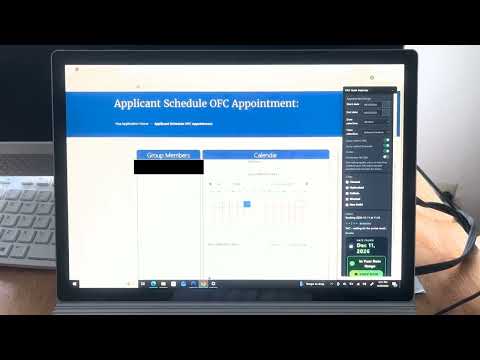
Overlays a control panel on the page to automatically cycle through the VAC options at configurable minute/second intervals.
## VAC Alerts — Your U.S. Visa Appointment Assistant VAC Alerts helps make checking U.S. visa appointments on **USVisaScheduling.com** easier and less repetitive. ### 🚀 Key Features **📅 Slot Checking** * Easily check for available visa appointment dates. * Reduce repetitive manual calendar checking. * Built to help you monitor appointment availability more efficiently. **🔔 FREE Community Alerts** * Get notified when community members spot available visa slots. * The more people checking, the more opportunities the community can discover. * Join the free community: https://t.me/vacslotalert **📆 Consular Window** * Set your preferred consular appointment window. * Choose **Any** date or specify how far out you are willing to book. * Helps keep appointment selection within your preferred range. **⚡ Portal Assist** * Helpful tools that make interacting with the scheduling portal easier. * Designed to reduce repetitive actions while using the official portal. * Works directly with the USVisaScheduling.com scheduling experience. **🔔 Portal Status Alerts** * Stay informed when the portal displays waiting rooms, security checks, or other interruptions. * Spend less time watching the screen while checking appointments. **🔐 No Login Required** * Use the extension without providing your USVisaScheduling.com username or password. * Your portal session stays under your control. **🔑 Optional Quick Login** * Optionally save your login information locally on your own computer for quicker access. * Your saved information remains on your device. ### 💡 Built From Real-World Experience VAC Alerts was created from hands-on experience with the U.S. visa appointment scheduling process, with a focus on making appointment checking simpler and more efficient. Visa appointments can appear and disappear quickly. VAC Alerts combines **slot checking, community alerts, consular window controls, and portal-assist tools** in one extension. ### ▶️ HOW IT WORKS 1. Install the Chrome extension. 2. Open **USVisaScheduling.com** and go to the scheduling page. 3. Configure your preferred settings. 4. Use VAC Alerts to help monitor appointment availability. 5. Join the free community and receive alerts from other users. 🎥 **See VAC Alerts in action:** https://www.youtube.com/watch?v=EoP28sCSWEQ 📢 **Join FREE Community Alerts:** https://t.me/+3TYrR2gjTOk3NzVh ### 🛡️ SAFETY & CONTROL VAC Alerts is designed as an **assistive tool** for the official U.S. visa scheduling portal. You remain in control of your portal session and settings. The official portal may still display waiting rooms, security checks, rate limits, slow pages, or session resets, just as it can during normal manual use. Important: VAC Alerts / VAC Dropdown Auto Selector is an independent project and is not affiliated with, endorsed by, or sponsored by the U.S. Government, the U.S. Department of State, or any visa appointment scheduling provider. Appointment availability is controlled by the official scheduling system. VAC Alerts does not guarantee appointment availability, earlier appointments, or successful bookings. Users should always follow the official website's terms, security requirements, waiting-room instructions and appointment procedures.
5 out of 59 ratings
Details
- Version1.0.12
- UpdatedOctober 12, 2026
- Offered byPrakash
- Size154KiB
- LanguagesEnglish (United States)
- DeveloperPRAKASH SUNDARSHAW
18645 NE 62nd Ct B1013 B1013 Redmond, WA 98052-5094 USEmail
prakashsha@gmail.com - Non-traderThis developer has not identified itself as a trader. For consumers in the European Union, please note that consumer rights do not apply to contracts between you and this developer.
Privacy

VAC Dropdown Auto Selector has disclosed the following information regarding the collection and usage of your data. More detailed information can be found in the developer's privacy policy.
VAC Dropdown Auto Selector handles the following:
This developer declares that your data is
- Not being sold to third parties, outside of the approved use cases
- Not being used or transferred for purposes that are unrelated to the item's core functionality
- Not being used or transferred to determine creditworthiness or for lending purposes
Support
For help with questions, suggestions, or problems, please open this page on your desktop browser