Item logo image for V2T: Voice To Text

V2T: Voice To Text

https://artrayd.com/
Featured
3.5(

36 ratings

)
Item media 2 (screenshot) for V2T: Voice To Text
Item media 3 (screenshot) for V2T: Voice To Text
Item video thumbnail
Item media 2 (screenshot) for V2T: Voice To Text
Item media 3 (screenshot) for V2T: Voice To Text
Item video thumbnail
Item media 2 (screenshot) for V2T: Voice To Text
Item video thumbnail
Item media 2 (screenshot) for V2T: Voice To Text
Item media 3 (screenshot) for V2T: Voice To Text

Overview

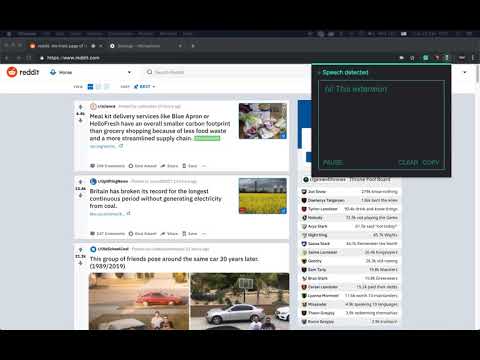
Use speech recognition to convert your voice to text on any tab without typing

Free voice-to-text dictation, right in your Chrome toolbar. Turn your voice into notes, messages, ideas and drafts using Chrome’s built-in speech recognition. No separate tab needed—just speak, then copy your text wherever you need it. ✅ Free to use, with no ads or extension-imposed usage limits ✅ A handy popup—no separate tab needed ✅ Simple controls: Start, Pause, Resume and Copy ✅ Dictate in multiple languages ✅ Your finalized text is saved between sessions ✅ Optional usage analytics—you choose whether to enable it What’s new in 1.10.0 • Undo and redo changes to dictated text, even after clearing it. • Refreshed colors make the transcript and controls easier to read. Speech recognition may require an internet connection and may process audio through Google’s services.

Details

  • Version
    1.10.0
  • Updated
    November 11, 2026
  • Size
    91.74KiB
  • Languages
    24 languages
  • Developer
    Website
    Email
    artrayd@gmail.com
  • Non-trader
    This developer has not identified itself as a trader. For consumers in the European Union, please note that consumer rights do not apply to contracts between you and this developer.

Privacy

Manage extensions and learn how they're being used in your organization

V2T: Voice To Text has disclosed the following information regarding the collection and usage of your data. More detailed information can be found in the developer's privacy policy.

V2T: Voice To Text handles the following:

Personally identifiable information
Location
User activity

This developer declares that your data is

  • Not being sold to third parties, outside of the approved use cases
  • Not being used or transferred for purposes that are unrelated to the item's core functionality
  • Not being used or transferred to determine creditworthiness or for lending purposes

Support

Related

SpeechAgent - Live Voice Typing

4.0

Speech to text converter to fill active text area with your voice using the built-in speech recognition engine of your browser

Speech Recognition Anywhere 365

3.8

Use Voice Recognition to fill out forms and dictate email with speech to text. Control the Internet with custom voice commands!

Speak! - Speech-To-Text Smart Dictation

4.1

Dictate with ease anywhere on the web. Speak! cleans up your speech, adds punctuation, and lets you edit by simply resaying.

Online speech recognition

3.3

Speech to text on any web site and in Windows and Linux applications

Voice In - Voice Typing & Speech-to-Text Dictation

4.2

Voice typing in ChatGPT, Gmail, Google Docs & 10,000+ sites. Dictate emails, notes & AI prompts in 50+ languages.

Voice Typing

3.2

Use your voice to type on any website

Speech To Text Engine

4.5

For your browser, there's an easy-to-use speech synthesis and analysis program!

Speech to Text

3.3

Speech recognizer application to keep it as text.

Speech to Text (Voice Recognition)

3.4

An easy to use speech synthesis and recognition tool for your browser!

Talk & Write

4.5

A listening notepad

Transkriptor Transcribe Audio to Text

4.7

Convert audio to text. Automatically record and transcribe your meetings, and other conversations with Transkriptor.

Speech to Text

2.9

Dictate your messages using your Voice.

SpeechAgent - Live Voice Typing

4.0

Speech to text converter to fill active text area with your voice using the built-in speech recognition engine of your browser

Speech Recognition Anywhere 365

3.8

Use Voice Recognition to fill out forms and dictate email with speech to text. Control the Internet with custom voice commands!

Speak! - Speech-To-Text Smart Dictation

4.1

Dictate with ease anywhere on the web. Speak! cleans up your speech, adds punctuation, and lets you edit by simply resaying.

Online speech recognition

3.3

Speech to text on any web site and in Windows and Linux applications

Voice In - Voice Typing & Speech-to-Text Dictation

4.2

Voice typing in ChatGPT, Gmail, Google Docs & 10,000+ sites. Dictate emails, notes & AI prompts in 50+ languages.

Voice Typing

3.2

Use your voice to type on any website

Speech To Text Engine

4.5

For your browser, there's an easy-to-use speech synthesis and analysis program!

Speech to Text

3.3

Speech recognizer application to keep it as text.

Search
Clear search
Close search
Google apps
Main menu