

Uzero — default account & order for Google

Overview
Choose your default Google account. Open Gmail, Drive and Calendar links in the right account, or truly reorder /u/0, /u/1.
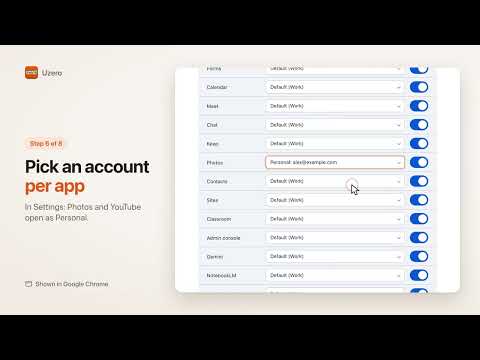
Links open in the wrong Google account? Uzero puts your signed-in Google accounts in the order you choose. Google numbers your accounts by the order you signed in. Your work account is /u/0 today and your personal one tomorrow. Links from Slack, email and bookmarks open in whichever account comes first. Uzero fixes that. WHAT IT DOES • Your order: drag your accounts into the order you want. Give each one a label and a color. • Pin your #1: Google links from outside Google (chat apps, bookmarks, the address bar) open in the account you pick. Or pick an account per service, for example Calendar in your work account. • Switch this tab: move the current Gmail, Drive, Docs or Calendar tab to another account in one click, or with Alt+1 to Alt+4. • Reorder for real: a guide in the side panel signs you out, then helps you sign back in one account at a time, so Google's own /u/0, /u/1 numbers match your order. WHY A REAL REORDER NEEDS A SIGN-OUT Google sets the numbers when you sign in. The only way to change them is to sign in again in a new order. Uzero shows each step and the email to use, with a Copy button for your password manager. You type every password on Google's own page. PRIVATE BY DESIGN • Runs only in your browser. No servers, no account, no analytics, no ads, no tracking. • Never sees, fills or stores your passwords. • Talks only to Google, and only to do what you ask. • Never runs in incognito windows. KEYBOARD SHORTCUTS Alt+1 to Alt+4 switch the current tab to account 1 to 4 in your order. Change them at chrome://extensions/shortcuts. Free and open source (GPL-3.0). Uzero is not affiliated with or endorsed by Google.
0 out of 5No ratings
Details
- Version0.1.0
- UpdatedNovember 11, 2026
- Offered byAnvil Nine
- Size102KiB
- LanguagesEnglish
- DeveloperZONILY JAME GANIBE PESQUERA
65 Maria Clara Corner Sikap Street Terri's Villa Condo Mandaluyong City, Metro Manila 1550 PHEmail
operations@anvilnine.comPhone
+63 906 351 7354 - TraderThis developer has identified itself as a trader per the definition from the European Union and committed to only offer products or services that comply with EU laws.
Privacy

Uzero — default account & order for Google has disclosed the following information regarding the collection and usage of your data. More detailed information can be found in the developer's privacy policy.
Uzero — default account & order for Google handles the following:
This developer declares that your data is
- Not being sold to third parties, outside of the approved use cases
- Not being used or transferred for purposes that are unrelated to the item's core functionality
- Not being used or transferred to determine creditworthiness or for lending purposes
Support
For help with questions, suggestions, or problems, visit the developer's support site