


Overview
Real-time speech translation for web calls, videos and talks in any Chrome tab. Free, open source; uses your own AI API key.
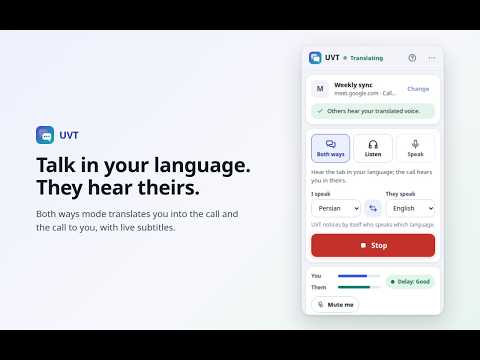
UVT translates speech in real time, right inside your browser. Talk with people who speak another language on web calls, or follow a video or talk in a language you don't know. It opens in the side panel next to your tab, speaks the result out loud and shows subtitles. It is free and open source (MIT license), with no ads, no accounts and no servers of its own. You use your own Gemini or OpenAI API key and pay the provider directly for what you use. WHAT DATA UVT USES (PLEASE READ) • While a session runs, your microphone (Both ways and Speak modes) and the chosen tab's sound (Both ways and Listen modes) are sent to the AI service you chose: Google Gemini or OpenAI. Nothing is sent when UVT is stopped. • It reads the titles and addresses of your open tabs only on your computer, so you can pick a tab. They are never sent anywhere. • Your API keys, settings, subtitles and a usage-minutes counter stay in your browser. • It asks for your agreement before the first session, and asks again if this ever changes. WHERE IT WORKS • Web calls such as Google Meet, Zoom on the web, Microsoft Teams on the web and WhatsApp Web, or any other call website you allow. The full list is on the help page. • Anything that plays sound in a tab: videos, recorded talks, live webinars, online classes. THREE MODES • Both ways: your voice is converted into the other person's language and sent into the call instead of your normal microphone. What they say is converted for you. • Listen: hear the tab's sound in your language. Your microphone is never used. • Speak: only your voice goes into the call in their language. You hear the others as they are. FEATURES • Live subtitles of what was said and what it means. Export them as a text file if you want to keep them. • Speech speed from 1× to 2× with natural pitch, so you can catch up with fast speakers. • "Speak without translation" to say a name or switch languages yourself. • "Mute me", and it follows the call app's own mute button. • Original sound volume: choose how loud the real voices stay underneath. • Headphones option for full two-way talk. With speakers, your mic pauses while sound plays, so nothing is sent back into the call. • A different AI engine for each direction (what you say / what you hear). • Interface in English and Persian (right-to-left). AI ENGINES (YOUR OWN KEY) • Gemini (default): speaks 70+ languages, including Persian. Get a key at aistudio.google.com/apikey. The paid tier costs about $0.037 per audio minute (November 2026). There is a free tier for many models, but whether it covers this model, and its limits, can change; on the free tier your data may be used to improve the provider's products. • OpenAI (optional): about $0.034 per audio minute. Speaks 13 languages and understands many more, but cannot speak Persian. Needs billing credit on your OpenAI account. Prices change, so check each provider's pricing page. HOW TO START 1. Open your call or video tab and click the extension icon there (or press Alt+Shift+U). 2. Pick a mode and your languages. 3. Press Start. To send your voice into a call, allow the site once and reload the tab before you join. Listen mode needs no site access. PRIVACY • No servers of its own, no analytics, no tracking, no ads. The developer receives nothing. • Audio is streamed over an encrypted connection only to the AI service you chose, and only while a session runs. That provider's terms apply. • Subtitles stay on your computer and are cleared when the browser closes, unless you export them. • Nothing is added to any web page at install time. On sites you allow, it stays inactive until you press Start and gives back your real microphone when you press Stop. • Please tell people on a call that an AI service is converting their speech. Laws differ by place. GOOD TO KNOW • Desktop call apps run outside the browser, so no extension can reach them. Use their web versions. • Browser settings pages and the extension store can't be used. • Machine output can contain mistakes. Double-check anything important. Help and FAQ: https://mgmehdiforme.github.io/UVT/help.html Privacy policy: https://mgmehdiforme.github.io/UVT/privacy.html Source code and issues: https://github.com/mgmehdiforme/UVT ABOUT THE DEVELOPER UVT is made by Mehdi Golzari, an independent developer. Need real-time speech or voice AI built for your company? See https://mgmehdiforme.github.io/UVT/about.html UVT is an independent project and is not affiliated with the companies named here. Product names belong to their owners.
0 out of 5No ratings
Details
- Version1.0.0
- UpdatedNovember 11, 2026
- Size295KiB
- LanguagesEnglish
- DeveloperWebsite
Email
MehdiGolzari.official@gmail.com - Non-traderThis developer has not identified itself as a trader. For consumers in the European Union, please note that consumer rights do not apply to contracts between you and this developer.
Privacy

UVT - Universal Voice Translator has disclosed the following information regarding the collection and usage of your data. More detailed information can be found in the developer's privacy policy.
UVT - Universal Voice Translator handles the following:
This developer declares that your data is
- Not being sold to third parties, outside of the approved use cases
- Not being used or transferred for purposes that are unrelated to the item's core functionality
- Not being used or transferred to determine creditworthiness or for lending purposes
Support
For help with questions, suggestions, or problems, visit the developer's support site