

UserUse - Vibe Coding Guide

Overview
No-code / vibe coding tool recommendations and step-by-step guide for non-developers
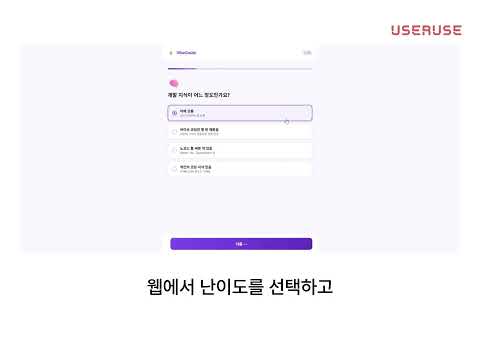
### Get recommended tools and receive step-by-step, UI-level guidance on how to build your website with no-code & vibe coding tools. **UserUse** helps you build websites and web apps **without writing code**. Whether you want a landing page, portfolio, simple SaaS, or online store, the extension recommends the right no-code and AI-assisted (“vibe coding”) tools and then **guides you step-by-step** on each tool’s website so you never feel lost. --- ### Why install UserUse? **You want to build something on the web but don’t know where to start.** There are many no-code and AI-assisted tools to choose from, and learning each interface can be overwhelming. UserUse solves this by: 1. **Recommending tools that fit your goal** – You describe the website you want (e.g. “landing page for my product,” “membership site,” “online course”). The extension suggests which tools to use and why. 2. **Guiding you on the actual sites** – When you open a recommended tool’s website, the extension detects the site and shows **what to do on this page** in plain language, with steps you can follow and mark as done. 3. **Highlighting what to click** – For supported pages, it can highlight the button or field you should use next, so you spend less time searching the UI. 4. **Letting you ask questions** – A built-in chat answers questions about the current page and your plan in non-technical terms, so you can clarify anything without leaving the tab. You get a **single, consistent guide** across signup, setup, and deployment—without reading long docs or watching hours of tutorials. --- ### Main features **1. Goal-based setup (survey)** - In one question you describe the website you want (e.g. landing page, demo, membership site, online course). - The extension suggests a set of tools (no-code builders, AI coding tools, databases, hosting, payments) that match your goal. - You choose which tools to use. For each recommended service, you can expand a short explanation of what it does and why you need it. - A personalized plan is created with an ordered list of tools and steps (e.g. “Create account → Start project → Set up feature → Deploy”). **2. Step-by-step guidance on tool websites** - When you visit a supported tool’s website, the extension: - Detects which tool you’re on. - Shows a **“What to do on this page”** section with clear steps. - Generates or updates steps based on your plan, your choices in the survey, and the current page (so guidance stays relevant as you move through signup, dashboard, and settings). - Steps are **actionable** (e.g. “Click the Start button,” “Enter your project name,” “Submit the form”) and avoid jargon. - You can mark each step as done. Progress is saved so you can continue later. - When all steps for a given tool/site are done, the extension can show a completion state and point you to the next tool or phase. **3. In-page spotlight (highlight)** - For many steps, the extension can **highlight the exact element** on the page (button, link, input) you should use. - The rest of the page is dimmed so the target stands out. - Clicking the highlighted element can automatically mark that step as complete and, when applicable, advance you to the next step. - This reduces confusion on busy dashboards and multi-step flows. **4. Progress and plan overview** - Your plan is visible in the side panel: which tools you’re using and which steps are pending or done. - Progress is computed per tool/domain (e.g. “Database setup done,” “Deploy next”). - You can open tool websites from the plan, reset and start a new plan, or go back to the survey to change your goal or tools. **5. Chat assistant** - A chat tab in the extension lets you ask questions in natural language (e.g. “What does this button do?” or “What should I do next?”). - Answers use your current tab and your saved plan, and explain things in **non-technical language** so non-developers can follow. - Chat history is stored in the extension so you can refer back to earlier answers. **6. Supported tools and sites** The extension works on popular no-code builders, AI-assisted coding tools, and backend or hosting services that appear in your plan. When you’re on a supported site, it shows contextual steps and, where possible, spotlights the right UI elements. --- ### Who is it for? - **Non-developers** who want to build a website or simple web app without learning to code. - **Beginners** to no-code or “vibe coding” who get lost in complex dashboards and prefer clear, step-by-step instructions. - **Solo founders, marketers, educators, and small teams** who need a landing page, portfolio, membership site, or small SaaS and want one place to get tool recommendations and in-context guidance. - **Anyone** who has tried no-code tools but gave up because the learning curve felt steep—UserUse keeps the next action visible and simple. --- ### How it works (in short) 1. **Install** the extension and open its side panel. 2. **Describe** the website you want in one sentence or a few words. 3. **Choose** from the suggested tools (and optionally read why each service is recommended). 4. **Start your plan** – the extension may open the first recommended tool’s site for you. 5. **Follow the steps** in the side panel on each tool’s page. Use “Spotlight” when available to see exactly what to click; mark steps done as you go. 6. **Ask the chat** anytime you’re unsure about the current page or next steps. 7. **Move to the next tool** when the current one is complete, and repeat until your site is set up and deployed. Your choices and progress are stored locally in the extension so you can close the browser and continue later. --- ### Privacy and permissions - The extension uses **storage** to save your survey answers, plan, and step progress. - It needs **access to the tabs you visit** so it can detect which tool site you’re on and show the right guidance. - It uses a **side panel** so the guide stays visible next to the tool’s website without covering the page. - When you use AI features (recommendations, step generation, chat), your goal description, plan, and current page context may be sent to a backend service to generate responses. Check the extension’s or developer’s privacy policy for how that data is handled. --- ### Summary **UserUse** is a Chrome extension that: - Recommends no-code and vibe coding tools based on the website you want to build. - Guides you step-by-step on each tool’s site with clear “what to do on this page” instructions. - Highlights buttons and fields so you know what to click. - Tracks your progress and lets you ask questions in plain language. Install it if you want to **build a website without code** and prefer **guided, in-context help** instead of long manuals or generic tutorials.
0 out of 5No ratings
Details
- Version1.0.0
- UpdatedMarch 9, 2026
- Offered bytpgns10120
- Size220KiB
- Languages2 languages
- Developer
Email
tpgns10120@gmail.com - Non-traderThis developer has not identified itself as a trader. For consumers in the European Union, please note that consumer rights do not apply to contracts between you and this developer.
Privacy

UserUse - Vibe Coding Guide has disclosed the following information regarding the collection and usage of your data. More detailed information can be found in the developer's privacy policy.
UserUse - Vibe Coding Guide handles the following:
This developer declares that your data is
- Not being sold to third parties, outside of the approved use cases
- Not being used or transferred for purposes that are unrelated to the item's core functionality
- Not being used or transferred to determine creditworthiness or for lending purposes
Support
For help with questions, suggestions, or problems, visit the developer's support site