


Overview
Discover and leave hidden comments on any URL. Like a treasure hunt for conversations that don't exist on the page itself.
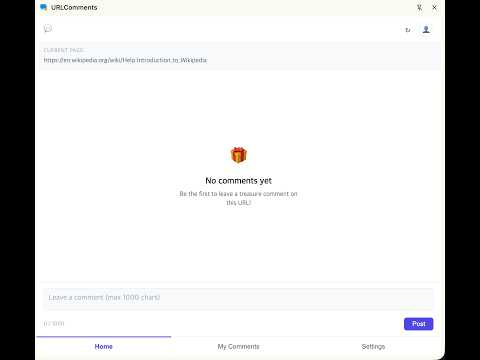
💬 URL Comments lets you discover and share short comments connected to the web page you are viewing. Many articles, blogs, documentation pages, and product pages do not include a comment section. With URL Comments, you can open the extension to read comments associated with the current page or leave a short note for other visitors. ✨ What you can do 📌 View URL-based comments Open the extension to see comments associated with the current web page URL. ✍️ Leave a short comment Sign in with Google and write a thought, review, question, or useful tip of up to 1,000 characters. 👀 Discover notes from other visitors Read comments left by people who opened the same page. 🔒 Designed with privacy in mind URL Comments does not automatically check every page you visit. It reads the current page URL and requests comments only after you click the extension icon. 🚀 How to use it 1. Open a web page. 2. Click the URL Comments icon in Chrome. 3. Read comments for that page, or sign in with Google to leave your own. This is an early MVP project. Feedback and contributions are welcome. 🔗 GitHub https://github.com/s4ngwoo/URLComments --- 💬 URL Comments는 지금 보고 있는 웹페이지와 연결된 짧은 댓글을 읽고 남길 수 있는 Chrome 확장 프로그램입니다. 뉴스 기사, 블로그, 문서, 상품 페이지처럼 원래 댓글 기능이 없는 페이지도 많습니다. URL Comments를 열면 현재 페이지에 남겨진 댓글을 확인하거나, 다른 방문자를 위해 짧은 메모를 남길 수 있습니다. ✨ 할 수 있는 일 📌 URL별 댓글 보기 확장 프로그램을 열면 현재 보고 있는 웹페이지 URL에 연결된 댓글을 확인할 수 있습니다. ✍️ 짧은 댓글 남기기 Google 계정으로 로그인한 뒤 생각, 리뷰, 질문, 유용한 팁 등을 최대 1,000자까지 작성할 수 있습니다. 👀 다른 방문자의 메모 발견하기 같은 페이지를 열어 본 다른 사용자가 남긴 댓글을 읽을 수 있습니다. 🔒 프라이버시를 고려한 설계 URL Comments는 사용자가 방문하는 모든 페이지를 자동으로 확인하지 않습니다. 사용자가 확장 프로그램 아이콘을 클릭했을 때만 현재 페이지의 URL을 확인하고, 해당 페이지의 댓글을 요청합니다. 🚀 사용 방법 1. 웹페이지를 엽니다. 2. Chrome에서 URL Comments 아이콘을 클릭합니다. 3. 해당 페이지의 댓글을 읽거나, Google 로그인 후 직접 댓글을 남깁니다. 이 프로젝트는 초기 MVP 버전입니다. 피드백과 기여를 환영합니다. 🔗 GitHub https://github.com/s4ngwoo/URLComments
5 out of 51 rating
Details
- Version1.0.3
- UpdatedSeptember 13, 2026
- Size141KiB
- Languages6 languages
- DeveloperWebsite
Email
s4ngwoo.lee@gmail.com - Non-traderThis developer has not identified itself as a trader. For consumers in the European Union, please note that consumer rights do not apply to contracts between you and this developer.
Privacy

URLComments has disclosed the following information regarding the collection and usage of your data. More detailed information can be found in the developer's privacy policy.
URLComments handles the following:
This developer declares that your data is
- Not being sold to third parties, outside of the approved use cases
- Not being used or transferred for purposes that are unrelated to the item's core functionality
- Not being used or transferred to determine creditworthiness or for lending purposes
Support
For help with questions, suggestions, or problems, visit the developer's support site