


Overview
Generate QR codes for any URL instantly. Auto-detects current page URL, customizable colors and size, download as PNG and History.
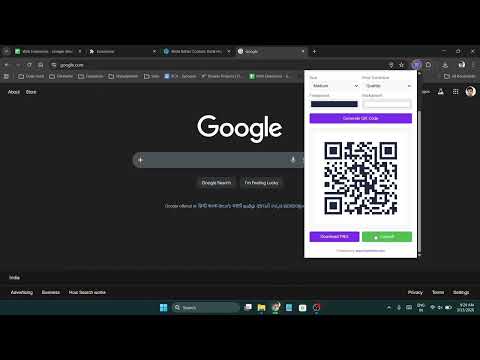
URL QR Code Generator is a fast, lightweight Chrome extension that creates QR codes for any URL or text instantly. It auto-detects the URL of your current tab so you can generate a QR code with just one click. 🔑 Key Features: → Auto-detect current tab URL — no typing needed → Generate QR codes for any URL or custom text → Customizable foreground and background colors → Adjustable QR code size (Small, Medium, Large, Extra Large) → 4 error correction levels (Low, Medium, Quartile, High) → Download QR code as PNG image → Copy QR code image to clipboard → Generation history with thumbnails — click to regenerate → Self-contained — no external APIs or servers → Works offline — no internet required 💡 How to Use: 1. Click the QR Code Generator icon in your toolbar 2. The current page URL is automatically filled in 3. Customize size, error correction, and colors as desired 4. Click "Generate QR Code" 5. Download the PNG or copy the image to clipboard 6. Share the QR code anywhere 🎨 Customization: → Choose any foreground color for QR modules → Choose any background color → Select from 4 size options → Select from 4 error correction levels 🔒 Privacy First: → All QR generation done locally — no data sent to servers → No browsing data collected or tracked → History stored locally on your device only → No external API calls — fully self-contained
0 out of 5No ratings
Details
- Version1.0.0
- UpdatedMarch 14, 2026
- Size44.51KiB
- LanguagesEnglish
- DeveloperGagan SahayWebsite
84/1 Nai Basti Abdullapur Meerut Meerut, Uttar Pradesh 250001 INEmail
gagansahay695@gmail.comPhone
+91 97617 38451 - TraderThis developer has identified itself as a trader per the definition from the European Union and committed to only offer products or services that comply with EU laws.
Privacy

This developer declares that your data is
- Not being sold to third parties, outside of the approved use cases
- Not being used or transferred for purposes that are unrelated to the item's core functionality
- Not being used or transferred to determine creditworthiness or for lending purposes
Support
For help with questions, suggestions, or problems, please open this page on your desktop browser