

Upwork Job Tile Minimizer

Overview
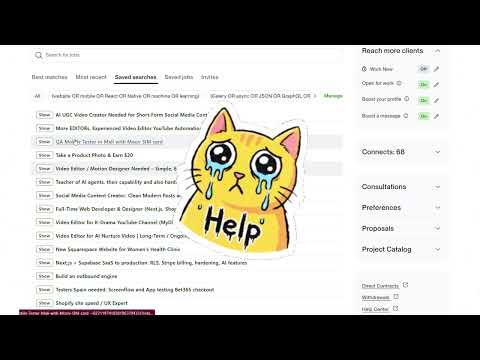
Hide job tiles on Upwork Find Work and remember that state in sync storage.
Restore the missing Hide button on Upwork job feeds. Upwork removed the native option to dismiss irrelevant listings, leaving search feeds cluttered with jobs you have already reviewed or rejected. This extension restores that control directly in your browser. Core Features: - One-Click Collapse: Click "Hide" on any job card to collapse it into a compact single-line row. - Instant Expansion: Click "Show" to restore the full job listing immediately without reloading the page. - Visual Noise Reduction: Minimizes scrolling and removes distractions in Saved Searches, Job Search, and Most Recent feeds. - Local State Storage: Preserves your hidden job list locally in the browser between sessions. Privacy and Permissions: - Runs entirely client-side. - No analytics, tracking, or remote server communication. - No access to personal data, financial information, or Upwork account credentials. - Requires access only to upwork.com DOM to manipulate job card elements. How to Use: 1. Navigate to any Upwork job feed (Search, Saved Searches, or Recommended). 2. Click the "Hide" button injected next to the job title. 3. To unhide, click the "[Show]" button on the collapsed bar.
0 out of 5No ratings
Details
- Version1.0.7
- UpdatedNovember 10, 2026
- Offered bylolkekdevelopment@gmail.com
- Size50.3KiB
- LanguagesEnglish
- Developer
Email
ross.rostyslav.z@gmail.com - Non-traderThis developer has not identified itself as a trader. For consumers in the European Union, please note that consumer rights do not apply to contracts between you and this developer.
Privacy

This developer declares that your data is
- Not being sold to third parties, outside of the approved use cases
- Not being used or transferred for purposes that are unrelated to the item's core functionality
- Not being used or transferred to determine creditworthiness or for lending purposes
Support
For help with questions, suggestions, or problems, visit the developer's support site