


Overview
Filter Upwork jobs by client history, budget and hiring activity. Shortlist opportunities and plan proposals in your Pursuit Board.
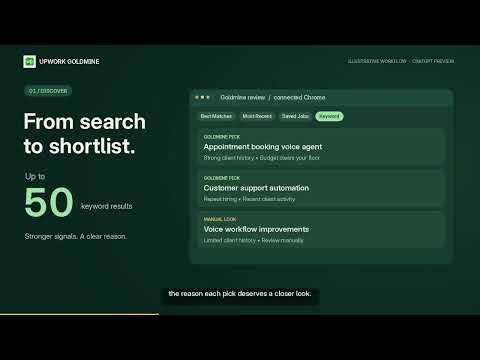
Find Upwork jobs worth a closer look before you spend Connects. Goldmine reviews visible client history, hiring activity and budget signals, hides weaker matches, and explains its picks. Use the Pursuit Board to shortlist opportunities, capture proposal ideas and choose your next step. 🚀 START WITH ONE CLICK 1️⃣ Open the jobs you want to review • Best Matches: review the 30-job feed. • Most Recent: review the loaded jobs. Use Upwork’s Load more button first if you want to include more. • Saved Jobs: revisit your saved opportunities and check which are still available. • Keyword search: search Upwork for your skills, then review up to 50 results on the page. 2️⃣ Click UG in Upwork’s left sidebar Goldmine reviews the loaded cards and opens job details when needed to check visible client and hiring signals. On supported keyword searches, it can set the page to show 50 results. Follow the progress, view the Upwork activity or stop the review at any time. Only checking one job? Click its small UG button, or use Goldmine from the open job-details page. 3️⃣ Start with the strongest picks ⭐ Gold Star: the strongest combination of available signals. ✅ Strong: promising and worth a closer look. 🔎 Manual-Look: potentially useful, with something that needs your judgment. Picks appear first with a concise reason. Lower-fit cards are hidden from the current list. Show all restores the jobs hidden by the review. 4️⃣ Choose your next step Shortlist, add a note or drop a job directly from its card or details. Open the Pursuit Board to keep your decisions and proposal work together. 🎯 UNDERSTAND THE CLIENT BEHIND THE JOB Depending on what Upwork makes visible, Goldmine considers: • Client spending, hire rate and average pay. • Payment verification and hourly rate or fixed-price budget. • Recent activity, confirmed hires and job availability. • Relevant signals for newer clients with limited history. Adjust your rate, budget and client-history thresholds in Goldmine Settings. Recommendations help you assess the evidence; you decide whether a job fits your skills. 🧭 TURN YOUR SHORTLIST INTO ACTION • Work through Focus rounds of four actions. • Capture proposal angles, proof points, notes and reminders. • Shortlist, postpone or clear an opportunity. • Track Decide, Prepare, Submitted, Respond and Cleared stages. • Use a 10, 25 or 45-minute proposal focus timer. • Reopen a job, refresh its status and export your pursuits as CSV. ✨ UPDATED FOR UPWORK’S NEW LAYOUT • The main UG action is in Upwork’s left sidebar. • Improved reviews across Best Matches, Most Recent and Saved Jobs. • Visible UG checks on featured cards beside Hiring Now. • Correct hiding and restoration of cards after filtering. • Optional Hide updates control and a refreshed Quick Tour. 💬 OPTIONAL CHATGPT INTEGRATION — LIMITED PREVIEW The “Draft in ChatGPT · Preview” action requires separate preview access and a connected Goldmine plugin. The plugin is not publicly listed yet; installing this extension alone does not provide access. Connected preview users can request job reviews, prepare tailored proposal drafts and prefill supported fields after approving the exact content and terms. Review the result and submit the proposal yourself on Upwork. Job filtering and the Pursuit Board work without ChatGPT. 🔐 YOU STAY IN CONTROL • Reviews start with your click or a request through your connected preview integration. • You can pause or stop a longer review and view the Upwork activity taking place. • Goldmine never submits proposals, spends Connects, buys boosts, contacts clients or accepts contracts. • It does not read private Upwork messages, collect Chrome browsing history or ask for your Upwork password. 🔒 ACCOUNT AND PRIVACY Goldmine uses passwordless email sign-in. Job reviews require active trial, complimentary or paid access; see the current options on the Goldmine website. Job filtering runs in your browser. Signed-in settings, Pursuit Board decisions, notes and saved job links may sync with your Goldmine account. Limited product-use and reliability events help operate the service. When you use the connected ChatGPT preview, selected job context, drafts, screening answers and approved terms are saved to your Goldmine account and exchanged with the connected AI service when requested. Hosted payment providers handle payment-card details. Goldmine receives the account and access status needed to provide the service. Privacy policy: https://goldmine.muyal.online/privacy Website and access options: https://goldmine.muyal.online ℹ️ BEFORE YOU APPLY Review the complete listing and make your own decision. Goldmine does not guarantee jobs, interviews, client responses or earnings. Stop a review if Upwork shows a verification step, warning or restriction. Upwork Goldmine is independently operated and is not affiliated with or endorsed by Upwork or OpenAI.
0 out of 5No ratings
Details
- Version1.0.143
- UpdatedOctober 26, 2026
- FeaturesOffers in-app purchases
- Size206KiB
- LanguagesEnglish
- DeveloperMUTHUKKUMARAN KALIYAKRISHNANWebsite
458/B, Sadam Usen Street, Pudhupattinam, Kalpakkam Chengalpattu, Tamil Nadu 603102 INEmail
upwork.goldmine@gmail.comPhone
+91 91766 49368 - TraderThis developer has identified itself as a trader per the definition from the European Union and committed to only offer products or services that comply with EU laws.
Privacy

Upwork Goldmine: Job Filter & Pursuit Board has disclosed the following information regarding the collection and usage of your data. More detailed information can be found in the developer's privacy policy.
Upwork Goldmine: Job Filter & Pursuit Board handles the following:
This developer declares that your data is
- Not being sold to third parties, outside of the approved use cases
- Not being used or transferred for purposes that are unrelated to the item's core functionality
- Not being used or transferred to determine creditworthiness or for lending purposes
Support
For help with questions, suggestions, or problems, please open this page on your desktop browser