

Upload Processing Complete Notifier

Overview
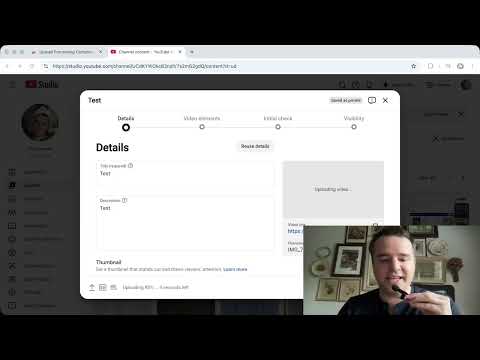
Plays a sound when YouTube Studio processing checks are complete. You can now multi-task and know when your full update is complete.
Upload Processing Complete Notifier Stay productive while your video finishes processing on YouTube. When YouTube Studio displays the message “Checks complete. No issues found.”, this extension plays a short notification sound and displays a small banner in the top right of your screen, so you don’t have to keep checking the upload page. Switch tabs, work on other tasks, or step away from your computer — you’ll hear a sound as soon as processing checks are complete. Works when Chrome is minimized too. Features Plays a sound when YouTube Studio processing checks are complete Works directly in YouTube Studio Lightweight and fast No login required No analytics or tracking No data collection This extension runs entirely locally in your browser. It does not collect, store, or transmit any personal information. This extension is not affiliated with, endorsed by, or sponsored by YouTube or Google. *remember, make sure your operating system, Chrome, and Youtube webpage (two sliding bars left of the URL) all allow audio notifications. Review our ToU before use: https://www.streamerhomes.com/upload-processing-complete-notifier-tou.html
0 out of 5No ratings
Details
- Version1.6
- UpdatedSeptember 21, 2026
- Offered byDrew the Dev
- Size42.11KiB
- LanguagesEnglish (United States)
- DeveloperBrighter Ecommerce LLC
113 Plantation Ln Acworth, GA 30101-8721 USEmail
Drew5459450@gmail.comPhone
+1 770-545-9450 - TraderThis developer has identified itself as a trader per the definition from the European Union and committed to only offer products or services that comply with EU laws.
- D-U-N-S132571965
Privacy

This developer declares that your data is
- Not being sold to third parties, outside of the approved use cases
- Not being used or transferred for purposes that are unrelated to the item's core functionality
- Not being used or transferred to determine creditworthiness or for lending purposes
Support
For help with questions, suggestions, or problems, visit the developer's support site