

Upload image from clipboard or URL

Visão geral
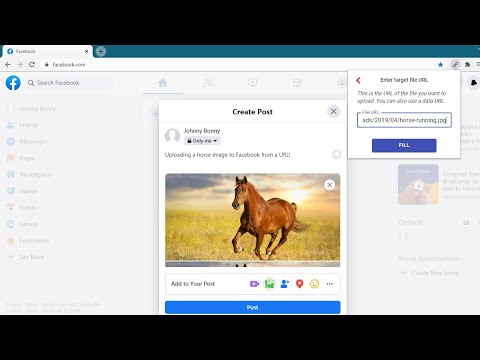
Upload images & files directly from a URL or the clipboard (ctrl+v), without needing to have them on your computer!
This extension will let you "fill" a file input directly from a remote URL. Normally, if you want to upload an image (or other file) from a URL, you first have to download it to your computer, then upload it, and then delete it from your computer. With this extension, all you have to do is enter the URL of the file, and the extension will automatically upload it into the page for you. The extension can now also upload an image directly from your clipboard. Just paste the image in the extension's popup using ctrl+v, and the image will be loaded into the page. You can use this extension to post an image on Facebook or Twitter, upload files to your Cloud storage or anywhere else you upload files. This is not a good tool for uploading large files. It first reads the entire file into your computer's RAM, and then uploads it into the page. Especially video files will just be too large for it to handle. This is meant more so for images and small files. Chrome hides extensions by default after you install them. If the extension icon "disappeared", go to extensions menu by clicking on the puzzle icon in your extensions toolbar, and then pin this extension to the toolbar. You can also use this extension with the Ctrl + Shift + U key combination, even when it's not in the 'pinned' state. Credits Icons sourced from www.flaticon.com
5 de 510 notas
Detalhes
- Versão1.4.1
- Atualização12 de março de 2025
- Oferecido porgoodthingscming
- Tamanho159KiB
- IdiomasEnglish
- DesenvolvedorLubelska 21 Kraków 30-003 Poland
E-mail
goodthingscming@gmail.com - Não negocianteEsse desenvolvedor não se identificou como comerciante. Caso você seja da União Europeia, observe que os direitos do consumidor não se aplicam a contratos firmados entre você e esse desenvolvedor.
Privacidade
O desenvolvedor declara que seus dados
- Não são vendidos a terceiros, exceto nos casos de uso aprovados
- Não são usados ou transferidos para fins não relacionados à função principal do item
- Não são usados ou transferidos para informações de crédito ou empréstimo
Suporte
Para receber ajuda com perguntas, sugestões ou problemas, abra esta página no seu navegador para computador