


概要
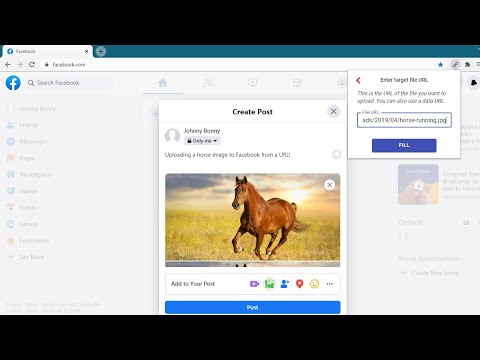
Upload images & files directly from a URL or the clipboard (ctrl+v), without needing to have them on your computer!
This extension will let you "fill" a file input directly from a remote URL. Normally, if you want to upload an image (or other file) from a URL, you first have to download it to your computer, then upload it, and then delete it from your computer. With this extension, all you have to do is enter the URL of the file, and the extension will automatically upload it into the page for you. The extension can now also upload an image directly from your clipboard. Just paste the image in the extension's popup using ctrl+v, and the image will be loaded into the page. You can use this extension to post an image on Facebook or Twitter, upload files to your Cloud storage or anywhere else you upload files. This is not a good tool for uploading large files. It first reads the entire file into your computer's RAM, and then uploads it into the page. Especially video files will just be too large for it to handle. This is meant more so for images and small files. Chrome hides extensions by default after you install them. If the extension icon "disappeared", go to extensions menu by clicking on the puzzle icon in your extensions toolbar, and then pin this extension to the toolbar. You can also use this extension with the Ctrl + Shift + U key combination, even when it's not in the 'pinned' state. Credits Icons sourced from www.flaticon.com
5 点満点で 510 件の評価
詳細
- バージョン1.4.1
- 更新:2025年3月12日
- 提供元goodthingscming
- サイズ159KiB
- 言語English
- デベロッパーLubelska 21 Kraków 30-003 Poland
メール
goodthingscming@gmail.com - 非取引業者このデベロッパーは取引業者として申告していません。EU 加盟国の消費者とこのデベロッパーとの間に締結された契約には、消費者の権利が適用されません。
プライバシー
このデベロッパーは、お客様のデータについて以下を宣言しています
- 承認されている以外の用途で第三者に販売しないこと
- アイテムの中心機能と関係のない目的で使用または転送しないこと
- 信用力を判断する目的または融資目的で使用または転送しないこと
サポート
質問や提案、問題がある場合は、パソコンのブラウザでこのページを開いてください