


Ringkasan
Upload images & files directly from a URL or the clipboard (ctrl+v), without needing to have them on your computer!
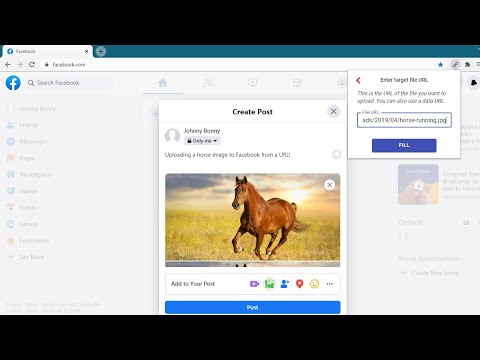
This extension will let you "fill" a file input directly from a remote URL. Normally, if you want to upload an image (or other file) from a URL, you first have to download it to your computer, then upload it, and then delete it from your computer. With this extension, all you have to do is enter the URL of the file, and the extension will automatically upload it into the page for you. The extension can now also upload an image directly from your clipboard. Just paste the image in the extension's popup using ctrl+v, and the image will be loaded into the page. You can use this extension to post an image on Facebook or Twitter, upload files to your Cloud storage or anywhere else you upload files. This is not a good tool for uploading large files. It first reads the entire file into your computer's RAM, and then uploads it into the page. Especially video files will just be too large for it to handle. This is meant more so for images and small files. Chrome hides extensions by default after you install them. If the extension icon "disappeared", go to extensions menu by clicking on the puzzle icon in your extensions toolbar, and then pin this extension to the toolbar. You can also use this extension with the Ctrl + Shift + U key combination, even when it's not in the 'pinned' state. Credits Icons sourced from www.flaticon.com
5 dari 511 rating
Detail
- Versi1.4.1
- Diupdate12 Maret 2025
- Ditawarkan olehgoodthingscming
- Ukuran159KiB
- BahasaEnglish
- DeveloperLubelska 21 Kraków 30-003 Poland
Email
goodthingscming@gmail.com - Non-pedagangDeveloper ini tidak mengidentifikasi diri sebagai pedagang. Bagi konsumen di Uni Eropa, perlu diperhatikan bahwa hak konsumen tidak berlaku untuk kontrak antara Anda dan developer ini.
Privasi

Developer ini menyatakan bahwa data Anda
- Tidak dijual ke pihak ketiga, di luar kasus penggunaan yang disetujui
- Tidak digunakan atau ditransfer untuk tujuan yang tidak terkait dengan fungsi inti item
- Tidak digunakan atau ditransfer untuk menentukan kelayakan kredit atau untuk tujuan pinjaman
Dukungan
Untuk mendapatkan bantuan terkait pertanyaan, saran, atau masalah, buka halaman ini di browser desktop Anda