

Upload image from clipboard or URL

Համատեսք
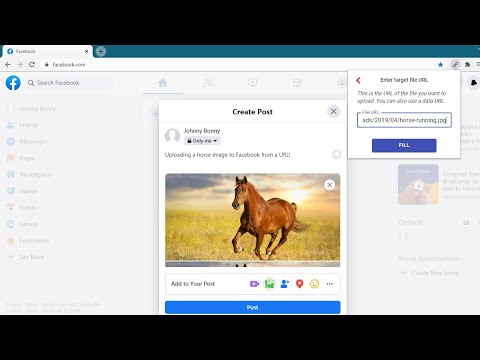
Upload images & files directly from a URL or the clipboard (ctrl+v), without needing to have them on your computer!
This extension will let you "fill" a file input directly from a remote URL. Normally, if you want to upload an image (or other file) from a URL, you first have to download it to your computer, then upload it, and then delete it from your computer. With this extension, all you have to do is enter the URL of the file, and the extension will automatically upload it into the page for you. The extension can now also upload an image directly from your clipboard. Just paste the image in the extension's popup using ctrl+v, and the image will be loaded into the page. You can use this extension to post an image on Facebook or Twitter, upload files to your Cloud storage or anywhere else you upload files. This is not a good tool for uploading large files. It first reads the entire file into your computer's RAM, and then uploads it into the page. Especially video files will just be too large for it to handle. This is meant more so for images and small files. Chrome hides extensions by default after you install them. If the extension icon "disappeared", go to extensions menu by clicking on the puzzle icon in your extensions toolbar, and then pin this extension to the toolbar. You can also use this extension with the Ctrl + Shift + U key combination, even when it's not in the 'pinned' state. Credits Icons sourced from www.flaticon.com
5/510 գնահատական
Մանրամասներ
- Տարբերակ1.4.1
- Թարմացված է12 մարտի, 2025 թ.
- Մշակող՝goodthingscming
- Չափս159KiB
- ԼեզուներEnglish
- ԾրագրավորողLubelska 21 Kraków 30-003 Poland
Էլփոստի հասցե
goodthingscming@gmail.com - Վաճառող չէԱյս ծրագրավորողը չի ներկայացել որպես վաճառող։ ԵՄ տարածքում բնակվող սպառողներին խնդրում ենք նկատի ունենալ, որ ձեր և այս ծրագրավորողի միջև գործարքների վրա չեն տարածվում սպառողների իրավունքների պաշտպանության օրենքները։
Գաղտնիություն
Այս ծրագրավորողը պնդում է, որ ձեր տվյալները՝
- Օգտատերերի տվյալները չեն վաճառվում երրորդ կողմերի՝ բացառությամբ թույլատրված դեպքերի
- Չի օգտագործվում կամ փոխանցվում պրոդուկտի հիմնական գործառույթների հետ կապ չունեցող նպատակներով
- Չի օգտագործվում կամ փոխանցվում վարկունակությունը որոշելու կամ վարկավորման նպատակով
Աջակցում
Հարցերի, առաջարկների և խնդիրների հետ կապված օգնության համար բացեք այս էջը ձեր համակարգչային դիտարկիչում