


Общ преглед
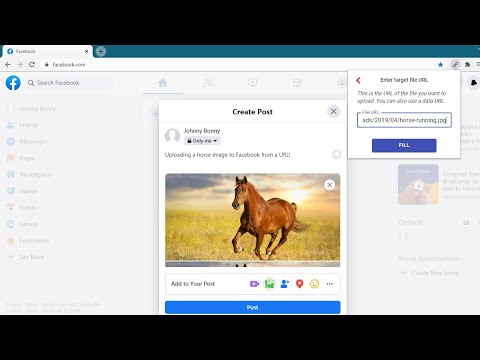
Upload images & files directly from a URL or the clipboard (ctrl+v), without needing to have them on your computer!
This extension will let you "fill" a file input directly from a remote URL. Normally, if you want to upload an image (or other file) from a URL, you first have to download it to your computer, then upload it, and then delete it from your computer. With this extension, all you have to do is enter the URL of the file, and the extension will automatically upload it into the page for you. The extension can now also upload an image directly from your clipboard. Just paste the image in the extension's popup using ctrl+v, and the image will be loaded into the page. You can use this extension to post an image on Facebook or Twitter, upload files to your Cloud storage or anywhere else you upload files. This is not a good tool for uploading large files. It first reads the entire file into your computer's RAM, and then uploads it into the page. Especially video files will just be too large for it to handle. This is meant more so for images and small files. Chrome hides extensions by default after you install them. If the extension icon "disappeared", go to extensions menu by clicking on the puzzle icon in your extensions toolbar, and then pin this extension to the toolbar. You can also use this extension with the Ctrl + Shift + U key combination, even when it's not in the 'pinned' state. Credits Icons sourced from www.flaticon.com
5 от 511 оценки
Подробности
- Версия1.4.1
- Актуализирано12 март 2025 г.
- Предлага се отgoodthingscming
- Размер159KiB
- ЕзициEnglish
- ПрограмистLubelska 21 Kraków 30-003 Poland
По имейл
goodthingscming@gmail.com - НетърговецТози програмист не се е идентифицирал като търговец. Имайте предвид, че правата на потребителите не са приложими за договори, сключени между потребители в Европейския съюз и този програмист.
Поверителност

Този програмист декларира, че данните ви:
- Не се продават на трети страни за цели извън одобрените случаи на употреба
- Не се използват или прехвърлят за цели, които не са свързани с основната функционалност на елемента
- Не се използват или прехвърлят с цел оценка на кредитоспособността или с цел кредитиране
Поддръжка
За помощ относно въпроси, предложения или проблеми, моля, отворете тази страница на настолния си браузър