


Overview
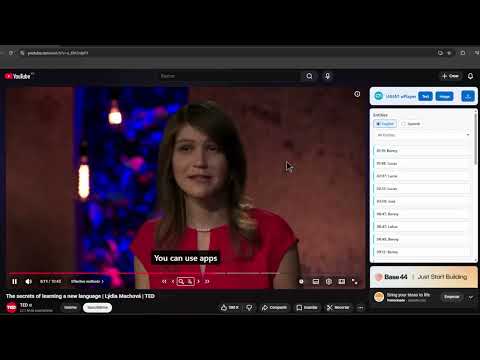
Explore and navigate the video in a more intuitive way.
uPlayer – AI-Powered Video Analysis, Accessibility, and Metadata Tools for YouTube uPlayer is a Chrome extension designed to transform your YouTube experience by providing advanced AI-powered tools to analyze, understand, and extract information from videos efficiently. Integrated seamlessly into the YouTube interface, uPlayer adds a non-intrusive layer of intelligent insights that allows users to focus on key content, save time, and make videos more accessible and actionable. With uPlayer, you gain access to subtitles, full transcriptions, translations, automatic summaries, keyword extraction, semantic segmentation, and keyframe detection—all presented in a clear and intuitive interface that ensures information is easy to follow, navigate, and utilize. Comprehensive Video Accessibility for Journalists For journalists, media professionals, and researchers, uPlayer is a powerful tool to make video content accessible and actionable. Video accessibility goes beyond basic subtitles—it provides fully searchable transcriptions, enabling professionals to locate quotes, verify statements, and extract relevant information quickly. By presenting all spoken content in a readable, editable format, uPlayer ensures that videos are no longer “locked” media but a structured source of information. This is crucial for investigative work, content verification, and reporting, as it allows journalists to efficiently analyze large amounts of footage without manually reviewing every second. Key Features and Functionalities 🎬 Enhanced Subtitles uPlayer overlays enhanced, customizable subtitles directly on the YouTube player. These subtitles improve readability and accessibility for viewers with hearing difficulties or those watching videos in noisy environments. Subtitles are AI-generated and synchronized with the video, ensuring accuracy and smooth playback. 📝 Full Video Transcription Every video can be transcribed into complete, searchable text. Users can navigate the transcript in a dedicated viewer, jump to specific timestamps, or quickly review key sections without rewatching the entire video. For journalists, this allows fast citation, content verification, and note-taking. 🌍 Translation of Subtitles For international content, uPlayer provides translations of available subtitles. This enables multilingual users and global news professionals to access and understand content that would otherwise be inaccessible, enhancing research capabilities and expanding coverage opportunities. 🧠 Automatic Video Summaries uPlayer leverages AI to generate concise, meaningful summaries of each video. Users can grasp the main ideas in seconds, helping prioritize viewing time, identify important segments, or share insights efficiently with colleagues. Summaries also aid journalists in quickly understanding the content of interviews, press conferences, or long-form videos. 🔑 Keyword Extraction Key concepts, topics, and important terms are automatically identified and highlighted. Keywords allow users to skim large videos for core content, track recurring themes, and organize information effectively. This is particularly useful for investigative reporting, research, and content indexing. 🧩 Semantic Segmentation Videos are analyzed for semantic changes, such as scene shifts or topic transitions. uPlayer visually segments the content, enabling users to jump to relevant parts of a video efficiently. Journalists and editors can pinpoint moments of interest, extract quotes, and save time during content review. 🖼️ Keyframe Detection Key visual moments are automatically detected and marked as keyframes. Users can preview or navigate to important scenes without scrubbing through the entire video. This feature is especially valuable for content editors, media analysts, and journalists who need to extract or reference specific visual content. 📋 Copy, Edit, and Export Transcriptions uPlayer allows users to copy the full transcript directly to their clipboard for notes, research, or writing. Beyond copying, users can edit and enrich transcripts, refine keywords, and structure metadata for further editorial use. All processed content—including transcriptions, summaries, keywords, and keyframes—can be exported to external tools in formats such as TXT, SRT, or JSON, supporting content creation, publishing, and archival workflows. How uPlayer Works uPlayer integrates a front-end interface directly onto the YouTube page, providing an intuitive panel to view subtitles, transcriptions, and AI insights without disrupting playback. All video processing and analysis are handled securely through the back-end system, which communicates with the extension to generate, store, and retrieve subtitles, summaries, keyframes, and metadata. The extension uses permissions responsibly: activeTab: Accesses the currently active YouTube tab only when users interact with the extension. Host permissions (https://www.youtube.com/*): Required to inject the interface and retrieve video data securely. No user data outside the active YouTube tab is accessed, ensuring privacy and security while enabling full functionality. Why Journalists, Researchers, and Editors Love uPlayer Time Efficiency: Quickly identify and extract relevant video content without watching entire videos. Accessibility: Transform spoken content into readable, searchable text that is accessible to all, including hearing-impaired users. Verification & Fact-Checking: Search and reference video content accurately for reporting, investigation, or research. Editorial Workflow: Edit, organize, and export metadata, transcripts, and keyframes for publishing, archiving, or content creation. Enhanced Understanding: Automatic summaries, keyword extraction, and semantic segmentation allow for a deep understanding of complex or lengthy videos. Global Reach: Subtitle translation expands access to international content, enabling coverage across languages. uPlayer is designed for anyone who works with video content regularly—students, educators, researchers, content creators, editors, and especially journalists. It transforms passive video watching into an active, accessible, and productive experience. Summary uPlayer combines AI-driven video analysis, accessibility, and metadata management to make YouTube videos more informative and actionable. From subtitles and transcriptions to summaries, keywords, and exportable metadata, every feature is designed to help professionals, especially journalists and researchers, extract value from video content quickly and efficiently. Turn passive viewing into an intelligent, productive, and accessible workflow with uPlayer.
5 out of 52 ratings
Details
- Version3.1
- UpdatedFebruary 10, 2026
- Size231KiB
- LanguagesEnglish
- DeveloperWebsite
Email
ugiat@ugiat.com - Non-traderThis developer has not identified itself as a trader. For consumers in the European Union, please note that consumer rights do not apply to contracts between you and this developer.
Privacy

uPlayer Tools has disclosed the following information regarding the collection and usage of your data. More detailed information can be found in the developer's privacy policy.
uPlayer Tools handles the following:
This developer declares that your data is
- Not being sold to third parties, outside of the approved use cases
- Not being used or transferred for purposes that are unrelated to the item's core functionality
- Not being used or transferred to determine creditworthiness or for lending purposes
Support
For help with questions, suggestions, or problems, visit the developer's support site