


Overview
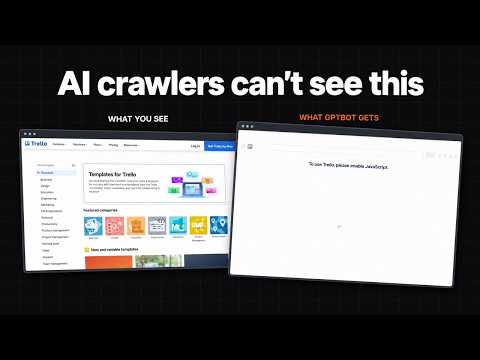
AI crawler checker: see which content GPTBot, ClaudeBot and other AI crawlers can't read because it needs JavaScript.
Unrendered is a free AI crawler checker for Chrome. It shows which content on a page AI crawlers such as GPTBot and ClaudeBot can read, and which content they miss because it only appears after JavaScript runs. Vercel and MERJ measured AI crawler traffic in December 2024 and found that none of the major AI crawlers currently render JavaScript. Text that JavaScript adds is invisible to them. Unrendered compares the page's raw HTML with its rendered HTML and shows you which text that is. Click the icon on any page. The side panel shows: Content • How much of the main content is already in the raw HTML. • Every text block, marked by where its text is, such as In raw HTML, Only in JSON-LD or Only in rendered HTML. • Show on page: outlines each block on the page in its colour. Fields • Title, meta description, canonical, hreflang, robots meta tags and JSON-LD, raw against rendered. • A warning when the raw HTML says noindex and JavaScript removes it. • Links that exist only in the rendered HTML. Bots • What robots.txt allows for 22 AI bot tokens, with the matching line. • How the site answers a request with each bot's user-agent: same page, different page, challenge page, blocked, rate-limited or redirected. Share • A 1200 × 630 image, a one-line summary and a Markdown report. In your AI assistant • The same analysis also runs as an MCP server, so an assistant such as Claude or Cursor can check a page for you. Setup: https://missiongrowth.io/tools/unrendered How it measures After the page settles, the same tab fetches the URL again without cookies, as a crawler would, and matches each rendered text block, in order, against the raw HTML. A page that answers with an error, a redirect or a challenge page from Cloudflare, AWS WAF or DataDome gets no percentage, because the raw HTML is not the page. Limits The extension is not a crawler. Requests come from your browser and your IP, and sites that verify bots by IP may answer the real bot differently. Text inside iframes is not included. Privacy Nothing is sent to Mission Growth or anyone else. No analytics, no accounts, no storage. Free and open source under the AGPL-3.0. Source code: https://github.com/missiongrowth/unrendered-ai-crawler-checker-mcp Made by Mission Growth: https://missiongrowth.io/tools/unrendered
0 out of 5No ratings
Details
- Version0.1.2
- UpdatedOctober 22, 2026
- Size215KiB
- LanguagesEnglish
- DeveloperWebsite
Email
contact@missiongrowth.io - Non-traderThis developer has not identified itself as a trader. For consumers in the European Union, please note that consumer rights do not apply to contracts between you and this developer.
Privacy

Unrendered - AI Crawler Checker has disclosed the following information regarding the collection and usage of your data. More detailed information can be found in the developer's privacy policy.
Unrendered - AI Crawler Checker handles the following:
This developer declares that your data is
- Not being sold to third parties, outside of the approved use cases
- Not being used or transferred for purposes that are unrelated to the item's core functionality
- Not being used or transferred to determine creditworthiness or for lending purposes
Support
For help with questions, suggestions, or problems, visit the developer's support site