

Unlimited Watchlists for TradingView

Overview
Unlimited watchlists for TradingView. Import from Finviz, Chartink & Screener.in. [Premium features unlocked]
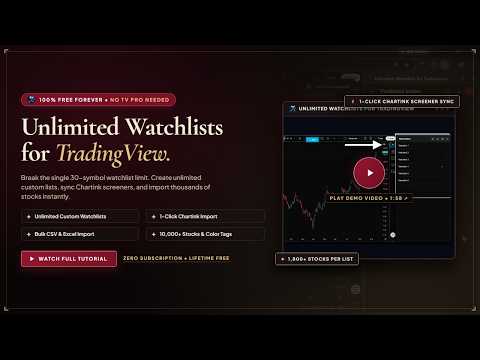
Get free unlimited watchlists for TradingView with zero restrictions. Bypass TradingView’s 30-stock free plan limit, import Finviz, Screener.in, and Chartink screeners in 1 click, export Finviz screeners to CSV for free (no Elite subscription needed), and cycle charts instantly with rapid arrow keys. TradingView’s free plan caps you at only 1 watchlist and 30 stocks ($14.95 to $59.95/mo for upgrades). Unlimited Watchlists for TradingView removes all watchlist limits forever. Organize thousands of stocks, crypto pairs, and futures in a sleek, resizable side panel docked directly beside your TradingView chart. 100% Free Forever • No Monthly Subscription • No Account Required • 100% Local & Private ━━━━━━━━━━━━━━━━━━━━━━━━━━━━━━━━━━━━━ ★ FINVIZ SCREENER TOOLS (FREE ELITE ALTERNATIVE) ━━━━━━━━━━━━━━━━━━━━━━━━━━━━━━━━━━━━━ Save $39.50/month on Finviz Elite with built-in screener power tools: ✔ 1-Click Finviz to TradingView Import: Send any Finviz screener results directly into a dedicated TradingView watchlist in one click. ✔ Free Finviz CSV Export: Download complete screener tables to CSV completely free — no paid Finviz Elite subscription required. ✔ Instant Chart Launcher: Direct TradingView icon next to every ticker on Finviz opens its live chart immediately. ✔ 1-Click Morning Re-Sync: Keep your Finviz watchlist updated daily in 1 click without losing custom tags or notes. ━━━━━━━━━━━━━━━━━━━━━━━━━━━━━━━━━━━━━ ★ INDIAN SCREENER INTEGRATIONS (SCREENER.IN & CHARTINK) ━━━━━━━━━━━━━━━━━━━━━━━━━━━━━━━━━━━━━ ✔ 1-Click Screener.in Import: Automatically import any screen across all pages into a TradingView watchlist. Smart name matching displays real company names for BSE stocks (no numeric codes). ✔ 1-Click Chartink Screener Import: Injects an "Import to Watchlist" button on Chartink.com screener pages to import all matching stocks instantly. ✔ 1-Click Daily Re-Sync: Refresh your Chartink and Screener.in watchlists every morning with one click. Newly matching stocks are added while your color tags and notes stay preserved. ━━━━━━━━━━━━━━━━━━━━━━━━━━━━━━━━━━━━━ ★ TRADINGVIEW WATCHLIST & CHARTING ENHANCEMENTS ━━━━━━━━━━━━━━━━━━━━━━━━━━━━━━━━━━━━━ ✔ Bypass TradingView Watchlist Limit: Create unlimited watchlists and hold 1,800+ stocks per list with zero lag. ✔ Instant Chart Switching (Zero Reload): Switch symbols without reloading the page — keeps all drawn trendlines, indicators, and timeframes intact. ✔ Hands-Free Keyboard Scanning: Cycle through dozens of charts in seconds using Down/Up arrow keys (↓ / ↑) or Spacebar. ✔ Color Tags, Notes & Filter Funnel: Right-click any stock to set 6 color-coded dots and trade notes. Filter any list by color setup or untagged stocks with 1 click. ✔ Bulk CSV & Excel Importer: Turn broker portfolio exports (Zerodha, Groww, AngelOne, Upstox, Dhan) and spreadsheets into clickable TradingView watchlists. ✔ Draggable "+ Add" Button: Floating button on TradingView charts lets you save the active symbol to any watchlist without blocking candlesticks or indicators. ✔ Live Global Symbol Search: Search and add US stocks (NASDAQ, NYSE), CME futures, crypto pairs, and Indian stocks (NSE, BSE) directly inside your watchlist. ━━━━━━━━━━━━━━━━━━━━━━━━━━━━━━━━━━━━━ ★ HOW TO USE ━━━━━━━━━━━━━━━━━━━━━━━━━━━━━━━━━━━━━ 1. Pin the extension to your Chrome toolbar. 2. Open any TradingView chart (tradingview.com/chart/). 3. Click the extension icon in the TradingView right toolbar or Chrome toolbar. 4. Create watchlists, import CSV files, or click "Import to Watchlist" on Finviz, Screener.in, or Chartink. 5. Use Down/Up arrow keys to cycle charts hands-free. ━━━━━━━━━━━━━━━━━━━━━━━━━━━━━━━━━━━━━ ★ PRIVACY & SAFETY ━━━━━━━━━━━━━━━━━━━━━━━━━━━━━━━━━━━━━ • 100% Local Storage: All watchlists and notes are saved directly in your browser. • No account required, no email collected, no ads, and zero tracking. ━━━━━━━━━━━━━━━━━━━━━━━━━━━━━━━━━━━━━ ★ DISCLAIMER ━━━━━━━━━━━━━━━━━━━━━━━━━━━━━━━━━━━━━ Unlimited Watchlists for TradingView is an independent companion tool developed by Alen Sarang Satheesh. It is not affiliated with, endorsed by, or sponsored by TradingView Inc., Finviz, Screener.in (Mittal Analytics Pvt. Ltd.), or Chartink. All trademarks belong to their respective owners. 💡 Open to Suggestions: Have a feature request or idea to improve the watchlist? The developer actively welcomes user feedback and is always happy to build new improvements suggested by the community.
4.4 out of 523 ratings
Details
- Version1.8.6
- UpdatedOctober 9, 2026
- Size2.33MiB
- LanguagesEnglish
- DeveloperWebsite
Email
alensarangsatheesh@gmail.com - Non-traderThis developer has not identified itself as a trader. For consumers in the European Union, please note that consumer rights do not apply to contracts between you and this developer.
Privacy

This developer declares that your data is
- Not being sold to third parties, outside of the approved use cases
- Not being used or transferred for purposes that are unrelated to the item's core functionality
- Not being used or transferred to determine creditworthiness or for lending purposes