

Universal Selector Tool
1 rating
)
Overview
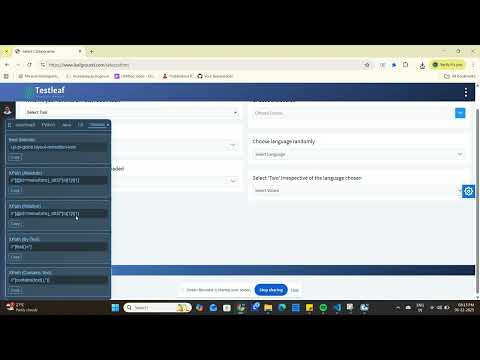
turns "inspect element" into "copy-paste ready test code." Click any element on any page and instantly get a CSS selector, XPath…
turns "inspect element" into "copy-paste ready test code." Click any element on any page and instantly get a CSS selector, XPath expression, and ready-to-use locator code for the framework you're already using. WHAT YOU GET FOR EVERY ELEMENT - Best CSS selector (auto-picks the most robust option available) - Multiple XPath strategies (absolute, relative, by text, by ID, advanced) - Framework-specific locator code: – JavaScript: Playwright, Cypress, Selenium (WebDriverJS), Puppeteer – Python: Selenium (Pytest), Playwright – Java: Selenium (TestNG), Playwright – C#: Selenium (NUnit), Playwright (.NET) BUILT FOR QA ENGINEERS AND SDETs - One click (or one keyboard shortcut) to start inspecting - Copy a single snippet, or hit "Copy All" to grab every framework variant for the current element at once - Works on any page — no setup, no account, no configuration FAST BY DESIGN - Ctrl+Shift+S (Cmd+Shift+S on Mac) toggles inspect mode instantly - A small floating toolbar stays out of your way until you need it PRIVACY, DONE RIGHT Universal Selector Tool runs 100% locally in your browser. There is no backend server, no analytics, no tracking, and nothing is ever sent anywhere. The only network request the extension can ever make is one you trigger yourself, by clicking "Report Bug" to open a pre-filled email — and even then, we never see the contents. Whether you're writing Selenium tests, migrating to Playwright, or just need a quick, correct CSS selector for a one-off script, Universal Selector Tool gets you there in one click.
5 out of 51 rating
Details
- Version1.4
- UpdatedJuly 18, 2026
- Offered byPrabhudeva Rajendran
- Size19.45KiB
- LanguagesEnglish
- Developer
Email
Prabhudeva.Rajendran@gmail.com - Non-traderThis developer has not identified itself as a trader. For consumers in the European Union, please note that consumer rights do not apply to contracts between you and this developer.
Privacy

This developer declares that your data is
- Not being sold to third parties, outside of the approved use cases
- Not being used or transferred for purposes that are unrelated to the item's core functionality
- Not being used or transferred to determine creditworthiness or for lending purposes
Support
For help with questions, suggestions, or problems, visit the developer's support site