

Universal Clipboard

Overview
Searchable clipboard history. Save text, links, images & emails. Screenshot any page, combine images, and pin your most-used items.
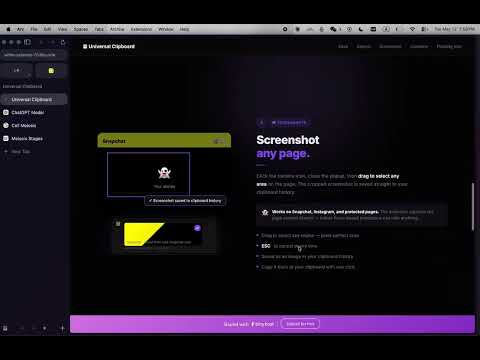
Universal Clipboard is your personal, searchable clipboard history — always one click away. Everything you save lives right in your browser: text, links, images, emails, and screenshots, all organised and searchable in seconds. ━━━ SAVE ANYTHING ━━━ Paste or type directly into the extension to save instantly. Universal Clipboard automatically detects what you've entered: • Links — full URLs or bare domains (youtube.com, docs.google.com) • Emails — including work and .edu addresses • Text — notes, quotes, code snippets, anything you want to keep • Images — via screenshot or the combine tool Up to 500 items stored securely on your device. ━━━ SCREENSHOT ANY PAGE ━━━ Click the camera icon and drag to capture any area of the page. Works on sites that normally block screenshots — including Snapchat, Instagram, and other social platforms. Your crop is saved as an image in your history and can be copied back to your clipboard with one click. ━━━ SEARCH EVERYTHING ━━━ Find anything instantly. Search matches: • The text content itself • The source URL and page title • Your custom rename labels • Your group names • Text visible inside screenshots (OCR powered by Tesseract — runs 100% on your device, nothing is sent anywhere) ━━━ COMBINE IMAGES ━━━ Select two or more screenshots and merge them into a single tall image. Perfect for bypassing ChatGPT's image upload limit — combine multiple screenshots into one and attach it in a single message. ━━━ GROUPS ━━━ Organise your clipboard history into custom groups like "bio", "work", or "school". Assign any item to a group, filter by group with one click, and search by group name. ━━━ RENAME ANYTHING ━━━ Give any item a custom label. Rename a screenshot "Q2 report", a link "my portfolio", or an email "main contact" — then find it instantly by searching that name. ━━━ FLOATING ICON ━━━ Enable the draggable 📋 icon in Settings to access your clipboard from any page without opening the popup. Right-click it to hide it on specific sites. ━━━ PRIVACY FIRST ━━━ Everything is stored locally on your device using Chrome's built-in storage. No accounts. No servers. No data ever leaves your browser. The OCR that reads text in your screenshots runs entirely on-device using a bundled engine — your screenshots are never uploaded anywhere. ━━━ HOW TO GET STARTED ━━━ Click the 📋 icon in your Chrome toolbar to open Universal Clipboard. Follow the built-in tutorial — takes about 60 seconds. Paste a link or text into the bar at the top and tap Add to save your first item. Enable the floating icon in Settings for quick access on every page.
0 out of 5No ratings
Details
- Version1.0.1
- UpdatedMay 18, 2026
- Offered byyucx928
- Size1.98MiB
- LanguagesEnglish
- Developer
Email
yucx928@gmail.com - Non-traderThis developer has not identified itself as a trader. For consumers in the European Union, please note that consumer rights do not apply to contracts between you and this developer.
Privacy

This developer declares that your data is
- Not being sold to third parties, outside of the approved use cases
- Not being used or transferred for purposes that are unrelated to the item's core functionality
- Not being used or transferred to determine creditworthiness or for lending purposes