Item logo image for Unclaw

Unclaw

Item media 3 (screenshot) for Unclaw
Item video thumbnail
Item media 2 (screenshot) for Unclaw
Item media 3 (screenshot) for Unclaw
Item video thumbnail
Item media 2 (screenshot) for Unclaw
Item media 3 (screenshot) for Unclaw

Overview

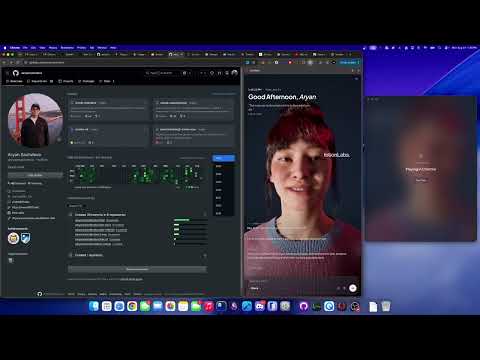
Your Unclaw companion in a side panel. She sees the page you see, answers by voice, and acts in your browser when you ask.

Unclaw is a 3D AI companion for your desktop. This extension brings your companion into Chrome: live video in the side panel, and help with whatever you are looking at. Requires the Unclaw desktop app for macOS (https://unclaw.io). The extension only talks to the app on your own computer; without it, the panel waits. What it does: - Answers questions about the page you are on. Select text and hit the shortcut, or ask "what am I seeing?" for a look at the page. - Voice conversations: speak naturally, get spoken replies with a live face and voice. - Acts in your browser when you ask: open sites, search, click, type. Only while the panel is open, and every action appears in the conversation as it happens. - Right-click anything to ask about it: selected text, an image, or the page itself. Privacy: the extension has no servers of its own. Page content, selections, and screenshots go to the Unclaw app on your machine, then to the AI provider you configured with your own account. If you sign in to an Unclaw account, conversation text syncs for cross-device history. No analytics, no trackers, no ads. Full policy: https://unclaw.io/extension-privacy

Details

  • Version
    1.1.0
  • Updated
    August 28, 2026
  • Size
    471KiB
  • Languages
    English
  • Developer
    Foton Render LLC
    1401 21st Street Ste R Sacramento, CA 95811-5226 US
    Website
    Email
    aryan@fotonlabs.com
    Phone
    +1 213-584-3571
  • Trader
    This developer has identified itself as a trader per the definition from the European Union and committed to only offer products or services that comply with EU laws.

Privacy

Manage extensions and learn how they're being used in your organization

Unclaw has disclosed the following information regarding the collection and usage of your data. More detailed information can be found in the developer's privacy policy.

Unclaw handles the following:

Personal communications
Website content

This developer declares that your data is

  • Not being sold to third parties, outside of the approved use cases
  • Not being used or transferred for purposes that are unrelated to the item's core functionality
  • Not being used or transferred to determine creditworthiness or for lending purposes

Support

Related

Definable

0.0

Talk to your Definable agents beside any page, and let them act in your browser.

Web Bridge by Onsfera

5.0

Your AI agent working in your Chrome, in background tabs and signed in to your accounts. See where it acts, pause it in one click.

Ask My AI - get answers about any page

0.0

Highlight text on any page and get an answer from your own AI chat account, right next to the text.

Jarel

0.0

A legal assistant in your browser. It asks before it acts.

StoreClaw

5.0

Connects StoreClaw AI to your browser and performs browser actions only after you grant authorization.

ChromeClaw - Your own personal AI assistant in your browser. 🦞

4.3

ChromeClaw - Your own personal AI assistant in your browser. Any OS. Any Platform. 🦞

Volnyn AI — Browser Agent

0.0

Volnyn in your browser: ask about any page, or let it read, click, type and work across tabs for you — you watch every step.

WonderCall

0.0

Your WonderCall tasks and assistant, alongside your browser.

Nanobrowser

3.7

An AI agent that works in your browser, in a side panel beside the page

Waifu Agent

4.6

Your anime AI companion in the side panel: she chats, sees your screen, remembers you, and does web tasks for you.

Stunning

5.0

Your AI agent that does tasks for you — right inside your browser.

Legal Assistant and Contract Review - AI Reads Law

5.0

Understand legal documents, ask legal questions and draft a reply beside the page you are reading.

Definable

0.0

Talk to your Definable agents beside any page, and let them act in your browser.

Web Bridge by Onsfera

5.0

Your AI agent working in your Chrome, in background tabs and signed in to your accounts. See where it acts, pause it in one click.

Ask My AI - get answers about any page

0.0

Highlight text on any page and get an answer from your own AI chat account, right next to the text.

Jarel

0.0

A legal assistant in your browser. It asks before it acts.

StoreClaw

5.0

Connects StoreClaw AI to your browser and performs browser actions only after you grant authorization.

ChromeClaw - Your own personal AI assistant in your browser. 🦞

4.3

ChromeClaw - Your own personal AI assistant in your browser. Any OS. Any Platform. 🦞

Volnyn AI — Browser Agent

0.0

Volnyn in your browser: ask about any page, or let it read, click, type and work across tabs for you — you watch every step.

WonderCall

0.0

Your WonderCall tasks and assistant, alongside your browser.

Search
Clear search
Close search
Google apps
Main menu