

UML Transportation Buddy
8 個評分
)
總覽
Adds functionality to TimeForge and RoadsterRoutes
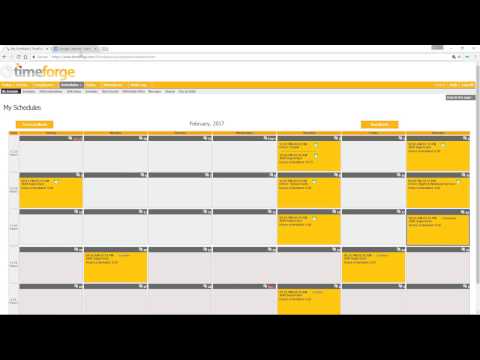
NOTE: If you are a supervisor, you MUST check the supervisor checkbox in the extension popup box (click the extension icon in the top right of your screen) UMLTranspoBuddy is the easiest way to: 1. Export your shifts to a Google Calendar 2. Keep bus numbers on RoadsterRoutes visible after a page refresh 3. Update HR Direct with your hours worked To upload your shifts, you must first tell the extension which calendar to upload to. To set the calendar to export your shifts to, right click the extension icon and click Options. Click the Change Calendar Button to load all your Google Calendars. Click the radio button next to the calendar you would like your shifts uploaded to, then click the Set Selected Calendar button to set that calendar. Once the calendar is set, go to your Timeforge schedule page. There should be an Export button at the top right. Clicking this button will upload all of the shifts for the month you are viewing on Timeforge, and any shifts that have already been uploaded to your Google Calendar will be omitted from the upload. To enable the RoadsterRoutes feature, left click the extension icon in the top right of your screen and check the "Roadster Routes" box. Subsequent visits to www.uml.edu/routes will have a clickable "Numbers On"/"Numbers Off" header at the top of the screen that you can toggle. To update HR Direct with your hours worked, go to your timecard on Timeforge. Above your hours table will be a button that says "Export to HR Direct". Click the button, and log in to HR Direct. There will be a prompt to ensure the times loaded by the extension accurately reflect what you work. Press cancel if they are incorrect. Otherwise, press Okay and wait. The page will refresh and your hours will be uploaded to HR Direct. For supervisors: Daily and weekly hour totals are added to the schedule page The "Schedules" menu drop-down includes a link to pick up shifts
4.9 分 (滿分 5 分)8 個評分
詳細資料
- 版本1.3.5
- 已更新2023年12月5日
- 提供者Mike Boharsik
- 大小126KiB
- 語言English (United States)
- 開發人員
電子郵件
mboharsik@gmail.com - 非交易商這位開發人員並未表明自己是交易商。歐盟地區的消費者請注意,消費者權利不適用於你和這位開發人員之間簽訂的合約。
隱私權
這位開發者就你的資料做出下列聲明:
- 除經核准的用途外,不會將你的資料販售給第三方
- 不會基於與商品核心功能無關的目的,使用或轉移資料
- 不會為了確認信用度或基於貸款目的,使用或轉移資料
支援
如有疑問或建議,請前往開發人員的支援網站