

UML Transportation Buddy
8 件の評価
)
概要
Adds functionality to TimeForge and RoadsterRoutes
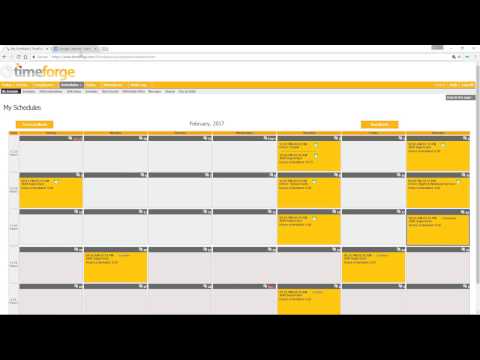
NOTE: If you are a supervisor, you MUST check the supervisor checkbox in the extension popup box (click the extension icon in the top right of your screen) UMLTranspoBuddy is the easiest way to: 1. Export your shifts to a Google Calendar 2. Keep bus numbers on RoadsterRoutes visible after a page refresh 3. Update HR Direct with your hours worked To upload your shifts, you must first tell the extension which calendar to upload to. To set the calendar to export your shifts to, right click the extension icon and click Options. Click the Change Calendar Button to load all your Google Calendars. Click the radio button next to the calendar you would like your shifts uploaded to, then click the Set Selected Calendar button to set that calendar. Once the calendar is set, go to your Timeforge schedule page. There should be an Export button at the top right. Clicking this button will upload all of the shifts for the month you are viewing on Timeforge, and any shifts that have already been uploaded to your Google Calendar will be omitted from the upload. To enable the RoadsterRoutes feature, left click the extension icon in the top right of your screen and check the "Roadster Routes" box. Subsequent visits to www.uml.edu/routes will have a clickable "Numbers On"/"Numbers Off" header at the top of the screen that you can toggle. To update HR Direct with your hours worked, go to your timecard on Timeforge. Above your hours table will be a button that says "Export to HR Direct". Click the button, and log in to HR Direct. There will be a prompt to ensure the times loaded by the extension accurately reflect what you work. Press cancel if they are incorrect. Otherwise, press Okay and wait. The page will refresh and your hours will be uploaded to HR Direct. For supervisors: Daily and weekly hour totals are added to the schedule page The "Schedules" menu drop-down includes a link to pick up shifts
5 点満点で 4.98 件の評価
詳細
- バージョン1.3.5
- 更新:2023年12月5日
- 提供元Mike Boharsik
- サイズ126KiB
- 言語English (United States)
- デベロッパー
メール
mboharsik@gmail.com - 非取引業者このデベロッパーは取引業者として申告していません。EU 加盟国の消費者とこのデベロッパーとの間に締結された契約には、消費者の権利が適用されません。
プライバシー
このデベロッパーは、お客様のデータについて以下を宣言しています
- 承認されている以外の用途で第三者に販売しないこと
- アイテムの中心機能と関係のない目的で使用または転送しないこと
- 信用力を判断する目的または融資目的で使用または転送しないこと
サポート
質問や提案、問題がある場合は、デベロッパーのサポートサイトにアクセスしてください。