


Visão geral
Save and restore browser tabs instantly. Copy URLs in multiple formats, paste to reopen tabs.
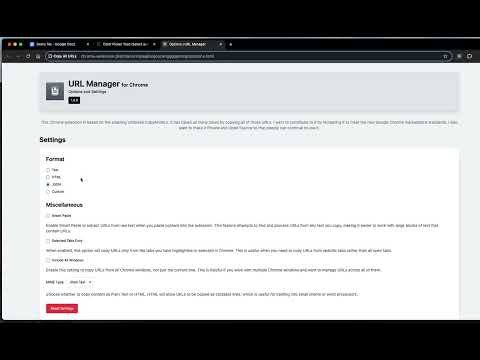
Copy All URLs - Save and Restore Your Browser Tabs A privacy-focused, open-source extension that makes managing browser tabs simple. Copy URLs from your open tabs in any format, then paste them back to restore your session. Based on the trusted Umbrella CopyAllURLs project, rebuilt for modern Chrome standards. WHAT IT DOES Copy URLs - Export all your open tabs in multiple formats: • Plain Text (URL + Title) • HTML (clickable links) • JSON (structured data) • URL Only (just the links) • Delimited (custom separators for spreadsheets) • Custom Templates (create your own format) Paste URLs - Restore your tabs instantly. Paste a list of URLs and open them all in new tabs with one click. Works with any text containing URLs—the extension automatically extracts and cleans them. Smart Features: • Copy from all tabs or just selected tabs • Include tabs from all windows • Keyboard shortcuts (Ctrl+Shift+U to copy, Ctrl+Shift+Y to paste) • Right-click context menu integration • Auto-copy on popup open (optional) • Dark mode support WHY THIS EXTENSION Privacy First - No data collection. No tracking. Everything runs locally on your device. Open Source - Full source code available on GitHub. Inspect it, modify it, contribute to it. Fast and Lightweight - No build bloat, no unnecessary dependencies. Just clean, efficient code that works. COMMON USES • Save research sessions and restore them later • Share multiple links with colleagues • Backup your tabs before closing the browser • Transfer tabs between devices • Export bookmarks from open tabs • Organize links in spreadsheets HOW TO USE 1. Click the extension icon 2. Choose "Copy URLs" and select your format (or use Ctrl+Shift+U) 3. Paste anywhere you need the links To restore tabs: 1. Copy your list of URLs 2. Click "Paste URLs" (or use Ctrl+Shift+Y) 3. All URLs open in new tabs instantly SETTINGS Customize everything in the Options page: • Default output format • Delimiter for separated values • Custom template with variables ($url, $title, $date) • Keyboard shortcuts • Auto-copy behavior • Context menu visibility • Theme preference (light/dark/auto) OPEN SOURCE Source code: https://github.com/Flozad/copy-all-urls-extension Report issues, suggest features, or contribute on GitHub. This is a community project—your input helps make it better.
4,1 de 518 notas
Detalhes
- Versão1.12.0
- Atualização30 de janeiro de 2026
- Tamanho384KiB
- IdiomasEnglish (United States)
- DesenvolvedorWebsite
E-mail
clasicwebtools@gmail.com - Não negocianteEsse desenvolvedor não se identificou como comerciante. Caso você seja da União Europeia, observe que os direitos do consumidor não se aplicam a contratos firmados entre você e esse desenvolvedor.
Privacidade

O desenvolvedor declara que seus dados
- Não são vendidos a terceiros, exceto nos casos de uso aprovados
- Não são usados ou transferidos para fins não relacionados à função principal do item
- Não são usados ou transferidos para informações de crédito ou empréstimo
Suporte
Para receber ajuda com perguntas, sugestões ou problemas, acesse o site de suporte do desenvolvedor.