
![“超宽屏流媒体:自定义比例 [QVI]”的产品徽标图片](https://lh3.googleusercontent.com/_W7JdAJVjYMFGhn9cKyoTy9MAOrLMD8xmhmfoUNt_dXP5BGE1tlxA8kaL4obertx3wAC5poZ5uTREjmJ_KLSRJfZ9A=s60)
![超宽屏流媒体:自定义比例 [QVI]的项目媒体 2(屏幕截图)](data:image/gif;base64,R0lGODlhAQABAIAAAP///////yH5BAEKAAEALAAAAAABAAEAAAICTAEAOw==)
概述
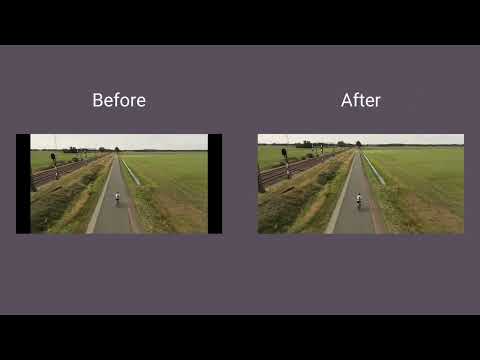
在超宽屏显示器上使用全屏。将视频调整为 21:9、32:9 或自定义比例。支持大多数平台。
Make the most of your ultrawide monitor and upgrade it to a home cinema! With UltraWide Streaming, you’ll be able to fit your favorite streaming content to various ultrawide ratios. Get rid of the annoying black bars and go fullscreen wider than average! 🔎How to use UltraWide Streaming? Follow these simple steps to get the ultrawide fullscreen mode: 1. Add UltraWide Streaming to Chrome. 2. Go to Extensions (a puzzle piece icon in the browser’s top right corner). 3. Find UltraWide Streaming and pin it to your toolbar. 4. Click the UltraWide Streaming icon to open the settings. 5. Set the basic ratio option (Crop or Stretch) 6. Click on Specify button to expand the setting options. 7. Choose one from the defined ratios (21:9, 32:9, or 16:9) or set your custom ratio values. 8. Finally, pick the platforms for which you want to use your new video settings. ✅You’re all set! Enjoy fullscreen movies and TV Shows on your ultrawide monitor. ⭐UltraWide Streaming supports most popular streamin services: - Netflix - Prime Video - Disney+ - Max - Hulu & many more! Changelog: [1.0.34] - 2024-11-14 Various minor bug fixes [1.0.33] - 2024-10-01 Minor bug fixes [1.0.32] - 2024-08-03 Bug fixes [1.0.31] - 2024-07-25 Improved compatibility with newer browser versions Fixed rare playback issue on PeacockTV [1.0.30] - 2024-06-20 Minor bug fixes [1.0.29] - 2024-06-03 Bug fixes [1.0.28] - 2024-04-15 Support for Max and AppleTV [1.0.27] - 2024-03-10 Enhanced streaming service detection algorithm Minor UI inconsistencies in extension settings [1.0.26] - 2024-02-25 Minor bug fixes [1.0.25] - 2024-02-10 Support for PeacockTV Other minor fixes [1.0.24] - 2024-02-02 Bug fixes [1.0.23] - 2024-01-15 Resolved playback tracking issue on Hulu Stability improvements during streaming [1.0.22] - 2023-12-20 Support for Paramount+ [1.0.21] - 2023-12-15 Minor bug fixes [1.0.20] - 2023-12-10 Faster loading times for Disney+ Optimized handling of user preferences [1.0.19] - 2023-12-05 Corrected bugs in subtitle synchronization for Hulu Minor code optimizations [1.0.18] - 2023-12-01 Minor bug fixes [1.0.17] - 2023-11-20 Minor bug fixes [1.0.16] - 2023-11-18 Bug fixes [1.0.15] - 2023-11-01 Support for Hulu [1.0.14] - 2023-10-15 Resolved random crashes reported by some users Improved error reporting for unsupported services [1.0.13] - 2023-09-20 Minor bug fixes [1.0.12] - 2023-09-05 Bug fixes [1.0.11] - 2023-08-20 Support for Disney+ General bug fixes [1.0.10] - 2023-07-29 Bug fixes [1.0.09] - 2023-07-16 Minor bug fixes [1.0.08] - 2023-07-01 Minor bug fixes [1.0.07] - 2023-06-01 Optimized performance for larger watchlists Addressed UI alignment issues on smaller screens [1.0.06] - 2023-05-20 Minor bug fixes [1.0.05] - 2023-05-10 Improved login process for Prime Video Enhanced support for regional Netflix libraries [1.0.04] - 2023-04-25 Minor bug fixes [1.0.03] - 2023-04-12 Support for Prime Video Minor fixes and improvements [1.0.02] - 2022-12-01 Initial bug fixes and performance improvements post-launch [1.0.01] - 2022-11-10 Minor bug fixes [1.0.0] - 2022-10-13 Initial release - Support for Netflix 此扩展是“高质量观看倡议”(Quality Viewership Initiative) 的一部分,这是一个旨在提高观众参与度理解的合作项目。它收集匿名、汇总的观看数据,以帮助创作者和工作室提升内容质量。您可以随时在选项页面关闭开关以停止共享您的信息。 Disclaimer: All product and company names are trademarks or registered trademarks of their respective holders. This website & extensions hold no association or affiliation with them or any third-party companies.
4.1 星(5 星制)30 个评分
详情
- 版本1.0.75
- 上次更新日期2026年4月3日
- 提供方Streaming Extensions
- 大小691KiB
- 语言55 种语言
- 开发者HideApp
1021 East Lincolnway Cheyenne, WY 82001 US邮箱
primepartyapp@gmail.com电话
+1 802-284-5301 - 交易者此开发者已根据欧盟的定义将自己标识为交易者,并承诺仅提供符合欧盟法律要求的产品或服务。
- D-U-N-S132615120
隐私权

“超宽屏流媒体:自定义比例 [QVI]”已就收集和使用用户数据披露了以下信息。 如需了解详情,请查看开发者的privacy policy。
超宽屏流媒体:自定义比例 [QVI]会处理以下数据:
该开发者已声明,您的数据:
- 不会因未获批准的用途出售给第三方
- 不会为实现与产品核心功能无关的目的而使用或转移
- 不会为确定信用度或放贷目的而使用或转移
支持
若有任何疑问、建议或问题,请在桌面浏览器中打开此页面