
![Gambar logo item untuk UltraWide Streaming: rasio khusus [QVI]](https://lh3.googleusercontent.com/_W7JdAJVjYMFGhn9cKyoTy9MAOrLMD8xmhmfoUNt_dXP5BGE1tlxA8kaL4obertx3wAC5poZ5uTREjmJ_KLSRJfZ9A=s60)
![Media item 2 (screenshot) untuk UltraWide Streaming: rasio khusus [QVI]](data:image/gif;base64,R0lGODlhAQABAIAAAP///////yH5BAEKAAEALAAAAAABAAEAAAICTAEAOw==)
Ringkasan
Gunakan mode layar penuh di monitor ultrawide Anda. Sesuaikan video ke 21:9, 32:9, atau rasio khusus. Mendukung sebagian besar…
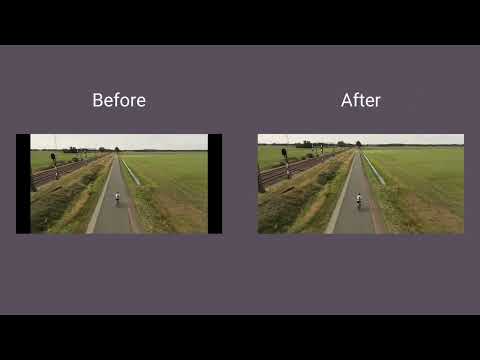
Make the most of your ultrawide monitor and upgrade it to a home cinema! With UltraWide Streaming, you’ll be able to fit your favorite streaming content to various ultrawide ratios. Get rid of the annoying black bars and go fullscreen wider than average! 🔎How to use UltraWide Streaming? Follow these simple steps to get the ultrawide fullscreen mode: 1. Add UltraWide Streaming to Chrome. 2. Go to Extensions (a puzzle piece icon in the browser’s top right corner). 3. Find UltraWide Streaming and pin it to your toolbar. 4. Click the UltraWide Streaming icon to open the settings. 5. Set the basic ratio option (Crop or Stretch) 6. Click on Specify button to expand the setting options. 7. Choose one from the defined ratios (21:9, 32:9, or 16:9) or set your custom ratio values. 8. Finally, pick the platforms for which you want to use your new video settings. ✅You’re all set! Enjoy fullscreen movies and TV Shows on your ultrawide monitor. ⭐UltraWide Streaming supports most popular streamin services: - Netflix - Prime Video - Disney+ - Max - Hulu & many more! Changelog: [1.0.34] - 2024-11-14 Various minor bug fixes [1.0.33] - 2024-10-01 Minor bug fixes [1.0.32] - 2024-08-03 Bug fixes [1.0.31] - 2024-07-25 Improved compatibility with newer browser versions Fixed rare playback issue on PeacockTV [1.0.30] - 2024-06-20 Minor bug fixes [1.0.29] - 2024-06-03 Bug fixes [1.0.28] - 2024-04-15 Support for Max and AppleTV [1.0.27] - 2024-03-10 Enhanced streaming service detection algorithm Minor UI inconsistencies in extension settings [1.0.26] - 2024-02-25 Minor bug fixes [1.0.25] - 2024-02-10 Support for PeacockTV Other minor fixes [1.0.24] - 2024-02-02 Bug fixes [1.0.23] - 2024-01-15 Resolved playback tracking issue on Hulu Stability improvements during streaming [1.0.22] - 2023-12-20 Support for Paramount+ [1.0.21] - 2023-12-15 Minor bug fixes [1.0.20] - 2023-12-10 Faster loading times for Disney+ Optimized handling of user preferences [1.0.19] - 2023-12-05 Corrected bugs in subtitle synchronization for Hulu Minor code optimizations [1.0.18] - 2023-12-01 Minor bug fixes [1.0.17] - 2023-11-20 Minor bug fixes [1.0.16] - 2023-11-18 Bug fixes [1.0.15] - 2023-11-01 Support for Hulu [1.0.14] - 2023-10-15 Resolved random crashes reported by some users Improved error reporting for unsupported services [1.0.13] - 2023-09-20 Minor bug fixes [1.0.12] - 2023-09-05 Bug fixes [1.0.11] - 2023-08-20 Support for Disney+ General bug fixes [1.0.10] - 2023-07-29 Bug fixes [1.0.09] - 2023-07-16 Minor bug fixes [1.0.08] - 2023-07-01 Minor bug fixes [1.0.07] - 2023-06-01 Optimized performance for larger watchlists Addressed UI alignment issues on smaller screens [1.0.06] - 2023-05-20 Minor bug fixes [1.0.05] - 2023-05-10 Improved login process for Prime Video Enhanced support for regional Netflix libraries [1.0.04] - 2023-04-25 Minor bug fixes [1.0.03] - 2023-04-12 Support for Prime Video Minor fixes and improvements [1.0.02] - 2022-12-01 Initial bug fixes and performance improvements post-launch [1.0.01] - 2022-11-10 Minor bug fixes [1.0.0] - 2022-10-13 Initial release - Support for Netflix Ekstensi ini merupakan bagian dari Quality Viewership Initiative, upaya kolaboratif untuk meningkatkan pemahaman tentang keterlibatan audiens. Ekstensi ini mengumpulkan wawasan tontonan anonim dan teragregasi untuk mendukung pembuat dan studio dalam meningkatkan kualitas konten mereka. Anda dapat berhenti membagikan informasi Anda kapan saja dengan mengubah sakelar di halaman opsi. Disclaimer: All product and company names are trademarks or registered trademarks of their respective holders. This website & extensions hold no association or affiliation with them or any third-party companies.
4,1 dari 530 rating
Detail
- Versi1.0.64
- Diupdate23 Desember 2025
- Ditawarkan olehStreaming Extensions
- Ukuran658KiB
- Bahasa55 bahasa
- DeveloperHideApp
1021 East Lincolnway Cheyenne, WY 82001 USEmail
primepartyapp@gmail.comTelepon
+1 802-284-5301 - PedagangDeveloper ini telah mengidentifikasi diri sebagai pedagang berdasarkan definisi dari Uni Eropa dan berkomitmen untuk hanya menawarkan produk atau layanan yang mematuhi hukum Uni Eropa.
- D-U-N-S132615120
Privasi
UltraWide Streaming: rasio khusus [QVI] telah mengungkapkan informasi berikut ini terkait pengumpulan dan penggunaan data Anda. Informasi lebih mendetail dapat dilihat di privacy policy developer.
UltraWide Streaming: rasio khusus [QVI] menangani hal berikut:
Developer ini menyatakan bahwa data Anda
- Tidak dijual ke pihak ketiga, di luar kasus penggunaan yang disetujui
- Tidak digunakan atau ditransfer untuk tujuan yang tidak terkait dengan fungsi inti item
- Tidak digunakan atau ditransfer untuk menentukan kelayakan kredit atau untuk tujuan pinjaman
Dukungan
Untuk mendapatkan bantuan terkait pertanyaan, saran, atau masalah, buka halaman ini di browser desktop Anda