
![「超寬螢幕串流:自訂比例 [QVI]」的項目標誌圖片](https://lh3.googleusercontent.com/_W7JdAJVjYMFGhn9cKyoTy9MAOrLMD8xmhmfoUNt_dXP5BGE1tlxA8kaL4obertx3wAC5poZ5uTREjmJ_KLSRJfZ9A=s60)
![超寬螢幕串流:自訂比例 [QVI]的項目媒體 2 (螢幕截圖)](data:image/gif;base64,R0lGODlhAQABAIAAAP///////yH5BAEKAAEALAAAAAABAAEAAAICTAEAOw==)
總覽
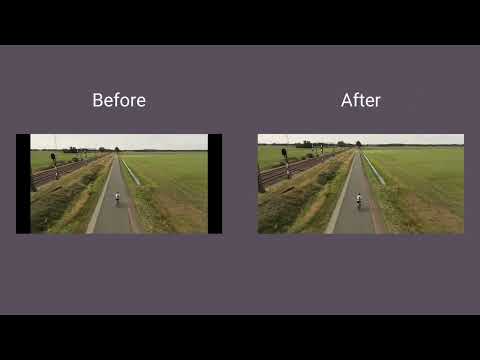
在超寬螢幕顯示器上使用全螢幕。將影片調整為 21:9、32:9 或自訂比例。支援大多數平台。
Make the most of your ultrawide monitor and upgrade it to a home cinema! With UltraWide Streaming, you’ll be able to fit your favorite streaming content to various ultrawide ratios. Get rid of the annoying black bars and go fullscreen wider than average! 🔎How to use UltraWide Streaming? Follow these simple steps to get the ultrawide fullscreen mode: 1. Add UltraWide Streaming to Chrome. 2. Go to Extensions (a puzzle piece icon in the browser’s top right corner). 3. Find UltraWide Streaming and pin it to your toolbar. 4. Click the UltraWide Streaming icon to open the settings. 5. Set the basic ratio option (Crop or Stretch) 6. Click on Specify button to expand the setting options. 7. Choose one from the defined ratios (21:9, 32:9, or 16:9) or set your custom ratio values. 8. Finally, pick the platforms for which you want to use your new video settings. ✅You’re all set! Enjoy fullscreen movies and TV Shows on your ultrawide monitor. ⭐UltraWide Streaming supports most popular streamin services: - Netflix - Prime Video - Disney+ - Max - Hulu & many more! Changelog: [1.0.34] - 2024-11-14 Various minor bug fixes [1.0.33] - 2024-10-01 Minor bug fixes [1.0.32] - 2024-08-03 Bug fixes [1.0.31] - 2024-07-25 Improved compatibility with newer browser versions Fixed rare playback issue on PeacockTV [1.0.30] - 2024-06-20 Minor bug fixes [1.0.29] - 2024-06-03 Bug fixes [1.0.28] - 2024-04-15 Support for Max and AppleTV [1.0.27] - 2024-03-10 Enhanced streaming service detection algorithm Minor UI inconsistencies in extension settings [1.0.26] - 2024-02-25 Minor bug fixes [1.0.25] - 2024-02-10 Support for PeacockTV Other minor fixes [1.0.24] - 2024-02-02 Bug fixes [1.0.23] - 2024-01-15 Resolved playback tracking issue on Hulu Stability improvements during streaming [1.0.22] - 2023-12-20 Support for Paramount+ [1.0.21] - 2023-12-15 Minor bug fixes [1.0.20] - 2023-12-10 Faster loading times for Disney+ Optimized handling of user preferences [1.0.19] - 2023-12-05 Corrected bugs in subtitle synchronization for Hulu Minor code optimizations [1.0.18] - 2023-12-01 Minor bug fixes [1.0.17] - 2023-11-20 Minor bug fixes [1.0.16] - 2023-11-18 Bug fixes [1.0.15] - 2023-11-01 Support for Hulu [1.0.14] - 2023-10-15 Resolved random crashes reported by some users Improved error reporting for unsupported services [1.0.13] - 2023-09-20 Minor bug fixes [1.0.12] - 2023-09-05 Bug fixes [1.0.11] - 2023-08-20 Support for Disney+ General bug fixes [1.0.10] - 2023-07-29 Bug fixes [1.0.09] - 2023-07-16 Minor bug fixes [1.0.08] - 2023-07-01 Minor bug fixes [1.0.07] - 2023-06-01 Optimized performance for larger watchlists Addressed UI alignment issues on smaller screens [1.0.06] - 2023-05-20 Minor bug fixes [1.0.05] - 2023-05-10 Improved login process for Prime Video Enhanced support for regional Netflix libraries [1.0.04] - 2023-04-25 Minor bug fixes [1.0.03] - 2023-04-12 Support for Prime Video Minor fixes and improvements [1.0.02] - 2022-12-01 Initial bug fixes and performance improvements post-launch [1.0.01] - 2022-11-10 Minor bug fixes [1.0.0] - 2022-10-13 Initial release - Support for Netflix 此擴充功能是「Quality Viewership Initiative」的一部分,這是一項旨在提升對觀眾參與理解的合作計畫。它會收集匿名且彙總的觀看資訊,以協助創作者與製作室改善內容品質。您可隨時在選項頁面切換開關以停止分享您的資訊。 Disclaimer: All product and company names are trademarks or registered trademarks of their respective holders. This website & extensions hold no association or affiliation with them or any third-party companies.
4.1 分 (滿分 5 分)30 個評分
詳細資料
- 版本1.0.65
- 已更新2026年1月6日
- 提供者Streaming Extensions
- 大小667KiB
- 語言55 種語言
- 開發人員HideApp
1021 East Lincolnway Cheyenne, WY 82001 US電子郵件
primepartyapp@gmail.com電話
+1 802-284-5301 - 交易商這位開發人員表明自己是交易商 (依歐盟的定義),並承諾只提供符合歐盟法律的產品或服務。
- 鄧白氏環球編碼132615120
隱私權
「超寬螢幕串流:自訂比例 [QVI]」已揭露下列關於收集及使用資料的資訊。 如需更多詳細資訊,請參閱開發人員的《privacy policy》。
超寬螢幕串流:自訂比例 [QVI] 會處理下列資料:
這位開發者就你的資料做出下列聲明:
- 除經核准的用途外,不會將你的資料販售給第三方
- 不會基於與商品核心功能無關的目的,使用或轉移資料
- 不會為了確認信用度或基於貸款目的,使用或轉移資料
支援
如有疑問或建議,請使用電腦版瀏覽器開啟這個頁面