
![울트라와이드 스트리밍: 사용자 지정 비율 [QVI]의 상품 로고 이미지](https://lh3.googleusercontent.com/_W7JdAJVjYMFGhn9cKyoTy9MAOrLMD8xmhmfoUNt_dXP5BGE1tlxA8kaL4obertx3wAC5poZ5uTREjmJ_KLSRJfZ9A=s60)
![울트라와이드 스트리밍: 사용자 지정 비율 [QVI]의 항목 미디어 2(스크린샷)](data:image/gif;base64,R0lGODlhAQABAIAAAP///////yH5BAEKAAEALAAAAAABAAEAAAICTAEAOw==)
개요
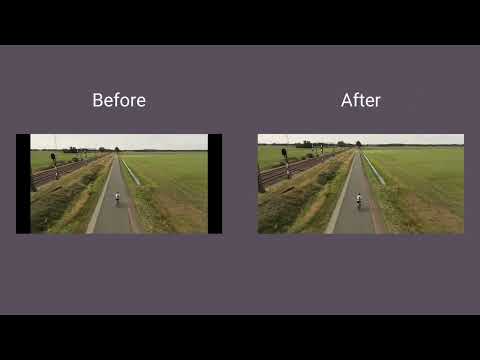
울트라와이드 모니터에서 전체 화면을 사용하세요. 비디오를 21:9, 32:9 또는 사용자 지정 비율에 맞춥니다. 대부분의 플랫폼을 지원합니다.
Make the most of your ultrawide monitor and upgrade it to a home cinema! With UltraWide Streaming, you’ll be able to fit your favorite streaming content to various ultrawide ratios. Get rid of the annoying black bars and go fullscreen wider than average! 🔎How to use UltraWide Streaming? Follow these simple steps to get the ultrawide fullscreen mode: 1. Add UltraWide Streaming to Chrome. 2. Go to Extensions (a puzzle piece icon in the browser’s top right corner). 3. Find UltraWide Streaming and pin it to your toolbar. 4. Click the UltraWide Streaming icon to open the settings. 5. Set the basic ratio option (Crop or Stretch) 6. Click on Specify button to expand the setting options. 7. Choose one from the defined ratios (21:9, 32:9, or 16:9) or set your custom ratio values. 8. Finally, pick the platforms for which you want to use your new video settings. ✅You’re all set! Enjoy fullscreen movies and TV Shows on your ultrawide monitor. ⭐UltraWide Streaming supports most popular streamin services: - Netflix - Prime Video - Disney+ - Max - Hulu & many more! Changelog: [1.0.34] - 2024-11-14 Various minor bug fixes [1.0.33] - 2024-10-01 Minor bug fixes [1.0.32] - 2024-08-03 Bug fixes [1.0.31] - 2024-07-25 Improved compatibility with newer browser versions Fixed rare playback issue on PeacockTV [1.0.30] - 2024-06-20 Minor bug fixes [1.0.29] - 2024-06-03 Bug fixes [1.0.28] - 2024-04-15 Support for Max and AppleTV [1.0.27] - 2024-03-10 Enhanced streaming service detection algorithm Minor UI inconsistencies in extension settings [1.0.26] - 2024-02-25 Minor bug fixes [1.0.25] - 2024-02-10 Support for PeacockTV Other minor fixes [1.0.24] - 2024-02-02 Bug fixes [1.0.23] - 2024-01-15 Resolved playback tracking issue on Hulu Stability improvements during streaming [1.0.22] - 2023-12-20 Support for Paramount+ [1.0.21] - 2023-12-15 Minor bug fixes [1.0.20] - 2023-12-10 Faster loading times for Disney+ Optimized handling of user preferences [1.0.19] - 2023-12-05 Corrected bugs in subtitle synchronization for Hulu Minor code optimizations [1.0.18] - 2023-12-01 Minor bug fixes [1.0.17] - 2023-11-20 Minor bug fixes [1.0.16] - 2023-11-18 Bug fixes [1.0.15] - 2023-11-01 Support for Hulu [1.0.14] - 2023-10-15 Resolved random crashes reported by some users Improved error reporting for unsupported services [1.0.13] - 2023-09-20 Minor bug fixes [1.0.12] - 2023-09-05 Bug fixes [1.0.11] - 2023-08-20 Support for Disney+ General bug fixes [1.0.10] - 2023-07-29 Bug fixes [1.0.09] - 2023-07-16 Minor bug fixes [1.0.08] - 2023-07-01 Minor bug fixes [1.0.07] - 2023-06-01 Optimized performance for larger watchlists Addressed UI alignment issues on smaller screens [1.0.06] - 2023-05-20 Minor bug fixes [1.0.05] - 2023-05-10 Improved login process for Prime Video Enhanced support for regional Netflix libraries [1.0.04] - 2023-04-25 Minor bug fixes [1.0.03] - 2023-04-12 Support for Prime Video Minor fixes and improvements [1.0.02] - 2022-12-01 Initial bug fixes and performance improvements post-launch [1.0.01] - 2022-11-10 Minor bug fixes [1.0.0] - 2022-10-13 Initial release - Support for Netflix 이 확장 프로그램은 시청자 참여에 대한 이해를 향상시키기 위한 공동 노력인 Quality Viewership Initiative의 일부입니다. 이는 제작자와 스튜디오가 콘텐츠 품질을 향상시키는 데 도움이 되도록 익명으로 집계된 시청 데이터를 수집합니다. 옵션 페이지에서 토글을 전환하여 언제든지 정보 공유를 중지할 수 있습니다. Disclaimer: All product and company names are trademarks or registered trademarks of their respective holders. This website & extensions hold no association or affiliation with them or any third-party companies.
5점 만점에 4.1점평점 30개
세부정보
- 버전1.0.64
- 업데이트됨2025년 12월 23일
- 제공Streaming Extensions
- 크기658KiB
- 언어언어 55개
- 개발자HideApp
1021 East Lincolnway Cheyenne, WY 82001 US이메일
primepartyapp@gmail.com전화
+1 802-284-5301 - 판매자개발자가 유럽연합에서 정의한 바에 따라 본인을 판매자로 밝혔으며 EU 법규를 준수하는 제품 또는 서비스만 제공하기로 약정했습니다.
- D-U-N-S132615120
개인정보 보호
울트라와이드 스트리밍: 사용자 지정 비율 [QVI]에서 데이터 수집 및 사용과 관련하여 다음 정보를 공개했습니다. 더 자세한 정보는 개발자의 privacy policy을 참고하세요.
울트라와이드 스트리밍: 사용자 지정 비율 [QVI] 항목은 다음을 처리합니다.
개발자가 사용자 데이터에 관해 다음과 같이 선언했습니다
- 승인된 사용 사례를 제외하고 서드 파티에 판매하지 않음
- 항목의 핵심 기능과 관련 없는 목적으로 사용하거나 전송하지 않음
- 신용도 판단 또는 대출 목적으로 사용하거나 전송하지 않음
지원
질문, 제안 또는 문제와 관련하여 도움이 필요하면 데스크톱 브라우저에서 이 페이지를 여세요.