Obraz logo produktu UltraFill: Ultrawide Video Fill & Tuner

UltraFill: Ultrawide Video Fill & Tuner

5,0(

2 oceny

)
RozszerzenieRozrywka21 użytkownicy
Element multimedialny 6 (zrzut ekranu) dotyczący usługi: UltraFill: Ultrawide Video Fill & Tuner
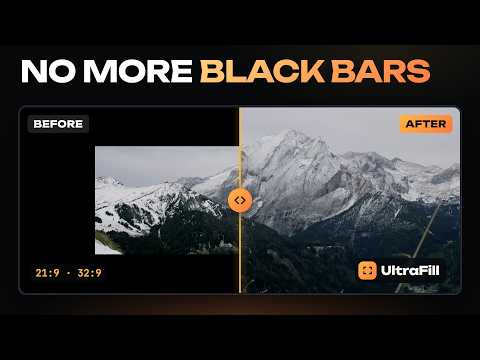
Miniatura filmu dotyczącego produktu
Element multimedialny 2 (zrzut ekranu) dotyczący usługi: UltraFill: Ultrawide Video Fill & Tuner
Element multimedialny 3 (zrzut ekranu) dotyczący usługi: UltraFill: Ultrawide Video Fill & Tuner
Element multimedialny 4 (zrzut ekranu) dotyczący usługi: UltraFill: Ultrawide Video Fill & Tuner
Element multimedialny 5 (zrzut ekranu) dotyczący usługi: UltraFill: Ultrawide Video Fill & Tuner
Element multimedialny 6 (zrzut ekranu) dotyczący usługi: UltraFill: Ultrawide Video Fill & Tuner

Przegląd

Usuwa czarne pasy i dopasowuje filmy do monitora 21:9 i 32:9. Style obrazu, lepszy dźwięk, przewijanie i pętla.

Got an ultrawide monitor but movies still have black bars? UltraFill fills the whole screen in one click. Hover the top of the video, click the UltraFill button and choose how to fill the screen: • Crop: no distortion, the bars disappear. • Elastic: stretches only the edges, faces in the center stay natural. • Stretch: the whole picture on the whole screen. The preview in the panel shows which part of the movie is visible. Drag the frame to choose more of the top or the bottom. FREE • Fill screen (crop, stretch) and automatic black bar detection • 16:9, 1.85, 2.20, 2.39, 21:9 and 4:3 formats • Zoom, move the frame, rotate and flip • Color and light: brightness, contrast, saturation, vibrance, temperature, shadows, highlights • Hold a key to see the original • Reset any tab of the panel with one click, with Undo • Themes (AMOLED included) and 10 languages PRO (7-day free trial, starts the first time you use a PRO feature, no card) • 12 picture styles and 7 film looks with a photo preview • Elastic stretch, sharpness and denoise • Ambient glow around the video that reacts to sound • Cinema mode: dims the page around the video in a window • Sound presets (movie at night, dialogue, music, headphones), clear dialog, loudness leveler, night mode, 5-band equalizer, volume above 100% • Balance, mono and audio delay • A profile for every title, remembered playback position, auto-fill in fullscreen • Preview how the movie fills another monitor (21:9, 32:9) • Before / after split screen, section loop • Speed from 0.1× to 16×, including custom values like 1.35 • 10-second seeking, frame by frame, sleep timer • Frame snapshot, picture in picture, custom shortcuts, Chrome sync Prices: $3.99 per month, $35.88 per year ($2.99 per month), $99 lifetime. Payments via Polar. Works in Google Chrome on Windows and macOS, on streaming services, video platforms and any site with video, including YouTube and Netflix. UltraFill is not affiliated with these services; their names belong to their owners. PROTECTED SITES (DRM) On sites with picture protection you pick the format manually. Framing, zoom and colors work everywhere. Sound tools work there too: click the UltraFill icon once (or press Alt+Shift+U, on Mac Option+Shift+U) and the tab's sound goes through UltraFill. Effects that read frames (denoise, glow, split screen) work on sites without protection. PRIVACY The extension collects no data and shows no ads. Settings stay in your browser. Tab sound is processed live on your computer and never recorded or sent

Szczegóły

  • Wersja
    1.9.0
  • Zaktualizowano
    6 listopada 2026
  • Funkcje
    Zawiera zakupy w aplikacji
  • Rozmiar
    211KiB
  • Języki
    Języki: 10
  • Deweloper
    VULPES HOUSE SPÓŁKA Z OGRANICZONĄ ODPOWIEDZIALNOŚCIĄ
    Żabieniec 24 Bądkowo 87-704 PL
    Witryna
    E-mail
    kacper@fenekmedia.pl
    Telefon
    +48 538 443 890
  • Przedsiębiorca
    Ten programista określił siebie jako przedsiębiorcę zgodnie z definicją Unii Europejskiej i zobowiązał się oferować tylko produkty i usługi zgodne z przepisami obowiązującymi w UE.
  • Numer D-U-N-S
    369585105

Prywatność

Zarządzaj rozszerzeniami i dowiedz się, jak są używane w Twojej organizacji
Deweloper oświadczył, że nie będzie zbierać ani używać Twoich danych. Więcej informacji zawiera privacy policy dewelopera.

Ten wydawca oświadcza, że Twoje dane

  • nie są sprzedawane osobom trzecim (z wyjątkiem uzasadnionych przypadków)
  • nie są używane ani przesyłane w celach niezwiązanych z podstawową funkcją produktu,
  • nie są używane ani przesyłane w celu ustalenia zdolności kredytowej lub udzielania pożyczek.

Pomoc

Jeśli masz pytania, sugestie lub problemy, wejdź na stronę pomocy dla deweloperów

Pokrewne

UltraWideo – Usuń czarne pasy i dopasuj każde wideo do ekranu

4,4

Usuń czarne pasy i dopasuj każde wideo do ekranu. Działa na Netflix, YouTube, Prime, Disney+, HBO i wszystkich stronach wideo.

UltraFit — Ultrawide Video

5,0

Fit any video to your ultrawide screen: crop black bars, fill, zoom and stretch, with shortcuts and per-site rules.

Fill Mode

5,0

Removes video black bars with custom & vertical (9:16) aspect ratio support.

YT Ultrawide Fill

0,0

For 21:9/32:9 monitors: fills your ultrawide screen with letterboxed YouTube video in fullscreen. No effect on 16:9.

Omniscope

0,0

Removes black bars from YouTube videos and fills the player. Only videos that have bars — full-frame videos are never zoomed.

Stretchy: Ultrawide Video Zoom, Aspect Ratio & Frame Rate Boost

5,0

Fill ultrawide and 16:10 screens, no black bars. Elastic Stretch keeps faces natural. Smooth video to your screen's refresh rate.

UltraWide dla U-NEXT: dostosuj rozmiar ekranu

0,0

Wykorzystaj pełny ekran swojego ultrapanoramicznego monitora. Dopasuj wideo do proporcji 21:9, 32:9 lub niestandardowej.…

YouTube Fullscreen: Anamorphic Scaler

5,0

Ultimate widescreen stretch and smart zoom optimizer to remove black bars on YouTube videos.

Zoom Video

5,0

Use Zoom Video to change aspect ratio, fill ultrawide screens, and switch between 16:9, 18:9, 21:9, and 32:9 – on any website.

WideFit: The Ultimate Video Optimizer for Ultrawide & Curved Displays

5,0

Ultrawide & curved monitor video optimizer: remove black bars, zoom to fill 21:9 & 32:9, fix curved-screen warping, brightness.

Manual Video Zoom

0,0

Manually zoom video to remove the black bars and fill an ultrawide 21:9 or 32:9 screen. Local only, no data collection.

Ultrawider — Remove Black Bars & Fill Ultrawide Video (21:9/32:9)

4,0

Remove black bars: fill your 21:9 / 32:9 ultrawide with any video — even Netflix. Edges stretch, center bends less. Free on YouTube.

UltraWideo – Usuń czarne pasy i dopasuj każde wideo do ekranu

4,4

Usuń czarne pasy i dopasuj każde wideo do ekranu. Działa na Netflix, YouTube, Prime, Disney+, HBO i wszystkich stronach wideo.

UltraFit — Ultrawide Video

5,0

Fit any video to your ultrawide screen: crop black bars, fill, zoom and stretch, with shortcuts and per-site rules.

Fill Mode

5,0

Removes video black bars with custom & vertical (9:16) aspect ratio support.

YT Ultrawide Fill

0,0

For 21:9/32:9 monitors: fills your ultrawide screen with letterboxed YouTube video in fullscreen. No effect on 16:9.

Omniscope

0,0

Removes black bars from YouTube videos and fills the player. Only videos that have bars — full-frame videos are never zoomed.

Stretchy: Ultrawide Video Zoom, Aspect Ratio & Frame Rate Boost

5,0

Fill ultrawide and 16:10 screens, no black bars. Elastic Stretch keeps faces natural. Smooth video to your screen's refresh rate.

UltraWide dla U-NEXT: dostosuj rozmiar ekranu

0,0

Wykorzystaj pełny ekran swojego ultrapanoramicznego monitora. Dopasuj wideo do proporcji 21:9, 32:9 lub niestandardowej.…

YouTube Fullscreen: Anamorphic Scaler

5,0

Ultimate widescreen stretch and smart zoom optimizer to remove black bars on YouTube videos.

Szukaj
Wyczyść wyszukiwanie
Zamknij wyszukiwanie
Aplikacje Google
Menu główne
