


Overview
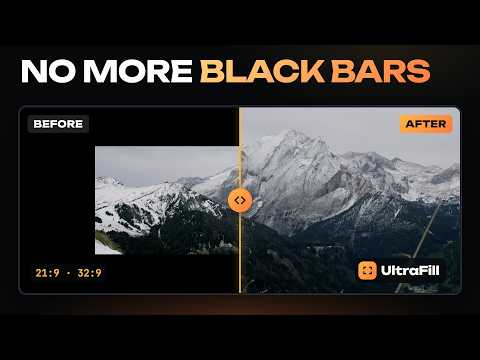
Remove black bars and fit videos to 21:9 and 32:9 ultrawide screens. Picture styles, better audio, seeking and loops.
Got an ultrawide monitor but movies still have black bars? UltraFill fills the whole screen in one click. Hover the top of the video, click the UltraFill button and choose how to fill the screen: • Crop: no distortion, the bars disappear. • Elastic: stretches only the edges, faces in the center stay natural. • Stretch: the whole picture on the whole screen. The preview in the panel shows which part of the movie is visible. Drag the frame to choose more of the top or the bottom. FREE • Fill screen (crop, stretch) and automatic black bar detection • 16:9, 1.85, 2.20, 2.39, 21:9 and 4:3 formats • Zoom, move the frame, rotate and flip • Color and light: brightness, contrast, saturation, vibrance, temperature, shadows, highlights • Hold a key to see the original • Themes (AMOLED included) and 10 languages PRO (7-day trial after install, no card) • 12 picture styles and 7 film looks with a photo preview • Elastic stretch, sharpness and denoise • Ambient glow around the video that reacts to sound • Clear dialog, loudness leveler, night mode, 5-band equalizer, volume above 100% • A profile for every title, remembered playback position, auto-fill in fullscreen • Preview how the movie fills another monitor (21:9, 32:9) • Before / after split screen, section loop • Speed from 0.1× to 16×, including custom values like 1.35 • 10-second seeking, frame by frame, sleep timer • Frame snapshot, picture in picture, custom shortcuts, Chrome sync Prices: $3.99 per month, $35.88 per year ($2.99 per month), $99 lifetime. Payments via Polar. Works in Google Chrome on Windows and macOS, on streaming services, video platforms and any site with video, including YouTube and Netflix. UltraFill is not affiliated with these services; their names belong to their owners. PRIVACY The extension collects no data and shows no ads. Settings stay in your browser. Note: on sites with picture protection (DRM) you pick the format manually. Framing, zoom and colors work everywhere; effects that read frames (denoise, glow, split screen, audio tools) work on sites without protection.
0 out of 5No ratings
Details
- Version1.6.8
- UpdatedOctober 24, 2026
- FeaturesOffers in-app purchases
- Size164KiB
- Languages9 languages
- DeveloperVULPES HOUSE SPÓŁKA Z OGRANICZONĄ ODPOWIEDZIALNOŚCIĄWebsite
Żabieniec 24 Bądkowo 87-704 PLEmail
kacper@fenekmedia.plPhone
+48 538 443 890 - TraderThis developer has identified itself as a trader per the definition from the European Union and committed to only offer products or services that comply with EU laws.
- D-U-N-S369585105
Privacy

This developer declares that your data is
- Not being sold to third parties, outside of the approved use cases
- Not being used or transferred for purposes that are unrelated to the item's core functionality
- Not being used or transferred to determine creditworthiness or for lending purposes
Support
For help with questions, suggestions, or problems, visit the developer's support site