

UI Context for Agents
2 ratings
)
Overview
Click elements on any page, write what should change, and copy one prompt with selectors and component names for your coding agent.
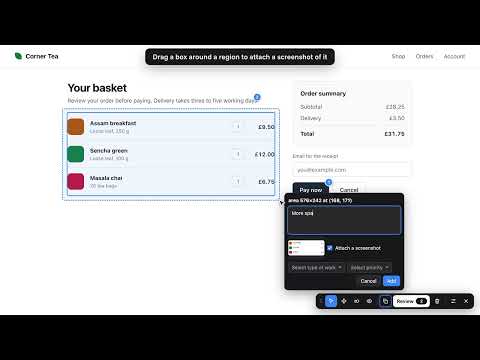
UI Context for Agents turns comments you leave on a web page into one prompt you can paste into a coding agent such as Claude Code, Cursor or Codex. Click the extension icon, click an element, and type what should change. A numbered marker stays on the element. When you have marked everything, press the copy button and paste the result into your agent. Each item carries the element's CSS selector, its text and classes, and, on React, Vue, Angular and Svelte development builds, the component names and the source file, so the agent can find the code without guessing. What you can mark: 1. Click any element. 2. Select text to comment on wording. 3. Hold Cmd+Shift (Ctrl+Shift on Windows and Linux) and click several elements to give them one comment. 4. Drag a rectangle over a region, including empty space where something should be added. A screenshot of the region is attached unless you untick it, with or without a description. 5. Press L and drag an element to show where it should move. The prompt records the distance and what it was dropped over. 6. Press P to pause animations and videos and mark a single frame. Each comment can carry a type of work (fix, change, question, approve) and a priority (blocking, important, suggestion). The copied prompt has four detail levels: Compact (one line per item), Standard, Detailed (adds attributes, position, nearby text and HTML) and Forensic (adds the DOM path, computed styles and browser details). The Review button opens a list of every comment and screenshot. You can edit a comment there, remove a screenshot's image, its description or both, and see the prompt as it will be copied. You can also edit the prompt itself before copying; the list is then locked until you discard the edits. The copy button copies the prompt directly, without opening the list. Copying puts the text and one image on the clipboard: the screenshot itself, or all your screenshots stacked under labels that match the item numbers in the text. Markers are saved in your browser for each page and come back after a reload. Markers not touched for 7 days are deleted. Keyboard, while annotating: P pause, H hide markers, R review, C copy, X delete all, L move, Esc cancel. Alt+Shift+A turns the extension on or off for the current tab. Privacy: your comments never leave your browser. The extension has no server, no account and no analytics. It reads a page only after you click its icon on that tab.
5 out of 52 ratings
Details
- Version0.5.1
- UpdatedNovember 4, 2026
- Offered byFrontendMaster
- Size56.59KiB
- LanguagesEnglish
- Developer
Email
to@allahabadi.dev - Non-traderThis developer has not identified itself as a trader. For consumers in the European Union, please note that consumer rights do not apply to contracts between you and this developer.
Privacy

This developer declares that your data is
- Not being sold to third parties, outside of the approved use cases
- Not being used or transferred for purposes that are unrelated to the item's core functionality
- Not being used or transferred to determine creditworthiness or for lending purposes
Support
For help with questions, suggestions, or problems, visit the developer's support site