

Video Translator for Udemy - Unlimited AI Voice Dubbing

Overview
Video translator for Udemy lectures: AI voice dubbing in your language. Unlimited and free, so you listen instead of reading.
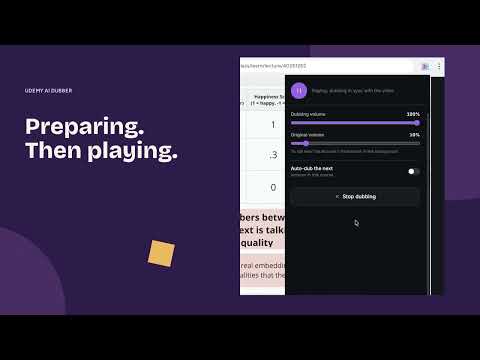
🎧 Video translator for Udemy that dubs your lectures into your own language. You stop reading captions and start hearing the instructor, because AI voice dubbing runs inside Chrome while the video plays. Anyone who has taken a technical course knows the problem. The instructor types code on screen and explains it at the same time, and the captions sit at the bottom demanding your eyes. Read the captions, miss the code. Watch the code, miss the sentence. Dubbing takes that trade-off away, because the explanation now arrives through your ears. 🚀 Get started in 60 seconds 1. Click Add to Chrome to install the extension. 2. Open any Udemy lecture you already own. 3. Pick your target language in the side panel. 4. Press play. The first dubbed lecture starts on its own. ⚡ Unlimited dubbing, no minute caps Most dubbing tools give you 15 free minutes, then ask for $19 to $129 a month and still cap you by the hour. A 40-hour course burns through that cap in a week. The free tier here has no timer: dub every lecture in the course, replay it as often as you want, and nothing resets on the first of the month. PRO costs one payment instead of a subscription. 🔟 Ten reasons people stay with it 1️⃣ You listen to the lecture instead of reading it. 2️⃣ The free tier has no minute limit. 3️⃣ Everything runs in Chrome, so there is nothing else to install. 4️⃣ Real-time mode starts talking a few seconds after you press play (PRO). 5️⃣ Audio is cached, so a dubbed lecture replays with no wait. 6️⃣ You can fix subtitle lines before they are voiced (PRO). 7️⃣ Premium voices are easy to listen to for an hour straight. 8️⃣ Background generation dubs the next lecture while you watch this one (PRO). 9️⃣ Export the lecture with its dubbed track, for planes and commutes (PRO). 🔟 One payment instead of per-minute billing that never ends. 🎙️ Dubbing you can hear ➤ Most tools only translate the subtitles. This one reads them out loud. ➤ Each phrase is held to the original timing, so the voice does not drift away from what is on screen. ➤ Your eyes stay on the code while the audio carries the explanation. 🌍 Your whole course library, in your language ▸ Courses recorded in another language can be dubbed into English. ▸ Lectures can be dubbed into Spanish, German, French, Hindi, Portuguese and dozens more. ▸ Switching the language pair is a single dropdown. ▸ Dubbing also helps with heavy accents and fast speech, where written captions tend to lag behind. ⚡ Two dubbing modes • Real-time dubbing (PRO): the first segments are ready in seconds and the rest are generated while you listen, so you are not waiting for the whole lecture. • Local dubbing (Free and PRO): the whole lecture is built once with on-device voices, then plays from cache after that. Good for courses you come back to. Free vs PRO Free tier: - Unlimited dubbing with local Piper and Vits voices - Translation through Google Translate - Cached playback, so you never regenerate the same lecture - Every course you own, with no lecture limit PRO tier, everything above plus: - Unlimited real-time dubbing with no waiting - Premium Edge TTS voices that sound closer to a human narrator - AI translation with your own API keys (BYOK): OpenAI, Gemini and more - Background generation for upcoming lectures - Export with the dubbed audio attached - Subtitle editing before dubbing - Multi-core parallel generation for faster processing - Extra languages through Edge TTS - One payment, no recurring charges 👥 Who uses it → Students who bought a course in English and lose the thread on dense technical lectures. → Professionals studying after work, who want dubbing they do not have to babysit. → Non-native speakers who would rather listen than read a wall of captions. → Anyone who hit a minute cap in a subscription tool halfway through a lesson. 🛠️ How it works The extension reads the captions attached to the lecture, translates them, then speaks the result with text-to-speech. In local mode nothing leaves your machine, because the whole pipeline runs in the browser. In PRO real-time mode, segments stream as they finish, so playback starts before the rest is ready. 🔒 Privacy and performance - Local dubbing keeps your data on your own computer. - Edge TTS (PRO) uses secure cloud processing purely for voice quality. - The extension is small and does not slow the browser down. - We update the dubbing engine for Chrome and platform changes as they land. ❓ Frequently asked questions ❓ Is the dubbing really unlimited? 💡 Yes. There is no minute cap on the free tier and nothing resets monthly. PRO is unlimited as well, for one payment. ❓ How does it work? 💡 It pulls the lecture subtitles, translates them, and generates speech with TTS. Free mode dubs locally, PRO adds real-time dubbing. ❓ Can I dub a course lecture by lecture? 💡 Yes. Open a lecture, choose a language, and it gets dubbed. Lectures you already dubbed replay from cache. ❓ Does it work in real time? 💡 PRO does. Free mode builds the lecture first, then plays it instantly from cache every time after. ❓ Do I have to pay? 💡 No. The free tier covers unlimited local dubbing. PRO unlocks real-time dubbing, premium voices, BYOK translation, export and subtitle editing. ❓ Which languages are supported? 💡 A wide range: English, Spanish, Portuguese, German, Japanese and many more pairs. ❓ Can I read translated subtitles instead? 💡 Yes. A subtitle-only mode is there when you would rather read, and you can edit the translated lines before dubbing. ❓ What is BYOK? 💡 Bring Your Own Key. PRO users plug in their own OpenAI or Gemini key for higher-quality AI translation. 🎓 3800+ learners already use it to get through Udemy courses without reading captions. Install it, open a lecture, and listen. Missing a language, or found a bug? Write to our support team. Most of what we add comes from those messages.
4.7 out of 598 ratings
Details
- Version4.12.2
- UpdatedOctober 24, 2026
- FeaturesOffers in-app purchases
- Size168MiB
- Languages53 languages
- DeveloperWebsite
Email
oleg.pharo@gmail.com - Non-traderThis developer has not identified itself as a trader. For consumers in the European Union, please note that consumer rights do not apply to contracts between you and this developer.
Privacy

Video Translator for Udemy - Unlimited AI Voice Dubbing has disclosed the following information regarding the collection and usage of your data. More detailed information can be found in the developer's privacy policy.
Video Translator for Udemy - Unlimited AI Voice Dubbing handles the following:
This developer declares that your data is
- Not being sold to third parties, outside of the approved use cases
- Not being used or transferred for purposes that are unrelated to the item's core functionality
- Not being used or transferred to determine creditworthiness or for lending purposes
Support
For help with questions, suggestions, or problems, visit the developer's support site