


Overview
Local-first UAE WPS SIF preparation and structural validation; optional online licensing and checkout.
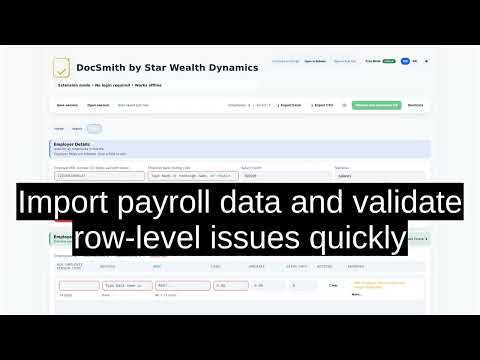
(UAE WPS) SIF GENERATOR - DOCSMITH DocSmith SIF Generator is a browser extension for preparing UAE Wages Protection System (WPS) Salary Information Files (SIF). It provides a focused workflow for turning payroll information into a structured SIF file. Users can import payroll data, review required information, identify structural issues, check routing details, and generate the resulting file for employer review and submission through the appropriate WPS channel. DocSmith is designed around one purpose: UAE WPS SIF preparation. The extension does not operate as a general spreadsheet editor, HR management system, accounting platform, analytics service, messaging tool, or general-purpose browser utility. How the workflow works A payroll run follows three connected stages: Start Enter or review the employer and salary-period information required for the payroll run. Import Bring payroll information into DocSmith using a supported XLSX file, CSV data, pasted rows, or the supported DocSmith payroll template. Build Review the imported records, resolve structural validation issues, confirm relevant salary and routing information, and generate the SIF output. The workflow is designed to keep the preparation process visible to the user rather than converting payroll data through an opaque background process. Flexible payroll import DocSmith supports common ways of moving payroll information into the SIF preparation workflow. Users may import a compact XLSX file, import CSV data, paste payroll rows, or work with the supported DocSmith payroll template. After import, the extension presents the payroll information for review before final SIF generation. Supported compatibility paths are maintained so existing payroll preparation methods do not need to be replaced simply to use the extension. Structural validation Before generating a SIF, DocSmith reviews the supplied payroll information for structural and required-field issues. Validation can identify problems involving information such as employee identifiers, salary values, payroll-period details, required fields, routing information, and the structure needed for SIF generation. Where an issue is detected, the user can review and correct the relevant payroll information before preparing the final output. These checks are intended to support accurate preparation. They are not a certification that a payroll run satisfies every legal or regulatory requirement. Routing-aware preparation Routing information is part of the SIF preparation process. DocSmith includes routing-aware checks and reference data to help users review the routing information included with payroll records and identify common preparation errors. The user remains responsible for confirming that the selected routing information is appropriate for the relevant bank, exchange house, WPS agent, or salary-transfer arrangement. Routing checks provided by the extension do not guarantee that a receiving institution will accept a particular submission. Consistent SIF generation Once payroll information has been reviewed, DocSmith generates the corresponding Salary Information File. The generation workflow is deterministic: equivalent validated inputs are intended to produce consistent SIF output. This provides a predictable relationship between the payroll information reviewed in the extension and the resulting file. The generated SIF should still be reviewed by the employer or another authorized reviewer before it is submitted. Local-first payroll processing Core payroll preparation, structural validation, and SIF generation take place locally within the browser extension. Payroll information used by the generation workflow, including employee MOL identifiers, IBANs, salary amounts, and payroll rows, is processed locally and is not uploaded to DocSmith as part of SIF generation. This local-first boundary applies to the payroll preparation workflow. The extension also contains separate optional licensing and checkout functions. Those functions may require an internet connection and communicate with declared DocSmith services when the user chooses to use them. Side panel workspace DocSmith’s primary interface runs in the browser side panel. This allows the extension to remain available while the user refers to payroll spreadsheets, source records, or other material in the main browser area. The side panel contains the same connected SIF preparation workflow used to start a payroll run, import records, review validation results, and generate the output. When more workspace is useful, the user may continue the same extension workflow in a full browser tab. The side-panel permission is used to display DocSmith’s own interface. It is not used to read, inject into, or modify unrelated webpage content. Free tier and licensing DocSmith includes a Free tier that supports payroll runs containing up to 20 employee records. Additional licensed access is available for larger payroll requirements. Licensing controls access to product functionality. It does not change the underlying SIF preparation process and does not provide a separate browser purpose. Optional licensing functions may include activation, entitlement validation, entitlement refresh, claim-code redemption, offline-token operations, and checkout-session creation. Network access Core payroll preparation does not require payroll records to be uploaded to DocSmith. The extension has limited host access to: https://licensing.docsmith.tools/* This access is used for licensing and entitlement functions associated with the product. Payroll rows, employee MOL IDs, employee IBANs, and salary amounts are not sent to this licensing domain as part of SIF generation. If a user chooses to proceed with a purchase, DocSmith may open its checkout page through normal user-initiated browser navigation. The checkout website is separate from the extension’s privileged host permission. Local storage and continuity DocSmith stores limited local information needed for normal extension operation. This may include license and entitlement state, an installation identifier, session-recovery information, recent export fingerprints used for duplicate-export warnings, and storage-recovery metadata. Payroll drafts and profiles may also be maintained locally using browser storage mechanisms so that users can continue their preparation work. Imported payroll rows are not stored in chrome.storage.local. The extension does not use browser storage for advertising, cross-site tracking, or behavioural profiling. Draft recovery During payroll preparation, local recovery mechanisms can help preserve workflow state when appropriate. This is intended to reduce unnecessary re-entry during an interrupted payroll-preparation session. Recovery functionality remains part of the same SIF preparation workflow and does not transmit payroll rows to DocSmith. Duplicate-export awareness DocSmith can maintain limited local information about recent SIF exports to help identify a possible duplicate export. This acts as an operational reminder during payroll preparation. It does not replace an employer’s payroll register, authorization process, bank submission records, or internal approval controls. Privacy Payroll records used by the core SIF-generation workflow are processed locally. Optional licensing and checkout functions may communicate with declared DocSmith services when those functions are used. DocSmith does not include third-party advertising or analytics SDKs in the extension and does not use payroll information for cross-site tracking or behavioural advertising. For further information about storage, licensing, checkout, and related data handling, users should review the DocSmith Privacy Policy. Important scope DocSmith is a payroll preparation and structural-validation utility. It assists with preparing UAE WPS Salary Information Files but does not replace the employer’s own payroll review, authorization procedures, or compliance responsibilities. Use of DocSmith does not guarantee that a generated SIF will be accepted by a bank, exchange house, WPS agent, UAEWPS, MOHRE, or any other organization or authority. Acceptance can depend on factors outside the technical structure of the generated file. The employer remains responsible for confirming the accuracy and suitability of the information used for payroll submission, including employee details, salary amounts, payroll-period information, and routing data. Final submission through the appropriate WPS channel remains the responsibility of the employer or its authorized representative. Product boundary DocSmith is intentionally focused on SIF preparation. Its import, validation, routing, local recovery, duplicate-export awareness, side-panel interface, licensing, and export functions all support that single workflow. The extension does not attempt to provide unrelated browser functionality. Summary DocSmith provides a structured way to move from payroll information to a reviewable UAE WPS SIF file. The workflow allows users to import supported payroll data, inspect structural validation results, review relevant salary and routing information, and generate consistent SIF output while keeping core payroll processing local to the extension. For support or product questions: support@starwealthdynamics.org
5 out of 51 rating
Details
- Version1.2.1
- UpdatedAugust 11, 2026
- FeaturesOffers in-app purchases
- Size412KiB
- LanguagesEnglish
- DeveloperHabib Rahman Kovindakudiyar Mohamed NoordeenWebsite
Email
support@starwealthdynamics.orgPhone
+971 52 178 2721 - TraderThis developer has identified itself as a trader per the definition from the European Union and committed to only offer products or services that comply with EU laws.
Privacy

(UAE WPS) SIF GENERATOR - DOCSMITH has disclosed the following information regarding the collection and usage of your data. More detailed information can be found in the developer's privacy policy.
(UAE WPS) SIF GENERATOR - DOCSMITH handles the following:
This developer declares that your data is
- Not being sold to third parties, outside of the approved use cases
- Not being used or transferred for purposes that are unrelated to the item's core functionality
- Not being used or transferred to determine creditworthiness or for lending purposes
Support
For help with questions, suggestions, or problems, please open this page on your desktop browser