

Typiest
Overview
This is a extension that will make any page a typing practice
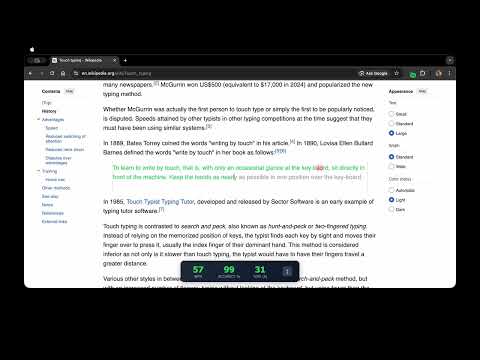
Typiest: Turn Any Webpage into Typing Practice Tired of boring, repetitive typing tests? Typiest allows you to transform any paragraph on any website into a real-time typing challenge, making your practice as realistic as the content you read every day. Most typing platforms provide generic text that does not reflect real-world tasks. Typiest changes the game by letting you practice on technical documentation, news articles, or blog posts right where they live on the web. Key Features: * Dynamic Practice: Turn any paragraph into a typing test with a single click. * Real-Time Stats: Track your WPM (Words Per Minute), Accuracy %, and Elapsed Time as you type. * Seamless UI: Features a smart overlay that dims the original text and highlights your progress in real-time. * Native Feel: The extension automatically detects the website's font colors to ensure the typing interface feels natural. * Lightweight and Fast: Built using modern Manifest V3 standards for optimal performance. How to Use: 1. Toggle ON: Click the Typiest icon in your toolbar to enable the extension. The badge will show ON in green. 2. Select a Target: Hover over any paragraph you want to practice. The text will highlight as you move your mouse. 3. Start Typing: Click the paragraph to begin. A typing area will appear, and you can start typing immediately. 4. Analyze: Watch your stats update live in the floating card at the top or bottom of your screen. Why Typiest? I created Typiest because traditional typing websites lack real-life context. Whether you are a developer practicing documentation or a student reading an essay, Typiest helps you build muscle memory using the content that actually matters to you. Level up your typing speed while you browse. Install Typiest today!
0 out of 5No ratings
Details
- Version1.0
- UpdatedJanuary 2, 2026
- Offered byAniruddha Gawali
- Size1.1MiB
- LanguagesEnglish
- Developer
Email
ANIRUDDHAGAWALI05@GMAIL.COM - Non-traderThis developer has not identified itself as a trader. For consumers in the European Union, please note that consumer rights do not apply to contracts between you and this developer.
Privacy

Typiest has disclosed the following information regarding the collection and usage of your data. More detailed information can be found in the developer's privacy policy.
Typiest handles the following:
This developer declares that your data is
- Not being sold to third parties, outside of the approved use cases
- Not being used or transferred for purposes that are unrelated to the item's core functionality
- Not being used or transferred to determine creditworthiness or for lending purposes